Online Game Commands
PC Gaming, Software, Hardware, Reviews and Guides
  • Fantasy MMORPG
    • Age of Conan: Unchained
      • Short Cut Hot keys
      • Slash Commands
      • Emotes
    • Dark Age of Camelot
      • Action Commands
      • Alliance Commands
      • Battle Group Commands
      • Boat Commands
      • Card Game Commands
      • Chat Commands
      • Emotes
      • Fighting / Defensive Commands
      • General Command
      • Group Commands
      • Guild Commands
      • Help Commands
      • Horse Commands
      • Housing Commands
      • PvP Commands
      • Quest Commands
      • Settings & Preferences
      • Siege Weapon Commands
    • EverQuest
      • Abbreviations
      • Alternate Advancement Abilities + Codes
      • Chat Channels
      • Class Titles
      • Console Slash Commands
      • Emotes
      • Haste Buffs
      • Haste Info
      • Leader officer Raid Commands
      • Lost Dungeons of Norrath – Merchant Locations
      • Macros / Scripts
      • Permanent Haste Items
      • Short Cut Hot Keys
      • Tweaks
    • EverQuest 2
      • Chat & Chat Channels
      • Emotes & Moods
      • Group / Guild / Raid Commands
      • Interface Commands
      • Macros
      • Slash Commands
      • Targeting and Movement Commands
      • Character Appearance
      • Combat Commands
      • Pet and Mercenary commands
      • Video/Graphical Display Commands/Settings
    • Final Fantasy XI
      • Chat Commands
      • Combat Commands
      • Emotes / Actions
      • General Commands
      • Macro Commands
      • Main Menu Commands
      • Party / Alliance Commands
      • Search Commands
      • Short Cut Keys
      • System Commands
    • Final Fantasy XIV Online
      • Emotes
      • Slash Commands
      • Targeting Commands
      • Facial Expression Emotes
    • Guild Wars
      • Emotes
      • Slash Commands
    • Guild Wars 2
      • Emotes
      • Slash Commands
    • Lineage 2
      • Chat Commands
      • Macro’s & Macro Commands
      • Short Cut Hot Keys
      • Slash Commands
      • Socials & Emotes
    • Ragnarok Online
      • Camera Controls
      • Emotes
      • Shortcut Keys
      • Slash Commands
    • Ultima Online
      • Boat and Ferry Commands
      • Chat Commands
      • Commands
      • Factions
      • Hireling Commands
      • Houses
      • Named NPC Commands
      • NPC Commands
      • Pets
      • Short Cut Hot keys
      • Shrines / Karma
      • Tweaks
      • Vendor Commands
    • World of Warcraft
      • Chat Commands
      • Combat Commands
      • Emotes
      • Group Leader Commands
      • Guild Commands
      • Shortcut Keys
      • Slash Commands
      • Voice Emotes
      • Lesser Arcanum of Constitution Quest Guide
        • Night Dragons Breath Quest Guide
        • Lung Juice Cocktail Quest Guide
      • Lord of the Rings meets World of WarCraft
  • SCI-FI GAMES
    • Anarchy Online
      • Help, Pet, System and Team Commands
      • Voice Commands
      • Organisation Commands
      • Keyboard Commands
      • Chat Commands
    • Eve Online
      • Chat Channel Commands
      • Drone Commands
      • General Slash Commands
      • Module Commands
      • Movement Commands
      • Navigation Commands
      • Window Commands
    • Planetside 2
      • Chat and General Commands
      • Commander Outfit Platoon and Squad Management
    • Skyforge
      • F key Keyboard Emotes
  • Battle Royale Games
    • Fortnite
      • 2FA Guide
      • All 150 Fortnite Keybinds
      • Best Fortnite Keybinds
      • Characters Locations (NPC’s)
      • Default PC Fortnite Keybinds
      • Events
        • Easter Event
        • Summer Event
        • Fortnite’s 5th Birthday Event
        • Halloween Event
        • Christmas Winterfest Event
      • Fish Locations
      • How to Get FREE V-Bucks
      • Free Fortnite Battle Pass
        • Battle Pass – Rewards
      • Locations
        • Gas Stations & Pumps
        • Gas Stations Locations
        • Whiplash Locations
      • Quests
        • Capture Points
        • Geyser Locations
        • Hide in a Giant Snowball
        • Search Cash Registers
        • Search Ice Machines or Cash Registers at Gas Stations
        • Search Produce Boxes
        • Travel in Whiplashes
      • Tips and Tricks
        • How to Regrow Your Reality Saplings Fruit
    • PUBG
      • Best PUBG Graphics Settings – 51 FPS Boost
      • Best PUBG Keyboard Controls
      • Default PUBG Keyboard Controls
      • FREE PUBG Skins Outfits
      • Change the PUBG Keyboard Controls
  • Gaming Hardware
    • CPU
    • GPU
      • Best Budget Graphics Cards for Gaming in 2021
PUBG Battlegrounds

PUBG

PUBG Battlegrounds – 2026

Soggydan PUBG 3 January 2026

PUBG Battlegrounds is an amazing game that just looks special. The graphics have been really well done, and look as real as possible, so you will sometimes find yourself just looking at the scenery, I know I have. Saying that the animations for the emotes needs some more work, if it was a school report it would read:  Emotes Team, Must Try harder!

Some of the drop locations or Points of Interest (Poi) are just amazing and do look and feel like real building layouts. I Especially like the Absolvitory and the Bunker.

Due to the more realistic graphics and blood splatter (you can change the colour from red) PUBG gets a PEGI 16+ age rating, a bit higher that Fortnite Battle royale at PEGI 13.

What is Battle Royale / Battlegrounds?

PUBG Battlegrounds is a Battle Royale style game that I feel has similarities on the Japanese film from 2000, Battle Royale  There maybe earlier references but this is certainly one of the oldest.   It is based on a group of school kids that are dropped on an island and made to fight for survival. The last one alive can leave the island.

PUBG takes this idea and turns it into military operation, with single, duo and trio teams dropping in to fight for their lives and become the ultimate Survivor. There are many such islands in PUBG Battlegrounds over the seasons and they do change and get updated from time to time.

What is PUBG? (Player Unknown Battlegrounds)

PUBG is the traditional Battle Royale style game but aimed at a higher age group than Fortnite Battle Royale. With a PEGI 16 rating PUBG has a realistic graphics engine and so your surrounds look awesome. With a good spec PC, you can get some high settings giving you some really nice visuals.

In PUBG you dive from a Transport plane, something like a Lockhead C-130 These planes also do the supply drops that you will need to look out for, if you spot one, head in the directions to collect some extra items, weapons and ammo.
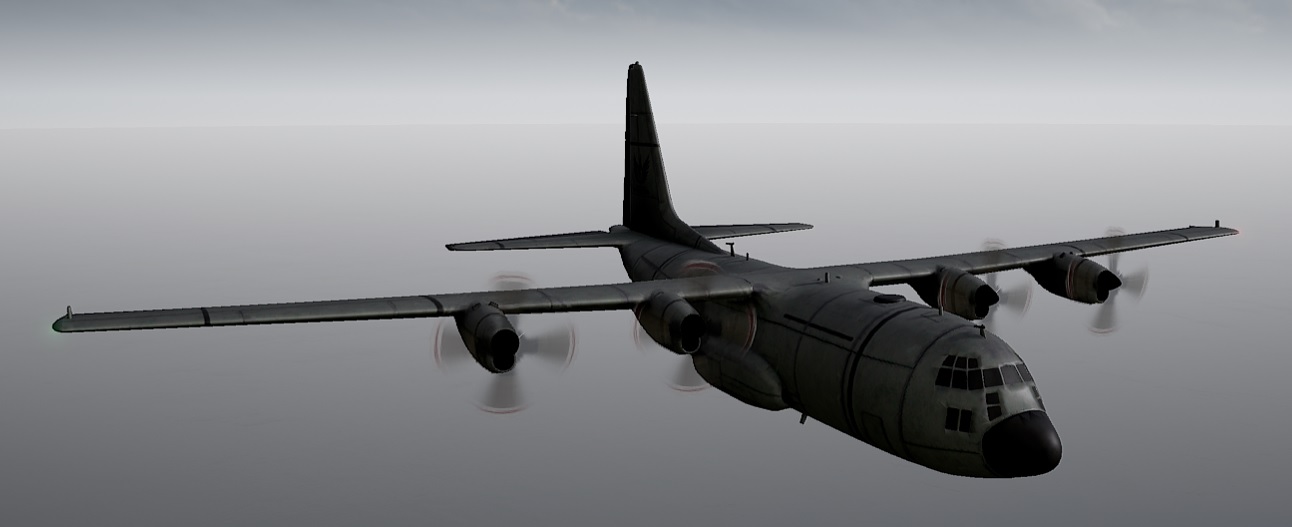
PUBG Battlegrounds C-130 Transport Supply Plane

The idea is to drop at a location or point of interest (Poi) and collect up on items to help you defeat other survivors. You can collect weapons, body armour, hard hats and utility items like grenades and med-kits. Collect up and stay out of the Storm and head to the safe circle.

Survivors also call the storm, The Blue due to its color. The red area on the map is currently marked for aerial bombing run so you better move fast if you’re in this area.

The storm starts out on the edge of the island (in the sea) but slowly as time goes on, it closes in, ever decreasing to make the survivors close in on themselves for the final battle.
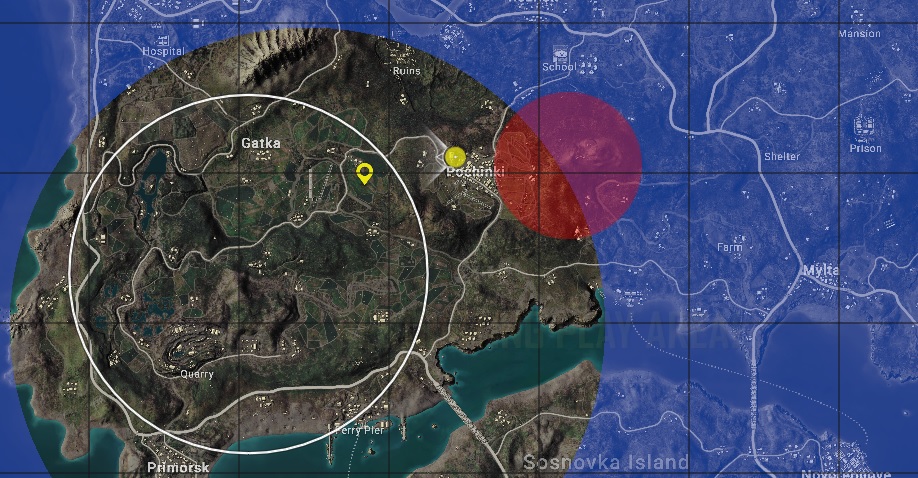
PUBG Battlegrounds - The Storm AKA The Blue
PUBG Battlegrounds – The Storm AKA The Blue

Is PUBG Battlegrounds Free to play?

Yes, technically its FREE.  You can create a Steam account and download it from Steam: PUBG Totally Free. Once in the game and you have played a while and feel you will stay for a while to level up and explore, there are options to buy add-ons such and skins, outfits, emotes and character customizations. These are all purchased in-game with G-Coin

What is G-Coin in PUBG?

G-Coin is only purchasable with real money and is used to purchase the in-game items such as outfits and emotes. It is purchasable via the Steam Store and will appear in-game for you to spent.

Navigate to the STORE menu then click G-Coin.  For more detailed information check out PUBG – How to Buy G-Coin
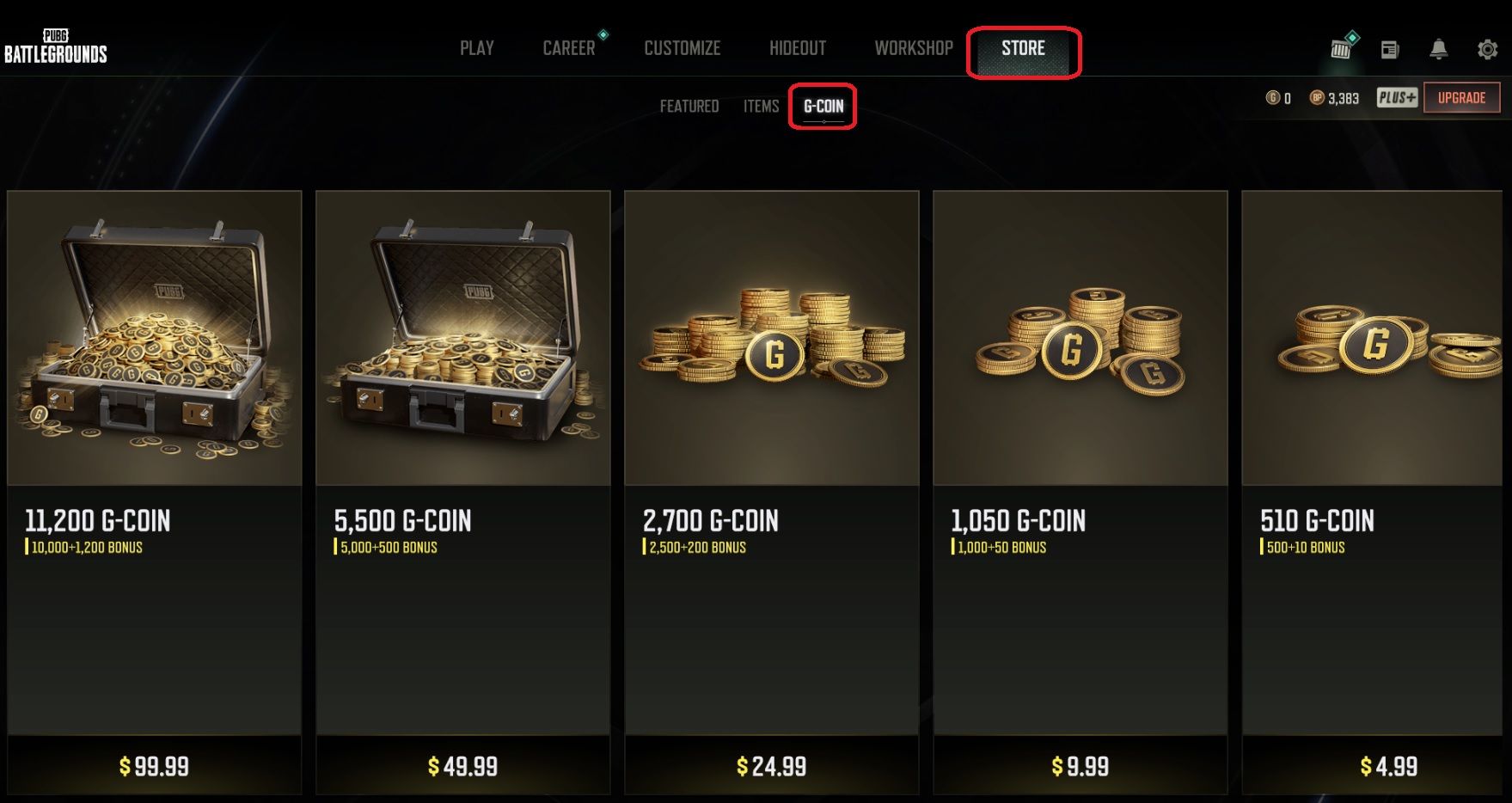
PUBG Battlegrounds - Buying G-Coin
PUBG Battlegrounds – Buying G-Coin

What is Battle Points (BP) Reward?

Another reward system by the name of Battle Points (BP) is offered in PUBG. BP are awarded after every battle, depending on how well you did, will depend on the battle points received. These points can be used to purchase an in-game “crate” that will contain an item. There is a tier system and so the more crates you buy, the more expensive they get.

What are PUBG Outfits / Skins?

PUBG Outfits are a way to customize your character, you can do this by equipping clothing items onto your characters, they don’t add stats in anyway, they just make you look unique

You can customize:

  • Wardrobe -Your Outfit/Skin – total of 19 slots to customize on your character
  • Weapons – Wrap to spruce up your guns
  • Emotes and Sprays – Feel like doing a dance, there’s and emote for you
  • Vehicle – Color match your cars
  • Utility – Game name change, Battlestat exchange kits
  • Appearance – You can change your face features here, hair style and skin color
  • Lobby – Loading Screens can be collected via item packs and quests

Navigate to the Customize screen then click on the Wardrobe tab. Here you can change your outfits from your locker.
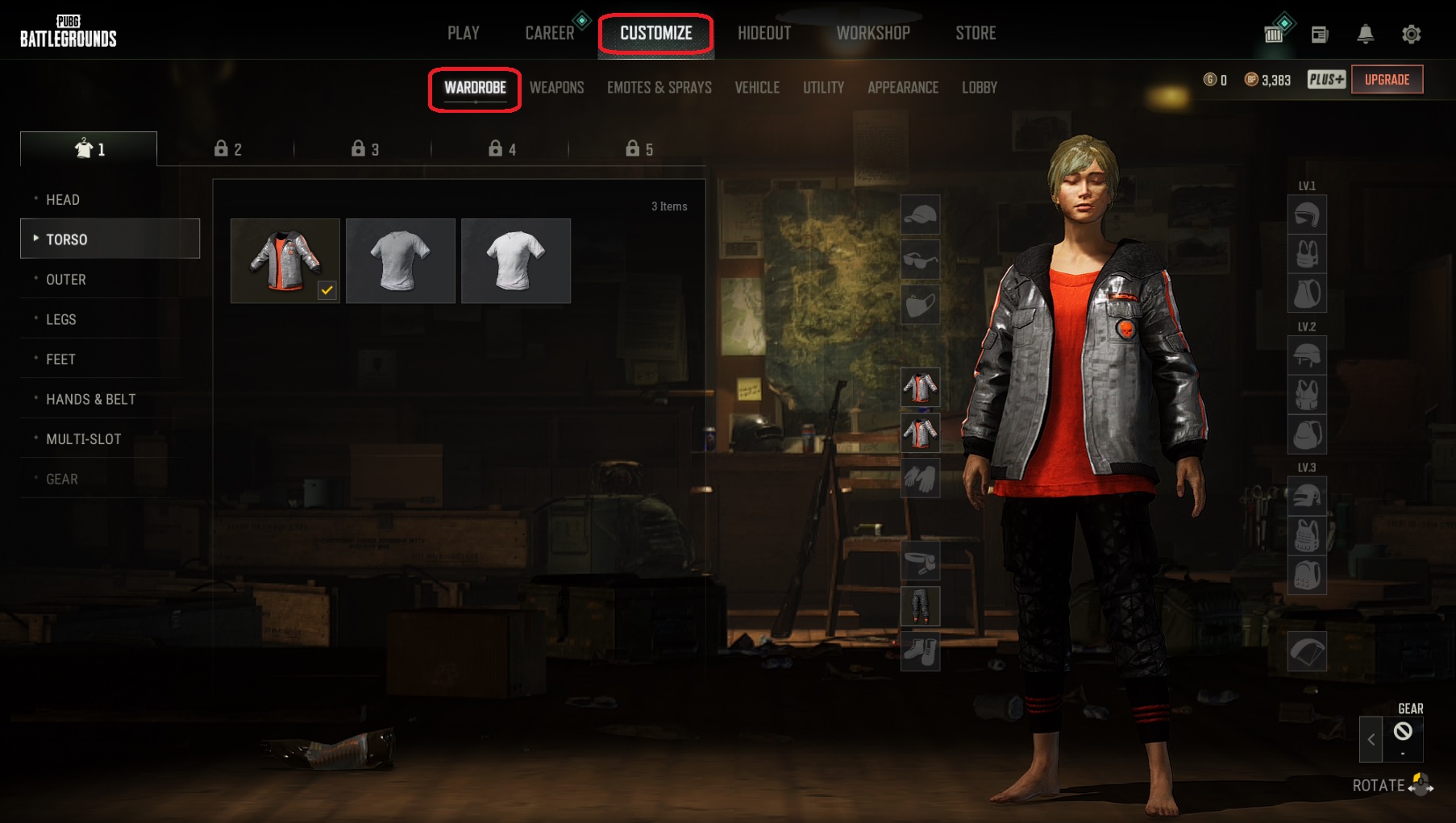
PUBG Battlegrounds - Skins Outfits & Items
PUBG Battlegrounds – Skins Outfits & Items

What is the PUBG Battlegrounds Survivor Pass?

The PUBG Survivor pass now replaces the Event Pass, it grants access to more in-game items by completing levels and missions, these items are exclusive to the Survivor Pass and can’t be sold or traded.

Its best to purchase the pass at the beginning of the season and so you can track your progress and receive rewards as you level. You can still buy the Survivor Pass half way into the season and still unlock all the items, so don’t be worried about buying half way in or even at the end of the season. You will get all the rewards to match the level you have achieved.

The Survivor Pass costs 990 or 3,270 G-Coin, depending on the one you buy.  The more expensive gives you +30 levels and more bonus items. You will need to buy some G-Coin via the Steam Store then use the G-Coin to buy the Survivor Pass.
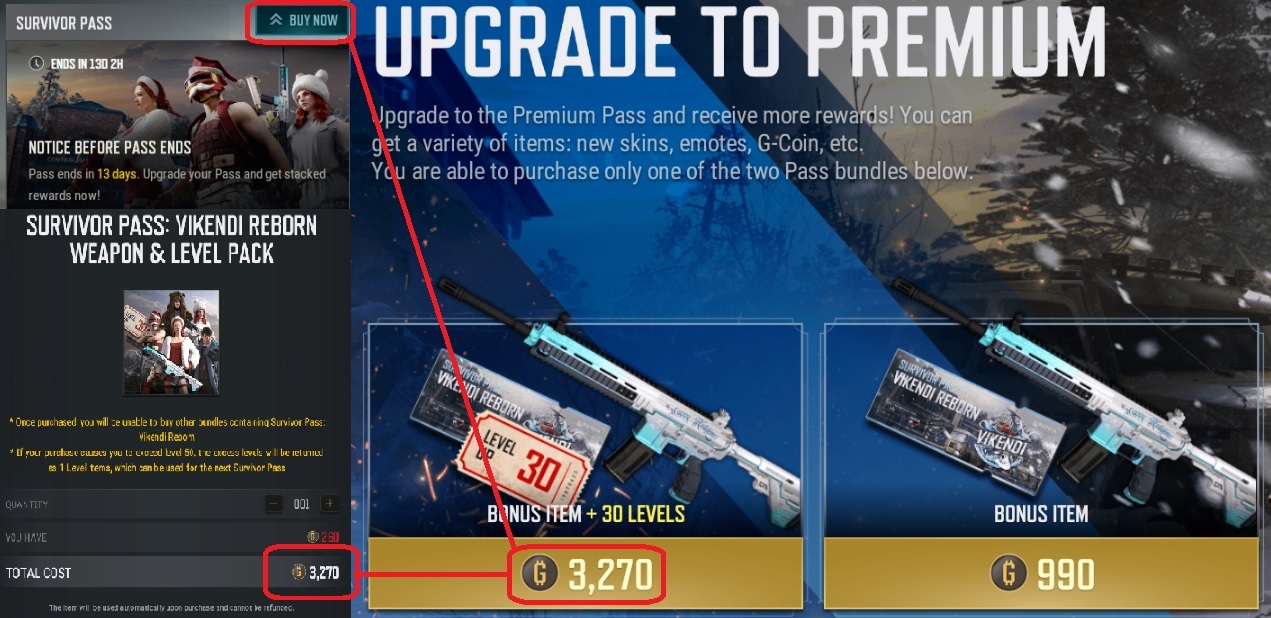
PUBG Battlegrounds - Survivor Pass
PUBG Battlegrounds – Survivor Pass

What is the PUBG Battlegrounds Plus?

Battleground PLUS gives you another round of items to choose from, some G-Coin, Ranked matchmaking and XP Boosts. You will also receive medals for your achievements.
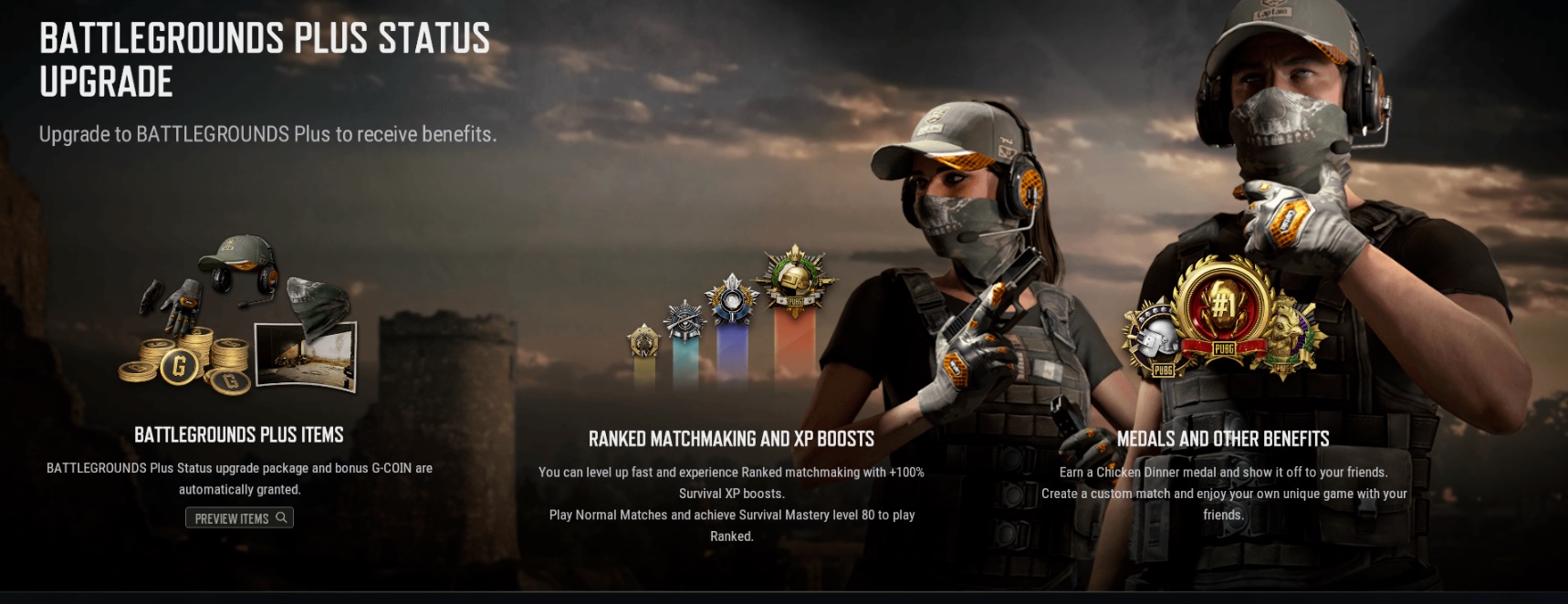
PUBG Battlegrounds - Plus Status Upgrade
PUBG Battlegrounds – Plus Status Upgrade

The PUBG Battlegrounds Plus Upgrade will cost you a little bit extra
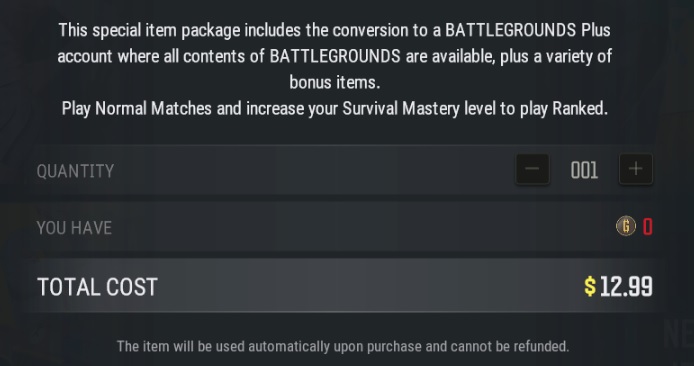
PUBG Battlegrounds - Plus Status Upgrade Cost
PUBG Battlegrounds – Plus Status Upgrade Cost

What are the PUBG Battlegrounds Events?

During your play time on PUBG there will be events running all the time. It’s worth checking out the Events menu for any FREE items or special quests that you may want to complete. When you start playing PUBG you can collect a set of starter items, Jacket, trousers, Boots etc to get you off the default skin and looking half decent.

Look out for more as you progress, keep checking the Events page every time you play to keep up with new events that may get you Free PUBG Skins
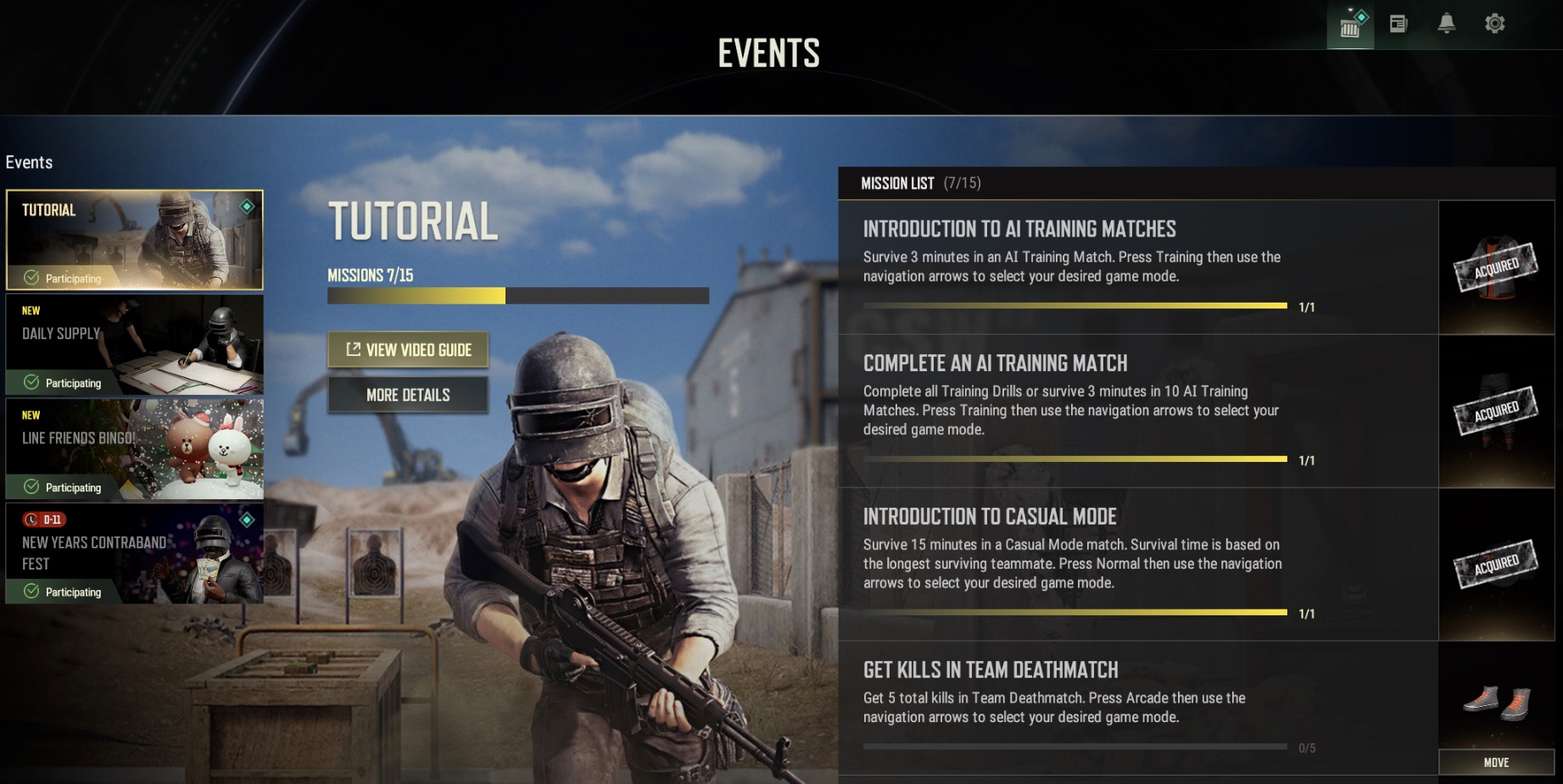
PUBG Battlegrounds - Events
PUBG Battlegrounds – Events

How to get FREE Starter outfits in PUBG

The free starter outfits/skins in PUBG are pretty good, much better than some of the other battleground’s games, but….

To get some truly cool FREE outfits, always check the NEWS page for info on offers, I picked up this Free PUBG Skin: Kingmaker set totally FREE as I am an Amazon Prime member.

Check the News Pages, look for offers

Follow the links and you too could end up for some FREE stuff. Keep checking the events as the rotate out every 30 days, sometimes less

PUBG Battlegrounds - Kingmaker Set -Amazon Prime
PUBG Battlegrounds – Kingmaker Set -Amazon Prime – Totally Free

Other PUBG Battlegrounds Guides

Introduction to PUBG Battlegrounds

Best PUBG Graphics Settings

Best PUBG Keyboard Controls

Default PUBG Keyboard Controls

FREE PUBG Battlegrounds skins outfits

How to Change the PUBG Keyboard Controls


Fortnite

All 150 Fortnite Keybinds / Keyboard Controls Full List (Jan 2026)

Soggydan Fortnite, Fortnite Guides, Fortnite Keybinds 1 January 2026

Here are ALL 150 of the default Fortnite keybinds regardless of what game mode you’re playing in, what vehicle you are driving or even if you are in creative mode. Once you have the list presented like this it’s easy to learn the basic keybinds to get into the game quickly. There are a lot of keybinds that do multiple roles depending on your game situation, like the E key or the mouse buttons.

An alternative view of the list of keys can be found on one of my other pages Default PC Fortnite Keybinds group as you see it in the game settings area

Also, check out my guide for some Free V-Bucks,  and some ways to get cheep V-Bucks

What Fortnite Keybinds do I need to know?

I would recommend getting comfortable with the movement keys, aiming and firing at first. Once you have this mastered then move onto the build keybinds.

These are the default keybinds you will find when you first install Fortnite. Once you have played for a while it is always worth looking at other keybinds like the top players use. Everyone is different so try a few setups until you find the one that works best for you.

Fortnite Keybinds Menu Options

Fortnite Keyboard Controls

On the in-game menu, under Settings you will find all the actions and what keys they are bound too.  If a key doesn’t feel right to you, then change it to something that suites you better. You can always change it back to the original key if it doesn’t work for you.

Use the table below to search for a Key you are looking for or change the order the list is in by clicking the top table line in light blue.

What are Secondary Fortnite Keybinds?

In the keyboard controls area of settings, you can assign a 2nd keybind to an action. These are secondary keybinds meaning you can have 2 keys for one action if needed. There are not many keys assigned on this list but means you can try out a new location for an action without changing the primary key

Primary KeySecondary KeyAction
1Creative Slot 1
1Weapon Slot 1
2Creative Slot 2
2Weapon Slot 2
3Creative Slot 3
3Weapon Slot 3
4Creative Slot 4
4Weapon Slot 4
5Creative Slot 5
5Weapon Slot 5
6Creative Slot 6
7Creative Slot 7
8Creative Slot 8
'PCreative Phone Toggle
ALeft ArrowMove Left
BCreative Quick Menu
BDriver Load Speaker
BEmote
CCreative Prop Pull
CDriver Radio Next Station
CDriver Roll Right
CStairs
Comma
,
Force Jog
DArrow RightMove Right
DeleteDriver Self Destruct
DeletePassenger Self Destruct
ECreative Island Panel Start Game
ECreative Prop Rotate Counterclockwise
EDismount
EDriver Exit
EExit
EPassenger Use / Exit
EUnhook
EUse
EnterChat
Equals
=
Num LockAuto Run
FCreative Prop Push
FDBNO Carry
FDBNO Place
FObject Carry / Slidegrade
FObject Place
FToggle Harvest Tool
F3Trap Equip/Picker
F4Squad Comms
GBuilding Edit
GCreative Prop Drop to Floor
HCreative Island Panel Toggle Detail
HRepair / Upgrade
Hold Right Mouse ButtonDriver Targeting (Zoom)
Left AltCurser Mode
Left CtrlCreative Fly Down
Left CtrlCrouch (tap)
Slide (Hold)
Left CtrlCrouch While Building (Tap)/Slide(Hold)
Left CtrlSwitch Seat
Left Mouse ButtonCreative Building Copy
Left Mouse ButtonCreative Copy
Left Mouse ButtonCreative Prop Copy
Left Mouse ButtonDriver Energy Cannon
Left Mouse ButtonDriver Fire
Left Mouse ButtonDriver Move Up
Left Mouse ButtonDriver Shoot
Left Mouse ButtonDriver Stomp
Left Mouse ButtonFire
Left Mouse ButtonFire / Contract Grapple
Left Mouse ButtonPassenger Shotgun
Left Mouse ButtonPlace Building (Build)
Left Mouse ButtonPossess Drop
Left Mouse ButtonSelect Building Edit
Left ShiftBoost
Left ShiftCreative Fly Up
Left ShiftDriver Boost
Left ShiftSprint
Left ShiftSprint
MCreative Building Mirror
MToggle Map
Mouse Wheel DownPrevious Picker Wheel
Mouse Wheel DownSlot Up
Mouse Wheel UpNext Picker Wheel
Mouse Wheel UpSlot Down
No Default BindingCreative Clear Selection
No Default BindingCroush(Tap) / Slide(Hold) / Gyro Modifier(Hold)
No Default BindingGyro Modifier
No Default BindingHarvesting Tool (Axe/shovel)
No Default BindingLocker Emote Slot 1
No Default BindingLocker Emote Slot 2
No Default BindingLocker Emote Slot 3
No Default BindingLocker Emote Slot 4
No Default BindingLocker Emote Slot 5
No Default BindingLocker Emote Slot 6
No Default BindingLocker Emote Slot 7
No Default BindingReset Camera
No Default BindingReset Camera / Gyro Modifier(Hold)
No Default BindingStart Recording
No Default BindingStop Recording
No Default BindingToggle Harvest / Gyro Modifier(Hold)
No Defualt BindingPlace Enemy Marker
QCreative Island Panel Support Creative
QPassenger Shield Boost
QSwitch QuickBar
RCreative Building Rotate Clockwise
RCreative Prop Rotate clockwise
RCreative Select
RDriver Move Down
RDriver Radio On/Off
RReload
RRotate Building
RUtility Ability
Right Mouse ButtonChange Building Material
Right Mouse ButtonEscape KeyCreative Building Exit
Right Mouse ButtonCreative Pick Up / Exit
Right Mouse ButtonEscape KeyCreative Prop Exit
Right Mouse ButtonDriver Move Down
Right Mouse ButtonDriver Target
Right Mouse ButtonDriver Tractor Beam
Right Mouse ButtonExtend Grapple
Right Mouse ButtonPassenger Missiles
Right Mouse ButtonReset Building Edit
Right Mouse ButtonTarget
Rigth Mouse ButtonDriver Honk
Rigth Mouse ButtonDrivr Free Look
SSpace BArDriver backwards
SDown ArrowDriver Pitch Backward
SDown ArrowMove Backward
Space BarBoost
Space BarDriver Brake
Space BarDriver Jump
Space barDriver Move Up
Space BarDriver Powerslide
Space BarDriver Push(Tap)/Coast(Hold)
Space BarDriver Stop Engine
Space BarJump
TPush to Talk
TSecondary Ability
TABCreative Prop Rotation Axis(TAP)/Reset(Hold)
TabToggle Inventory
VCreative Prop Grid Snap
VCreativeBuilding Grid Snap
VRoof
WUp ArrowDriver Pitch Forward
WLeft ShiftDriver Start Engine
WUp ArrowMove Forward
XCreative Delete
XCreative Prop Remove From QuickBar
XDriver Roll Invert
XFloor
YTrap
ZCreative Building Rotate Counterclockwise
ZDriver Roll Left
ZMouse Button 2Wall
Force Jog (Hold)

Fortnite Guides to help you get Cracked

  • How to Enable Fortnite 2FA
  • How to Get FREE V-Bucks in Fortnite
  • FREE Fortnite Battle Pass
  • Default Fortnite KeyBinds
  • Best Fortnite Keybinds
  • All 150 Keybinds listed Key
  • Fortnite Map Locations
  • Fortnite Quest Locations
  • Fortnite Characters Locations
  • Fortnite Fish Locations
  • Fortnite Hints, Tips and Tricks
  • Fortnite Game Tactics, Old and New
  • Fortnite Game Exploits or Bugs
  • Fortnite Game Phrases

Battle Royale/ Fortnite

Essential Fortnite Hints, Tips and Tricks of (2026)

Soggydan Fortnite, Fortnite Tips 1 January 2026

Fortnite Hints, Tips and Tricks can be for EVERYONE, no single player knows everything. With the island constantly in flux, new tricks are needed all the time. From complete noobs that have just started playing Fortnite to the more seasoned players that have been around for a while, we all need to get an advantage over the next player to get that Fortnite Crown

In-Gameplay Fortnite Hints, Tips and Tricks

There are general gameplay tips that will help you in your everyday battles. They are listed from easy with most impact to harder tricks that can take some time to master

  • Can you keep items in your tent
  • Instantly re-grow your Reality Saplings – Spawn more fruits
  • Health Hints, Tips and Tricks
  • Shield Hints, Tips and Tricks

Use 5.1 Surround Sound Headphones

Use head phones as much as possible, get a decent pair of DJ Style head phones that support 7.1 or at least 5.1 Surround Sound.  Having supported head phones will mean you can tell the direction the sound is coming from. The overall sound quality is also improved over standard headphone or ear buds, like the ones used for smartphones. Do not use smartphone ear buds, these sound flat and will not give the best experience.

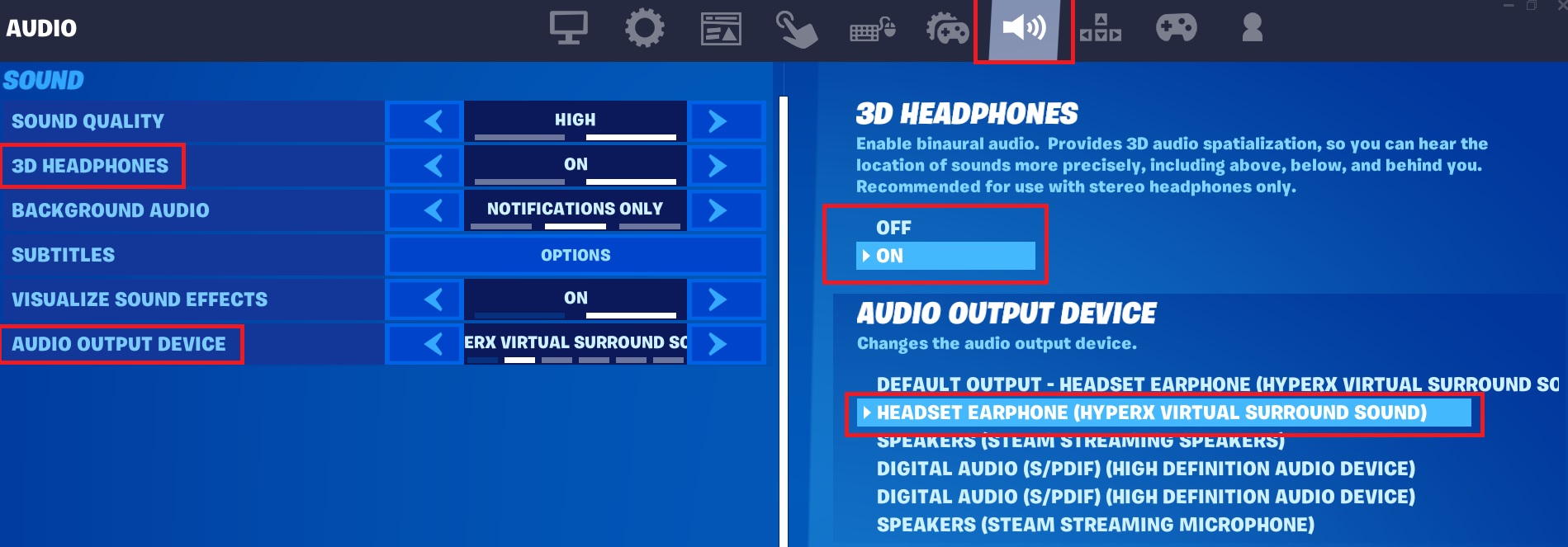
Enable the 3d Headphones in the Audio options. Navigate to the Settings menu and then Audio, check you have 3D Headphones on and your headphones are set to defualt.

3D Headphones Audio Settings
3D Headphones Audio Settings ON

Use a High DPI Mouse

Using a high DPI mouse (anything more than 600DPI) will give you the ability to decrease the mouse sensitivity in the Fortnite Mouse Settings and so give you better control over aiming. This does sound like in reverse but this is due to the higher DPI of a better mouse.

Defualt setting is about 28%, but with a 1600 DPI Mouse you may need to bring down to 10-11%

Mouse Sensitivity
Mouse Sensitivity with 1600 DPI with Mouse

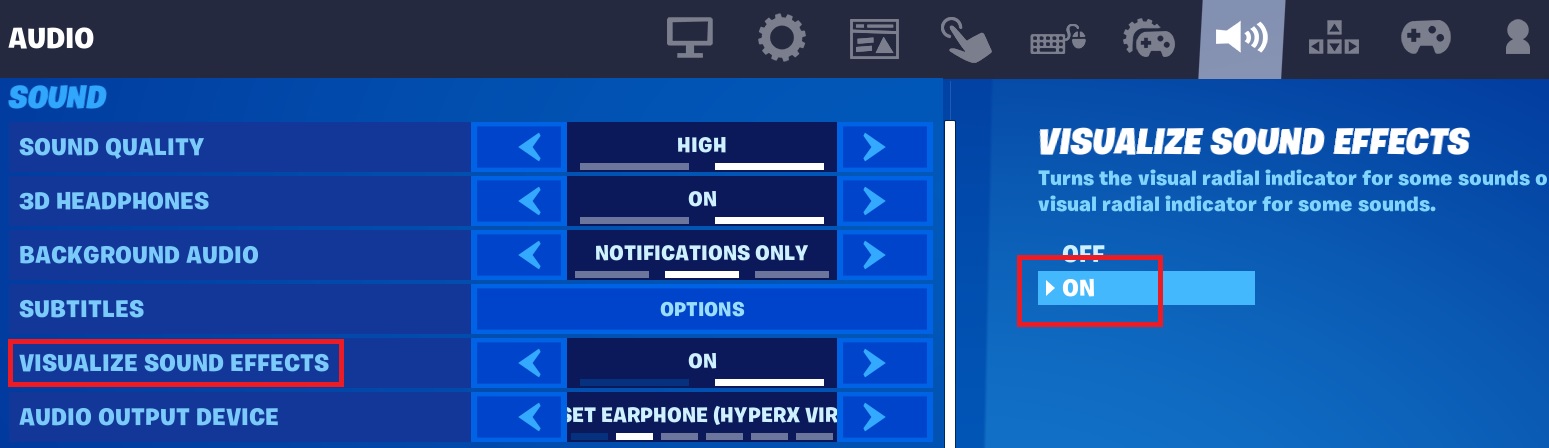
Turn on the Fortnite 3D Visualize Sound Effects

This is an option in the GUI, enabling this will give you a visual circle affect showing you where sound is coming from. Gun noise shows up as orange with a muzzle flash symbol while footsteps (players, NPC or creatures) are shown in white with small feet or an animal symbol

Visualize Sound Effects
Visualize Sound Effects ON

Collect a Long, Medium and Short-Range Weapon

Everyone has their own preference on weapon choice but it’s a good idea to have 1 from all 3 ranges available with you, after all, a sniper can get snuck up on and so needs a side arm or shotgun. I like to keep 3 slots for the 3 ranges and upgrade each one as I find better versions.

But… Always get a weapon of some sort quickly as soon as you land, then farm a few easy materials if you’re in build mode. So, you’re ready to fight if needed

Also check on How to Update the Preferred item Slots

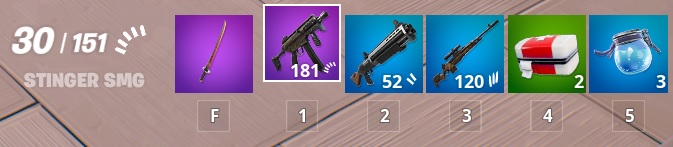
Item Slots
Item Slots

Keep Heals and Shields to Hand

Not everyone’s play style but I like to keep a slot for Med kits and a slot for Shield buffs. Or if you find one, the double slot Chug Cannon!  I also prefer small chug pots to large; they will only take you to 50% but after a battle, you can hide and they are faster to down than the large pots. Once you have left the area, you can find something to boost you back to 100%

Item Slots with Med Mist and Small Chug Pots

This is practicaly my favorite setup, in order Slot 1-5

  • Mid-Range – Assault Rifle
  • Close Range – One of the many Shot Guns or SMG
  • Long Range – DMR or Striker Burst Rifle
  • Shields – Mini Pots or Klomberry’s – Very Quick to each and will restore health first
  • HP – Medmist or 100% first Aid Kit

Stay on the Move

Standing or even kneeling still is almost signing your elimination papers. Also keep on the move, left, right, back, forward, especially if you’re looking out over the map toward some gun fire you have just heard. You never know when you’re in a sniper’s sights! Never stand still, unless you really have too, like healing etc in those cases find some cover, hidden away to med up.

Also keep om the move from location to location, have a plan in mind to get into the circle before the storm.

Don’t Run in a Straight Line

Just like staying on the move, don’t run in a line. Even if you think you are safe, someone is always around the corner with a sniper rifle ready to make your day very unhappy. Ziggy and Zagging when running away or in very open territory can save you.

Make Your Shots Count

Always make sure you can land your bullets and hit your target. Don’t over reach by using a Striker Burst where you should have used a DMR. This will just waste ammo and alert other players to your location. Every gun has pro’s and con’s, make sure you know them and use them accordingly.

Try not to panic as that rush of adrenaline pumps into your system, this is often a noob mistake and after some game time you will be able to relax and take it easy, it’s all about practice.

Always use controlled bursts when using any form of rapid-fire guns. SMG and Assault Rifles will unload pretty quickly and have you shooting everything but what you want to hit. Use small controlled bursts with 1 click of the mouse at a time.

Crouch to make your crosshair smaller and tighter so giving you a better aim

Pic of crouching with DMR

Use the Surrounding Terrain

Always check around you, try and stick to the high ground so you are looking down on other players. Use building, rocks, trees and tall grass to hide behind, check the damage on a rock or tree so you have an idea how long it may last if you are shot at.

Staying hidden is a sure way of staying alive, if you can’t be seen, you can’t be shot at.

Don’t Rush into a Fight

Sometimes it pays to hand back, don’t rush at another player as soon as you see them. Hang tight a while, see if anyone else is about, they may be looking for a spot to heal up. Then take your shots and ambush them. Head shot to a player while they are using a med kit to too funny.

This also goes for 2 other players fighting it out. Don’t rush into a fight with them, by all means hit both players from a distance with a DMR. Once you see both down with no shields then take them both out.

Learn Some Basic Builds

I play Zero Build as building is my weak area, I can never get the hang of builds but I am told by my son’s it’s something I need to work on. Some basic builds can get you out of trouble and will certainly help you escape an elimination.

Keeping Quite

I think this is one of the best things to get good at in Fortnite, being quiet.

  • If in a house or barn (wood is noisy) don’t auto-run, crouch, this keeps footsteps quiet and also makes you a smaller target
  • Keep sniper shots to max 3 then move position as fast as possible
  • Close doors behind you – this will not only reduce noise but an open door is a sign of activity
  • Try not to accidently shoot your gun, if you do, move fast to a new location

Keep an Eye on the Storm

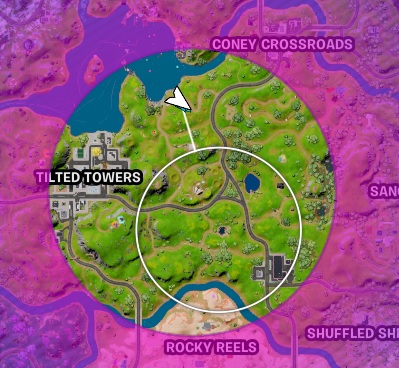
Watch the map, the storm and the Storm timer. Pay attention to the relationship between the current storm and the new inner circle location.  If you’re on the side of the safe zone that furthest from the storm, the storm will move faster on this side and you won’t be able to out run it.

You can see here that the safe circle I need to get to is off centre to the safe zone before.  This means the side I am on will close in faster than the other side, so I have to move quickly.

Fortnite Storm Ring - Fortnite Hints
Fortnite Storm Ring – Fortnite Hints

Reload Weapons Soon as You Can

Soon as you can, reload your weapons, even if you on 10% health with no shields. If you can’t fight back your eliminated anyway!

After each battle:

  • Find a safe spot
  • Reload all weapons
  • Use med kit or health restorers
  • Use shield pots or eat fruit

Learn the Order you can Heal and Restore Shields

Different restore items will only restore to a certain level.

  • Bandages to 75% then the med mist can go to 100%
  • 2 Small shield pots to 50% then 1 large shield pot to 100%

Fruit and Veg will also get you back upto 100% so if you see some close to you, pick it up and use it.

If you have/see a shield pot, use them if you are not 100%.  These are no good in your inventory once you’re dead and even 10-20% can be the difference to being eliminated or eliminating your opponent.

If you have a large shield keg then throw this down and use a med kit/bandage at the same time to restore both HP and shield at the same time.

How to Get FREE V-Bucks in Fortnite

Everyone likes some Free V-Bucks so check out a way to get them Free every season and also some ways to get V-Bucks cheeper than directly buying them

Read my Guide here on How to Get FREE V-Bucks in Fortnite


Fortnite Guides to help you get Cracked

  • How to Enable Fortnite 2FA
  • How to Get FREE V-Bucks in Fortnite
  • FREE Fortnite Battle Pass
  • Default Fortnite KeyBinds
  • Best Fortnite Keybinds
  • All 150 Keybinds listed Key
  • Fortnite Map Locations
  • Fortnite Quest Locations
  • Fortnite Characters Locations
  • Fortnite Fish Locations
  • Fortnite Hints, Tips and Tricks
  • Fortnite Game Tactics, Old and New
  • Fortnite Game Exploits or Bugs
  • Fortnite Game Phrases

PUBG

Best PUBG Keyboard Controls – 2026

Soggydan PUBG, PUBG Keyboard Controls 1 January 2026

Best PUBG Keyboard Controls are going to vary from player to player, but we can get an idea of the Best Keybinds from the Professional player that spend hours perfecting there skills at eliminating others

Here are a few of the Best PUGB Players and the keybinds they use. They won’t be best for everyone, but gives you some ideas on what to try out. Add them to your set up and give them a go, you might find you are a bit quicker at of the controls. If not, roll back to the PUBG Default Keyboard Controls

Best PUBG keyboard controls for Beginners

If you are new to PUBG Battlegrounds, but have played other Battle Royale games, you will notice that the keybinds are slightly different. This might confuse you for a bit but it’s worth sticking with the original PUBG Controls for a few games, you might be surprised at the layout. After a few games then start changing the keybinds about more to your liking.

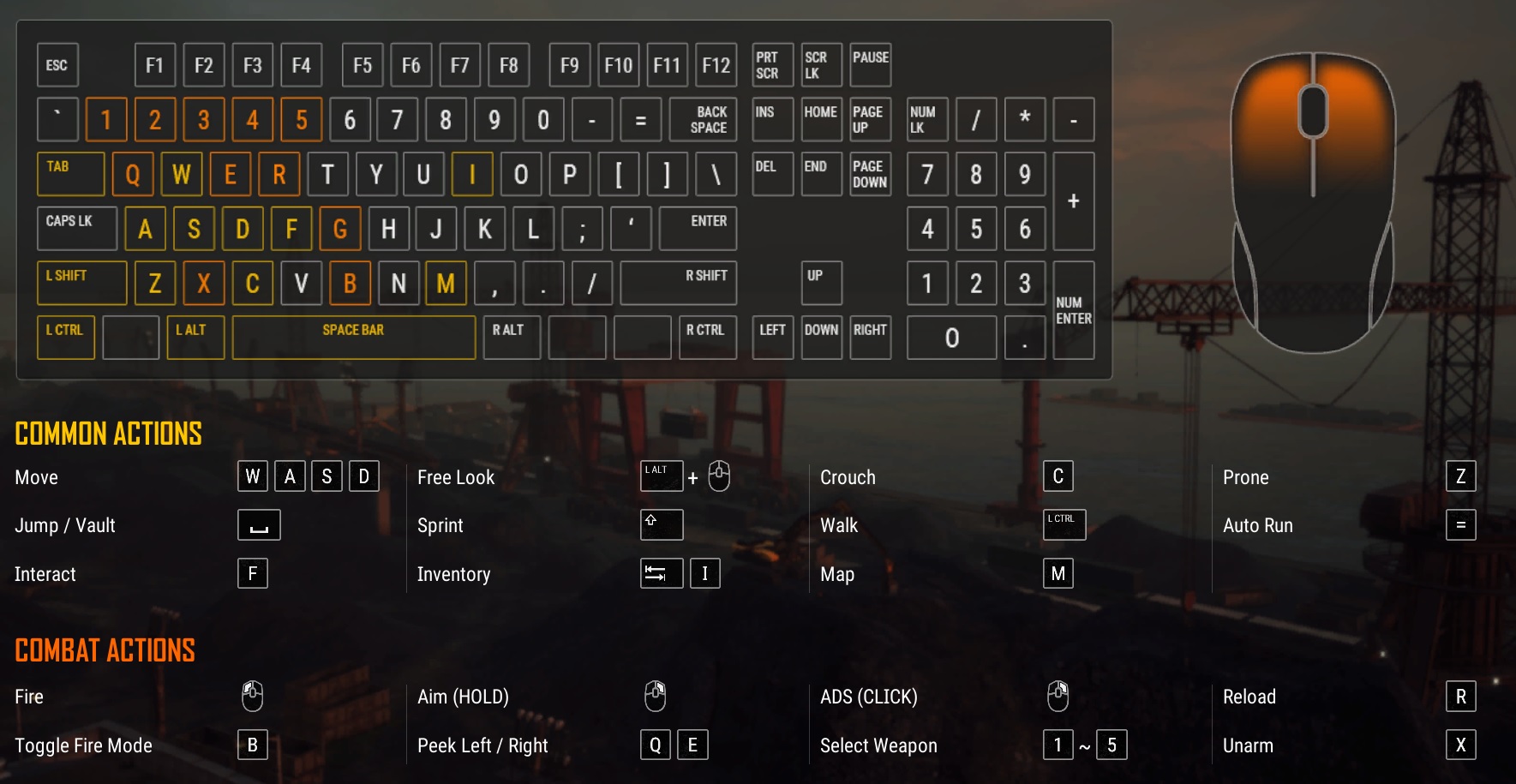
Here are the most common PUBG Keyboard Controls, let’s see how they differ from the professional players.

Best PUBG Keyboard Controls

How do you reset PUBG Keyboard Controls to Default

If you change your PUBG Default Keyboard Controls but then don’t like them and wish to roll back to the original controls, check on the Settings Menu, and on the bottom of each page you will see  APPLY   BACK   DEFUALT.   Click Default to return to standard.

Defualt PUBG Keyboard Controls

How do I change PUBG keyboard settings?

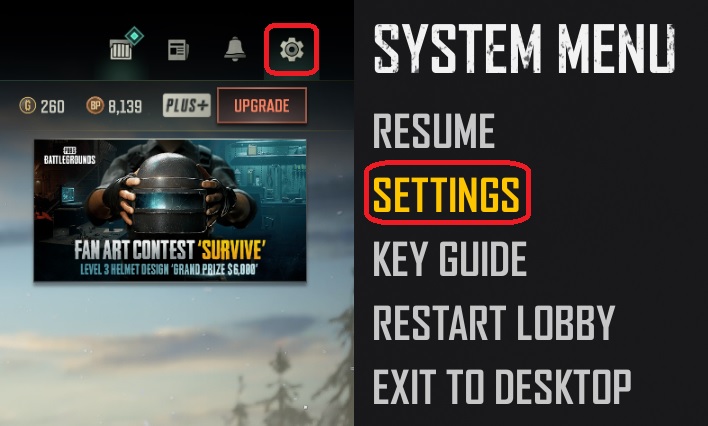
From the main menu screen, the one with your characrter looking about, click the Cog Symbol in the top right and then click Settings.

PUBG Keyboard Controls - Key Bindings
PUBG Keyboard Controls – Key Bindings

You can edit any of the PUBG Keyboard Controls from the Settings menu, follow How to Change the PUBG Keyboard Controls

What Keyboard Controls do the Pro Players Use?

Professional PUBG Players will use a variety of settings and controls, mainly based around the Hardware they have selected to play on. Not all Monitors, Mice or keyboards, look, feal or react the same. Even 2 identically spec’d mice, made by different manufactures will have different feels about them and so could need different settings.

You can review the settings that Pro-players use and get an idea of how they play and try them out. Try out some of the Pro-player keyboard controls from the players on this page, see if they feel combatable or not, change them about if you need to.

Ultimately, you are looking for a Keyboard layout that you feel relaxed with, can get to all the keys quickly and that won’t give you RSI. RSI is something to be taken seriously if you’re gaming for hours at a time and is easily missed. Any aches or the need to stretch out is an indication that you need a break. Take at least 15min breaks every 2 hours.

What’s are the Professional PUBG Keyboard Controls?

Here are the main keybinds used by a few of the top players. You may find these better or worse than the defaults or what your used to using but it’s worth giving them a try. you can see some of the keybinds are wildly different from the defaults, players will normally place the most used keys close to the primary fingers. Primary fingers normally have a better reaction time than say, your little finger.

Myself, I switched to using C for crouch rather then Left-Shift. I found this much easier to use and so I then started using C for crouch in Fortnite as well.

ActionChocotaco's KeybindsUbah's KeybindsGrimmmz KeybindsShroud Keybinds
Aim MethodHoldHoldHold
AimRight Mouse ButtonRight Mouse ButtonRight Mouse Button
ADSMouse Button 4Right Mouse Button (Click)Right Mouse Button (click)
QuickmarkerScroll buttonScroll button
VaultMouse Button 5N
JumpSpace BarSpace BarSpace Bar
CrouchCCC
ProneZZZB
ReloadRRR
Cycle Fire ModeBB
AutoRun0Equals / Num LockEqualsMiddle Mouse Button
InteractFFF
Move ForwardWWW
Move LeftAAA
Move BackwardSSS
Move RightDDD
Peek LeftQQQ
Peek RightEEE
WalkLeft CtrlLeft CtrlLeft Ctrlleft Alt
SprintLeft ShiftLeft ShiftLeft Shift
Toggle CameraVVV
FreelookLeft AltLeft AltLeft AltMouse Button 2
FireLeft Mouse ButtonLeft Mouse ButtonLeft Mouse Button
Next WeaponNum 7 / Mouse Wheel UpMouse Wheel UpMouse Wheel Up
Previous WeaponMouse Wheel DownMouse Wheel DownMouse Wheel Down
Primary Weapon 1111
Primary Weapon 2222
Side Arm333
Melee Weapon444
Throwables555
Toggle Firing ModeXBBQ
Unarm (Fists)BXXX
Increase ZeroingTPage Up / Thumb Mouse Button 2Page Up
Decrease ZeroingGPage Down / Thumb Mouse ButtonPage Down
Reset ZeroingMiddle Mouse Button
Toggle Throwing StanceRight Mouse ButtonRight Mouse Button
Cook GrenadeRR
Use Med KitDefault77
Use First Aid KitF188
Use BandageF299Shift + 1
Use Boost Item000Shift + 3
Use Heal ItemHyphenHyphenShift + 2
Use Energy DrinkF400Shift + 4
MapMMM
InventoryI / TabI / TabI / Tab
Push to TalkPage Up / Middle Mouse ButtonTTMouse Button 1
Holster WeaponX
Equip GrenadeG
Driver SeatW
Delete My MarkerDelete
Motorcycle Air Control Roll RightV
Motorcycle Air Control Roll LeftC

Other PUBG Battlegrounds Guides

Introduction to PUBG Battlegrounds

Best PUBG Graphics Settings

Best PUBG Keyboard Controls

Default PUBG Keyboard Controls

FREE PUBG Battlegrounds skins outfits

How to Change the PUBG Keyboard Controls


Fortnite

Best Fortnite Keybinds for PC – 2026

Soggydan Fortnite, Fortnite Guides, Fortnite Keybinds 1 January 2026

The best Fortnite keybinds are kind of a personal thing for everyone, a keybind layout for one person may not be great for another. The best approach is to try as many keybinds as possible, mix them up a bit, move them about a bit more, them change back until you find what works for you. Start off with the Fortnite Default Keybinds and change a key at a time.

Alternatively, you could try using a Pro-Gamers Keybind layout and see how you get on as a Pro! Carry on reading to find out more

Best Fortnite keyboard controls for Beginners

If you are a complete beginner, I would recommend playing with the default keys for a while, until you have got a grasp of game. During this time if there is a key that you feel is out of place, just doesn’t feel right or maybe you can’t reach that key very well, then change that one element. Play a few games and see how you get on, maybe you will need to change it again until it feels right.

Best Fortnite Keybinds

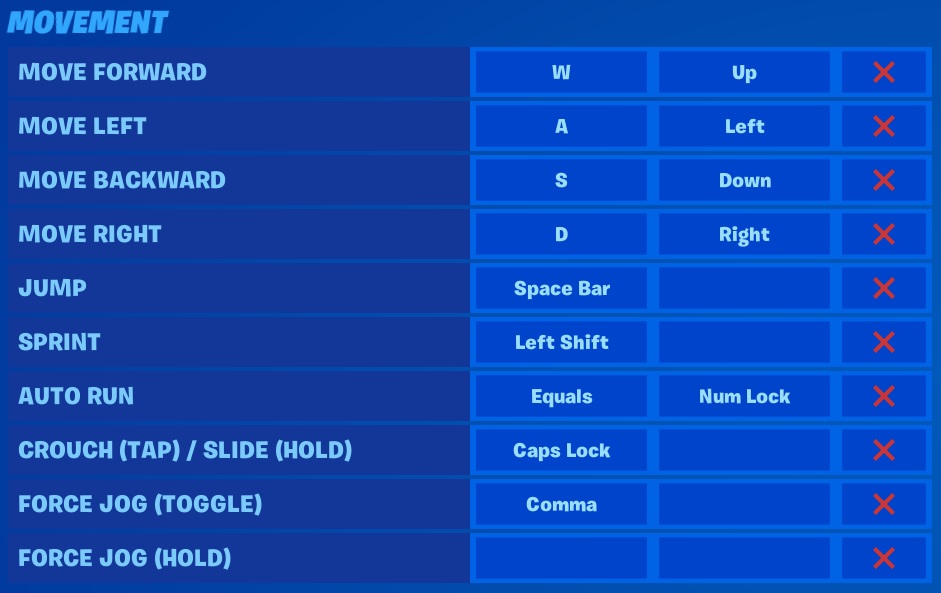
To improve your skills at Fortnite, you could look to the professional Fortnite players for inspiration, I have collected all the top players keybinds that openly shared they keybaord layouts and recorded them here. I would recommend reviewing all of the setups and then giving each one a trail run to see if it feels OK, once you find a setup that feels good, you now need to get Cracked at it!

NOTE: Take care when clicking on the RED X as this deletes the Keybinds for that row

Best Fortnite Keybinds

How do I change the Fortnite Keybinds?

All the keybinds can be changed from within the Fortnite Menu system, follow these steps to find the Keybinds:

  • Hit Escape Key – to bring up the left side menu
  • Click the Cog Symbol – Near the Bottom of the side menu
  • Click Settings – At the top
  • Click on the 4 Arrow Movement Keys Icon (here shown in red square)
Fortnite Keyboard Menu Options

If you are looking for the best of the best Fortnite Keybinds then you have to look to the top players, the professionals. If these guys are cranking 90s at a rate that can’t be seen if your using a budget video card and there winning battles by the bus load then they must be doing something right.

Have a review of the best Fortnite keybinds the Pro-Players use, some of the Top Players I have listed below. Try some of the settings and see what works for you, there will be something that will give you that edge your looking for.

How do you reset Fortnite Keybinds to Default

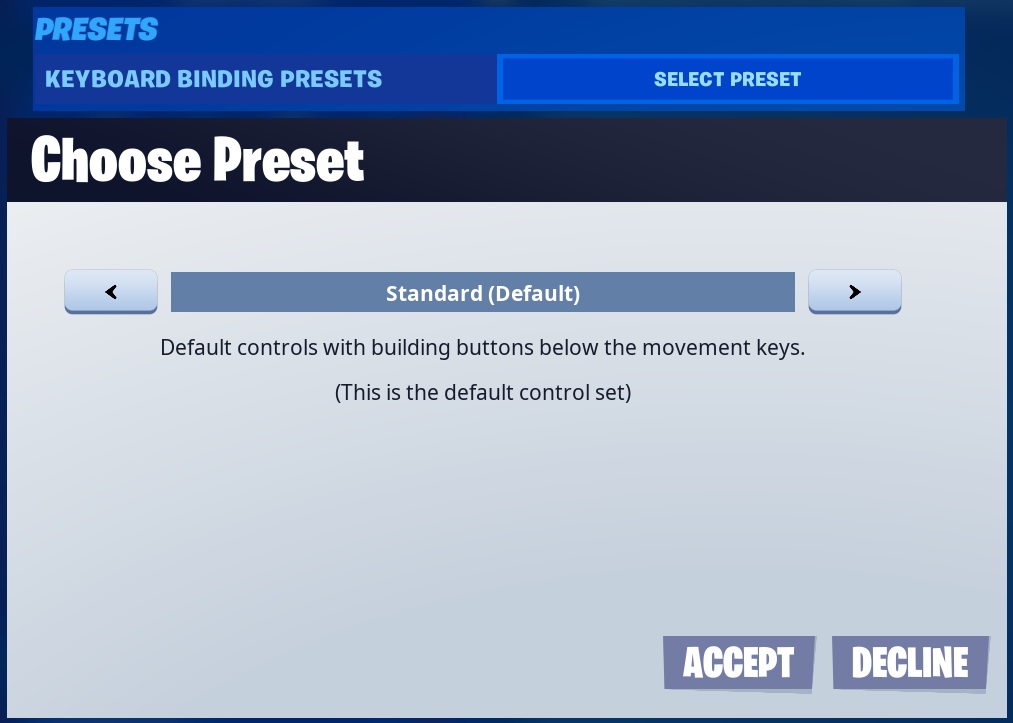
Before changing any of the Fortnite Keybinds I would recommend you reset them to default or to one of the pre-sets. You do this by following the method above to get to the Keyboard Controls and at the top of the menu you should see KEYBAORD BINDING PRESETS for the pre-sets

  • Click on SELECT PRESET
  • Then Select the Pre-set you want, Standard or Old School
  • Click ACCEPT on the option you want

You could also click on RESET in the bottom right to reset them to default

Fortnite Keybinds Rest

Best Building Keybinds for Fortnite

Building is a huge part of Fortnite and its only recently that “Zero Build” has been introduced as an option for those players not liking the imaginary wall building aspect of the game, can’t see why…

Being able to build really fast and build what comes to mind is a skill in its own, i would recommend finding a Practice map on your own, best in creative that you can mess about in and try out some Keybinds.  You could even create a practice map for yourself and friend to train in, undisturbed. Not all Keybind will suit all players so try out some of the professional players keybind listed below.

I have formated all the Best Fortnite Keybinds the same way so it should be easy to compare players together.

Post in the comments your Best Fortnite Keybinds!

What is Cdnthe3rd’s Fortnite Keybinds?

ActionKeybind
JumpSpace
ReloadMouse Wheel Up
Rotate
Sprint By Defualt
UseMouse Wheel Button
Crouch
Repair/UpgradeMouse Wheel Up
Harvesting Tool~
Weapon Slot 1Thumb Mouse Button 5
Weapon Slot 2Thumb Mouse Button 4
Weapon Slot 3Mouse Wheel Down
Weapon Slot 41
Weapon Slot 52
Building Slot 1 (Wall)Q
Building Slot 2 (Floor)Z
Building Slot 3 (Stairs)F
Building Slot 4 (Roof)X
Building Reset
TrapLeft Ctrl
Edit on Release
Building EditG
InventoryTAB
MapM
Emote Key

What is Clix’s Fortnite Keybinds?

ActionKeybind
JumpSpace
ReloadR
RotateR
Sprint By DefualtDefault
UseE
CrouchC
Repair/Upgrade
Harvesting Tool1
Weapon Slot 12
Weapon Slot 23
Weapon Slot 34
Weapon Slot 45
Weapon Slot 56
Building Slot 1 (Wall)F
Building Slot 2 (Floor)X
Building Slot 3 (Stairs)Q
Building Slot 4 (Roof)V
Building ResetRight Click / Mouse Wheel Down
TrapT
Edit on ReleaseOff
Building EditG / Mouse Wheel Down
InventoryI
MapTAB
Emote Key
Locker Emote 1Enter
Ping / Place MarkerU

What is Daequan’s Fortnite Keybinds?

ActionKeybind
JumpSpace
ReloadR
RotateR
Sprint By DefualtDefualt
UseE
CrouchMouse Button 5
Repair/Upgrade
Harvesting Tool1
Weapon Slot 12
Weapon Slot 23
Weapon Slot 34
Weapon Slot 46
Weapon Slot 57
Building Slot 1 (Wall)Q
Building Slot 2 (Floor)Mouse Button 8
Building Slot 3 (Stairs)F
Building Slot 4 (Roof)Mouse Button 9
Building ResetRight Click
TrapT
Edit on Release
Building EditG
InventoryTAB
MapM
Emote KeyE
Switch QuickbarMouse Button 4

What is Dakotaz’s Fortnite Keybinds?

ActionKeybind
JumpSpace
ReloadR
RotateR
Sprint By DefualtDefualt
UseE
CrouchLeft Ctrl
Repair/UpgradeN
Harvesting Tool1
Weapon Slot 12
Weapon Slot 23
Weapon Slot 34
Weapon Slot 45
Weapon Slot 5X
Building Slot 1 (Wall)Q
Building Slot 2 (Floor)F
Building Slot 3 (Stairs)V
Building Slot 4 (Roof)Mouse Button 4
Building Reset
TrapT
Edit on ReleaseOff
Building EditG
InventoryI
MapM
Emote KeyB

What is DrDisRespect’s Fortnite Keybinds?

ActionKeybind
JumpSpace
ReloadR
RotateR
Sprint By DefualtDefualt
UseE
CrouchLeft Ctrl
Repair/UpgradeH
Harvesting ToolF
Weapon Slot 12
Weapon Slot 23
Weapon Slot 34
Weapon Slot 45
Weapon Slot 56
Building Slot 1 (Wall)Z
Building Slot 2 (Floor)Q
Building Slot 3 (Stairs)C
Building Slot 4 (Roof)Left Alt
Building ResetRight Click
TrapMiddle Mouse Button
Edit on Release
Building EditG
InventoryTAB
MapM
Emote Key

What is DrLupo’s Fortnite Keybinds?

ActionKeybind
JumpSpace
ReloadR
RotateR
Sprint By DefualtDefualt
UseE
CrouchC
Repair/Upgrade
Harvesting Tool1
Weapon Slot 12
Weapon Slot 23
Weapon Slot 34
Weapon Slot 4Z
Weapon Slot 5X
Building Slot 1 (Wall)Q
Building Slot 2 (Floor)Left Shift
Building Slot 3 (Stairs)
Building Slot 4 (Roof)V
Building Reset
TrapT
Edit on Release
Building EditG
InventoryTAB
MapMouse Button 5
Emote KeyB

What is Hamlinz’s Fortnite Keybinds?

ActionKeybind
JumpSpace
ReloadR
RotateR
Sprint By DefualtDefualt
UseE
CrouchC
Repair/UpgradeH
Harvesting Tool1
Weapon Slot 12
Weapon Slot 23
Weapon Slot 34
Weapon Slot 4Z
Weapon Slot 5X
Building Slot 1 (Wall)F
Building Slot 2 (Floor)Mouse Button 5
Building Slot 3 (Stairs)Mouse Button 4
Building Slot 4 (Roof)Q
Building Reset
Trap
Edit on Release
Building EditG
InventoryTAB
MapM
Emote Key

What is HighDistortion’s Fortnite Keybinds?

ActionKeybind
JumpSpace
ReloadR
RotateR
Sprint By DefualtDefualt
UseF
CrouchC
Repair/Upgrade
Harvesting ToolY
Weapon Slot 11
Weapon Slot 22
Weapon Slot 33
Weapon Slot 4Z
Weapon Slot 5X
Building Slot 1 (Wall)Q
Building Slot 2 (Floor)E
Building Slot 3 (Stairs)Mouse Button 5
Building Slot 4 (Roof)4
Building ResetRight Click
Trap\
Edit on Release
Building EditLeft Alt
InventoryI
MapM
Emote Key

What is KingRichard’s Fortnite Keybinds?

ActionKeybind
JumpSpace
ReloadR
Rotate
Sprint By DefualtDefualt
UseMouse Wheel Up
CrouchLeft Ctrl
Repair/Upgrade
Harvesting ToolE
Weapon Slot 1C
Weapon Slot 22
Weapon Slot 34
Weapon Slot 41
Weapon Slot 5X
Building Slot 1 (Wall)Q
Building Slot 2 (Floor)Mouse Button 5
Building Slot 3 (Stairs)F
Building Slot 4 (Roof)Mouse Button 4
Building Reset
TrapF5
Edit on Release
Building EditE
InventoryTAB
MapM
Emote Key

What is Mongraal’s Fortnite Keybinds?

ActionKeybind
JumpSpace
ReloadMouse Button 5
RotateT / G
Sprint By Defualt
UseDefualt
CrouchLeft Ctrl
Repair/Upgrade1
Harvesting ToolQ
Weapon Slot 12
Weapon Slot 2E
Weapon Slot 3R
Weapon Slot 44
Weapon Slot 5X
Building Slot 1 (Wall)Mouse Button 5
Building Slot 2 (Floor)DPI Button (N) - Not all mice have this
Building Slot 3 (Stairs)Mouse Button 4
Building Slot 4 (Roof)Left Shift
Building Reset
TrapC
Edit on ReleaseOff
Building EditF / Mouse Wheel Down
InventoryLeft Alt
MapM
Emote KeyF1
Auto RunRight Bracket

What is Ninja’s Fortnite Keybinds?

ActionKeybind
JumpSpace
ReloadR
RotateR
Sprint By DefualtOn
UseE
CrouchC
Repair/UpgradeG
Harvesting Tool1
Weapon Slot 12
Weapon Slot 23
Weapon Slot 34
Weapon Slot 45
Weapon Slot 56
Building Slot 1 (Wall)Thumb Mouse Button 4
Building Slot 2 (Floor)Q or Scroll Side Click Left (Logitech G502 Feature)
Building Slot 3 (Stairs)Thumb Mouse Button 5
Building Slot 4 (Roof)Left Shift or Scroll Side Click Right (Logitech G502 Feature)
Building ResetRight Mouse Button
Trap5
Edit on Release
Building EditF
InventoryTAB
MapM
Emote KeyB

What is NRG Benjyfishy’s Fortnite Keybinds?

ActionKeybind
JumpSpace
ReloadR
RotateR
Sprint By DefualtOn
UseMouse Wheel Up
CrouchLeft Ctrl
Repair/UpgradeMouse Button 4
Harvesting Tool1
Weapon Slot 12
Weapon Slot 23
Weapon Slot 34
Weapon Slot 45
Weapon Slot 5Z
Building Slot 1 (Wall)Q
Building Slot 2 (Floor)Mouse Button 5
Building Slot 3 (Stairs)C
Building Slot 4 (Roof)Left Shift
Building ResetRight Mouse Button
TrapV
Edit on ReleaseOff
Building EditE
InventoryTAB
MapM
Emote KeyB

What is Sen Bugha’s Fortnite Keybinds?

ActionKeybind
JumpSpace
ReloadR
RotateG
Sprint By DefualtOn
UseE / Mouse Wheel Up
CrouchLeft Ctrl
Repair/UpgradeMouse Button 4
Harvesting Tool1
Weapon Slot 12
Weapon Slot 23
Weapon Slot 34
Weapon Slot 45
Weapon Slot 56
Building Slot 1 (Wall)X
Building Slot 2 (Floor)V
Building Slot 3 (Stairs)C
Building Slot 4 (Roof)Left Shift
Building ResetRMB / Mouse Wheel Down
TrapT
Edit on ReleaseOn
Building EditF / Mouse Wheel Down
InventoryTab
MapM
Emote KeyN

What is Shroud’s Fortnite Keybinds?

ActionKeybind
JumpSpace
ReloadR
RotateR
Sprint By DefualtDefualt
UseF
CrouchLeft-Ctrl
Repair/Upgrade
Harvesting ToolZ
Weapon Slot 11
Weapon Slot 22
Weapon Slot 33
Weapon Slot 44
Weapon Slot 5H
Building Slot 1 (Wall)Q
Building Slot 2 (Floor)X
Building Slot 3 (Stairs)E
Building Slot 4 (Roof)Mouse Button 4
Building Reset
TrapT
Edit on ReleaseOff
Building EditG
InventoryI
MapMouse Button 5
Emote KeyE

What is Summit1g ‘s Fortnite Keybinds?

ActionKeybind
JumpSpace
ReloadR
RotateR
Sprint By DefualtDefualt
UseE
CrouchLeft Ctrl
Repair/Upgrade
Harvesting ToolX
Weapon Slot 11
Weapon Slot 22
Weapon Slot 33
Weapon Slot 44
Weapon Slot 5Z
Building Slot 1 (Wall)Q
Building Slot 2 (Floor)C
Building Slot 3 (Stairs)Mouse Button 5
Building Slot 4 (Roof)F4
Building Reset
TrapF5
Edit on ReleaseOff
Building EditG
InventoryTAB
MapM
Emote Key

What is SypherPK’s Fortnite Keybinds?

ActionKeybind
JumpSpace
ReloadMouse Wheel Button
RotateMouse Wheel Button
Sprint By DefualtOn
UseV
CrouchLeft Ctrl
Repair/UpgradeCaps Lock
Harvesting ToolTAB
Weapon Slot 1E
Weapon Slot 2R
Weapon Slot 3C
Weapon Slot 4X
Weapon Slot 5Z
Building Slot 1 (Wall)Q
Building Slot 2 (Floor)Mouse Button 4
Building Slot 3 (Stairs)Mouse Button 5
Building Slot 4 (Roof)Left Shift
Building Reset
TrapT
Edit on ReleaseOff
Building EditF
Inventory3
MapM
Emote Key

What is Tfue’s Fortnite Keybinds?

ActionKeybind
JumpSpace
ReloadC
RotateC
Sprint By DefualtDefualt
UseMouse Wheel Down
CrouchLeft Shift
Repair/Upgrade
Harvesting Tool1
Weapon Slot 12
Weapon Slot 23
Weapon Slot 34
Weapon Slot 45
Weapon Slot 56
Building Slot 1 (Wall)R
Building Slot 2 (Floor)E
Building Slot 3 (Stairs)Q
Building Slot 4 (Roof)Mouse Button 5
Building ResetRight Click / Mouse Wheel Up
TrapF
Edit on ReleaseOff
Building EditMouse Button 4 / V / Mouse Wheel Up
InventoryTAB
MapM
Emote KeyB
Auto RunCaps Lock

What is TSM Myth’s Fortnite Keybinds?

ActionKeybind
JumpSpace
ReloadR
RotateR
Sprint By DefualtDefault
UseC
CrouchLeft Ctrl
Repair/UpgradeLeft Alt
Harvesting ToolLeft Shift
Weapon Slot 11
Weapon Slot 22
Weapon Slot 33
Weapon Slot 4Z
Weapon Slot 5X
Building Slot 1 (Wall)Q
Building Slot 2 (Floor)Mouse Button 5
Building Slot 3 (Stairs)V
Building Slot 4 (Roof)D
Building Reset
TrapMouse Button 4
Edit on Releaseoff
Building EditF
InventoryI
MapM
Emote KeyF4


What is Soggydan’s Keybinds?

Couldnt resist this, i am not a pro player but its my site and i can add who i like!

If you think you have the Best Fortnite Keybind and want to be added to this list, drop a comment below

ActionKeybind
JumpSpace
ReloadMiddle Mouse Button
RotateR
Sprint By Defualt
UseMouse Button 4
CrouchLeft Shift
Repair/Upgrade
Harvesting ToolH
Weapon Slot 11
Weapon Slot 22
Weapon Slot 33
Weapon Slot 44
Weapon Slot 55
Building Slot 1 (Wall)Z
Building Slot 2 (Floor)X
Building Slot 3 (Stairs)C
Building Slot 4 (Roof)V
Building Reset
Trap
Edit on Release
Building EditG
InventoryTAB
MapM
Emote KeyB
Auto Run=
Place MarkerMouse Button 5

Fortnite Guides to help you get Cracked

  • How to Enable Fortnite 2FA
  • How to Get FREE V-Bucks in Fortnite
  • FREE Fortnite Battle Pass
  • Default Fortnite KeyBinds
  • Best Fortnite Keybinds
  • All 150 Keybinds listed Key
  • Fortnite Map Locations
  • Fortnite Quest Locations
  • Fortnite Characters Locations
  • Fortnite Fish Locations
  • Fortnite Hints, Tips and Tricks
  • Fortnite Game Tactics, Old and New
  • Fortnite Game Exploits or Bugs
  • Fortnite Game Phrases
‹ 1 2 3 4 ›»

Search the Site

Tags

Battle Royale Best Gaming Chair Fortnite Fortnite 2FA Fortnite Battle Pass Fortnite Chrome Fortnite Discord Fortnite Events Fortnite Guides Fortnite Keybinds Fortnite Locations Fortnite Paradise Fortnite Quests Fortnite Tips Free to Play Free VBucks GPU MMORPG Privacy Policy PUBG PUBG GPU Settings PUBG Keyboard Controls Secret Lab

Categories

  • Battle Royale (60)
    • Fortnite (54)
    • PUBG (6)
  • Browser Games (2)
  • Fantasy MMORPG (120)
    • Age of Conan (4)
    • Anarchy Online (6)
    • Dark Age of Camelot (19)
    • EverQuest (15)
    • EverQuest 2 (12)
    • Final Fantasy XI (11)
    • Final Fantasy XIV (5)
    • Guild Wars (3)
    • Guild Wars 2 (3)
    • Lineage 2 (6)
    • Ragnarok (5)
    • Skyforge Online (2)
    • Ultima Online (14)
    • World of Warcraft (14)
  • Hardware (7)
  • SCI-FI Games (13)
    • Eve Online (9)
    • Planetside 2 (3)

Archive

  • March 2026
  • February 2026
  • January 2026
  • January 2025
  • January 2024
  • March 2023
  • February 2023
  • January 2023
  • December 2022
  • November 2022
  • October 2022
  • September 2022
  • August 2022
  • July 2022
  • June 2022
  • May 2022
  • January 2022
  • July 2021
  • November 2020
  • October 2020
  • June 2020
  • May 2020
  • April 2020
  • March 2016
  • February 2016

Back to Top

Latest Tweets

Socials

  • Twitter Twitter
  • Home
  • About the Games I Play
  • Contact Information
  • Disclaimer
  • Privacy Policy
© Online Game Commands 2026