Online Game Commands
PC Gaming, Software, Hardware, Reviews and Guides
  • Fantasy MMORPG
    • Age of Conan: Unchained
      • Short Cut Hot keys
      • Slash Commands
      • Emotes
    • Dark Age of Camelot
      • Action Commands
      • Alliance Commands
      • Battle Group Commands
      • Boat Commands
      • Card Game Commands
      • Chat Commands
      • Emotes
      • Fighting / Defensive Commands
      • General Command
      • Group Commands
      • Guild Commands
      • Help Commands
      • Horse Commands
      • Housing Commands
      • PvP Commands
      • Quest Commands
      • Settings & Preferences
      • Siege Weapon Commands
    • EverQuest
      • Abbreviations
      • Alternate Advancement Abilities + Codes
      • Chat Channels
      • Class Titles
      • Console Slash Commands
      • Emotes
      • Haste Buffs
      • Haste Info
      • Leader officer Raid Commands
      • Lost Dungeons of Norrath – Merchant Locations
      • Macros / Scripts
      • Permanent Haste Items
      • Short Cut Hot Keys
      • Tweaks
    • EverQuest 2
      • Chat & Chat Channels
      • Emotes & Moods
      • Group / Guild / Raid Commands
      • Interface Commands
      • Macros
      • Slash Commands
      • Targeting and Movement Commands
      • Character Appearance
      • Combat Commands
      • Pet and Mercenary commands
      • Video/Graphical Display Commands/Settings
    • Final Fantasy XI
      • Chat Commands
      • Combat Commands
      • Emotes / Actions
      • General Commands
      • Macro Commands
      • Main Menu Commands
      • Party / Alliance Commands
      • Search Commands
      • Short Cut Keys
      • System Commands
    • Final Fantasy XIV Online
      • Emotes
      • Slash Commands
      • Targeting Commands
      • Facial Expression Emotes
    • Guild Wars
      • Emotes
      • Slash Commands
    • Guild Wars 2
      • Emotes
      • Slash Commands
    • Lineage 2
      • Chat Commands
      • Macro’s & Macro Commands
      • Short Cut Hot Keys
      • Slash Commands
      • Socials & Emotes
    • Ragnarok Online
      • Camera Controls
      • Emotes
      • Shortcut Keys
      • Slash Commands
    • Ultima Online
      • Boat and Ferry Commands
      • Chat Commands
      • Commands
      • Factions
      • Hireling Commands
      • Houses
      • Named NPC Commands
      • NPC Commands
      • Pets
      • Short Cut Hot keys
      • Shrines / Karma
      • Tweaks
      • Vendor Commands
    • World of Warcraft
      • Chat Commands
      • Combat Commands
      • Emotes
      • Group Leader Commands
      • Guild Commands
      • Shortcut Keys
      • Slash Commands
      • Voice Emotes
      • Lesser Arcanum of Constitution Quest Guide
        • Night Dragons Breath Quest Guide
        • Lung Juice Cocktail Quest Guide
      • Lord of the Rings meets World of WarCraft
  • SCI-FI GAMES
    • Anarchy Online
      • Help, Pet, System and Team Commands
      • Voice Commands
      • Organisation Commands
      • Keyboard Commands
      • Chat Commands
    • Eve Online
      • Chat Channel Commands
      • Drone Commands
      • General Slash Commands
      • Module Commands
      • Movement Commands
      • Navigation Commands
      • Window Commands
    • Planetside 2
      • Chat and General Commands
      • Commander Outfit Platoon and Squad Management
    • Skyforge
      • F key Keyboard Emotes
  • Battle Royale Games
    • Fortnite
      • 2FA Guide
      • All 150 Fortnite Keybinds
      • Best Fortnite Keybinds
      • Characters Locations (NPC’s)
      • Default PC Fortnite Keybinds
      • Events
        • Easter Event
        • Summer Event
        • Fortnite’s 5th Birthday Event
        • Halloween Event
        • Christmas Winterfest Event
      • Fish Locations
      • How to Get FREE V-Bucks
      • Free Fortnite Battle Pass
        • Battle Pass – Rewards
      • Locations
        • Gas Stations & Pumps
        • Gas Stations Locations
        • Whiplash Locations
      • Quests
        • Capture Points
        • Geyser Locations
        • Hide in a Giant Snowball
        • Search Cash Registers
        • Search Ice Machines or Cash Registers at Gas Stations
        • Search Produce Boxes
        • Travel in Whiplashes
      • Tips and Tricks
        • How to Regrow Your Reality Saplings Fruit
    • PUBG
      • Best PUBG Graphics Settings – 51 FPS Boost
      • Best PUBG Keyboard Controls
      • Default PUBG Keyboard Controls
      • FREE PUBG Skins Outfits
      • Change the PUBG Keyboard Controls
  • Gaming Hardware
    • CPU
    • GPU
      • Best Budget Graphics Cards for Gaming in 2021

Fortnite

Epic Games Fortnite 2FA – Get a Great Free Emote

Soggydan Fortnite, Fortnite 2FA, Fortnite Guides 4 January 2023

Tweet

Table of Contents

  • What is Epic Games Fortnite 2FA?
  • How do I start setting up 2FA for Fortnite?
  • How do I enable 2FA with Fortnite?
  • What 2FA Should I use for Fortnite?
  • Enabling Fortnite 2FA via a Third-Party Authenticator App
  • Enabling Fortnite 2FA via SMS Authentication
  • Enabling Fortnite 2FA via Email Authentication
  • How to get the Free Boogie Down emote
  • Should I use my social media Account for Fortnite?
  • Can you crack 2FA?
  • How do hackers defeat 2FA?
  • Fortnite Guides to help you get Cracked

Enabling Epic Games Fortnite 2FA is essential to help keep it secure and it will help to keep your account, skins and all your hard-earned items safe. For the most secure Epic Account setup, continue reading for the full proppa guide to Epic Games Fortnite 2FA and securing your most precious Fortnite Assets!

A real-life wallet with credit cards, some cash, driving licence etc = All Replicable

Online gaming account you spent years building = Irreplaceable

Epic Games Fortnite 2FA

What is Epic Games Fortnite 2FA?

Epic Games Fortnite 2FA (Two Factor Authentication) is not exclusive to Epic Games and Fortnite, you will also be using it to log onto secure banking or maybe social media sites like Facebook or Twitter. It is called “Two Factor Authentication” as you use 2 different pieces of authentication or identification to log into a site.

You would normally use an email or login name with a complex password for the first authentication to get into a site. Then once you pass this, you use a second piece of authentication like a code sent to your email address or SMS TXT message or the best would be by using an actual authenticator application on your smart device to generate a code for you.

How do I start setting up 2FA for Fortnite?

To enable Epic Games Fortnite 2FA, you are going to need a secure Epic login account with a good strong password! Use any of the big AV or VPN sites to help create a password for you.

I would recommend any of the following to generate a 16-character password, select to use all character and numbers and then once you have your password, add another 2 characters yourself to bump it to 18, this way there is no way anyone, not even the password generation site knows your password.  keep this super safe!

LastPass – Online Password storage platform

Nordpass –  Also creator of NordVPN

NortonPass – One of the original Anti-Virus programs ever made

I would not recommend using social media accounts like Facebook, Google or even your Steam account to log into Epic Games.  If you ever have issues with your account on these other platforms you would now be locked out of your Epic Account and so locked out of your Fortnite account. It’s a lot of pain to get account issues resolved, so just don’t go there.

If you are new to Fortnite and login using a Facebook, Google or other accounts i would strongly think about opening a pure Epic Account under a personal email.

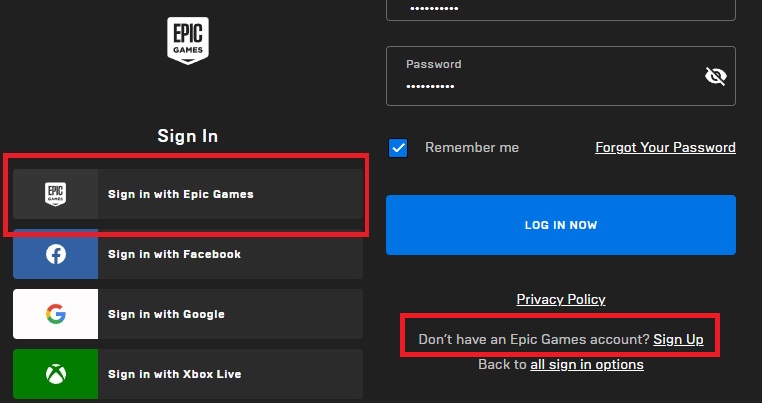
To log into Fortnite you are going to need to create an Epic Account first, click the “sign in” button on the top right. Select “Sign in with Epic Games” to make a pure unlinked Epic account to use with Fortnite. then click “Sign up” after – Don’t have an Epic Account?

Epic Games Account for Fortnite - Sign Up
Epic Games Account for Fortnite – Sign Up
Have access to the email account you will be using ready as you will need to verify a code sent to the email address to setup the account, remember to use a good secure password like described above.
Use the Epic Game launcher to download Fortnite
Once you are setup and verified you can then enable 2FA!

How do I enable 2FA with Fortnite?

Epic Games Fortnite 2FA is enabled via the Epic Account login on the web portal and NOT in the Fortnite game itself. Navigate to Epic Games Login and log into your account, notice you only used your single login name and password to login. You are still on single Factor Authentication at this point.

From the drop-down menu in the top right, where your login name is, click Account 
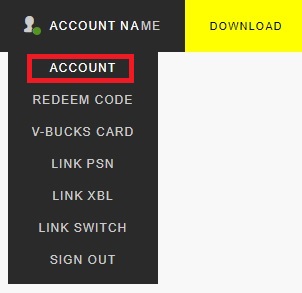
Epic Games Account for Fortnite - Setting Up 2FA
Epic Games Account for Fortnite – 2FA

From the menu to the left side, you now select Password & Security
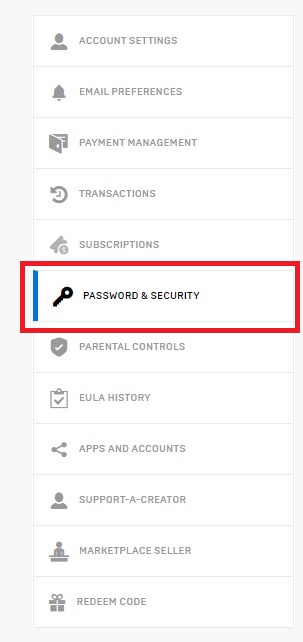
Epic Games Account for Fortnite - Password and Security
Epic Games Account – Password and Security


If you scroll to the bottom of the screen, you will see a section for TWO-FACTOR AUTHENTICATION.

You now have 3 options for Epic Games Fortnite 2FA (Two factor Authentication) to select from, but what one? Continue to read to find out more.
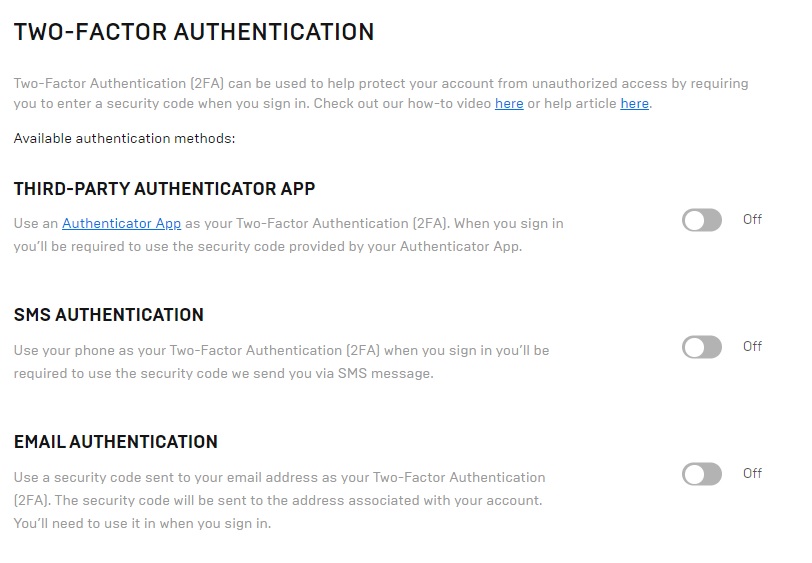
Epic Games Account for Fortnite - TWO-FACTOR AUTHENTICATION
Epic Games Account for Fortnite – TWO-FACTOR AUTHENTICATION

What 2FA Should I use for Fortnite?

There are 3 options for Epic Games Fortnite 2FA you can select from, lets cover them here and select what’s best for your situation.
  • Third- Party Authenticator App – Smart Phone App
  • SMS Authentication – Standard mobile phone network (AKA TXT Message)
  • Email Authentication – Standard Email account such as [email protected]

Enabling Fortnite 2FA via a Third-Party Authenticator App

The first stage with this option is to download an Authenticator App to your smart device, IMHO the 3 Tops apps are as follows:

  • Microsoft Authenticator
  • Google Authenticator
  • Authy Authenticator

The Microsoft Authenticator is my favourite as it asks you for your mobile PIN Security at launch giving another layer of security to the setup. Once you have the app installed, return to the epic game site to enable 2FA Auth App on your account.

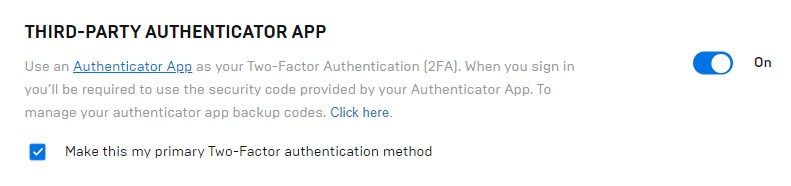
Toggle on the On/Off button next to the Third Party Auth App section.
Epic Games Account for Fortnite - Authentication App
Epic Games Account for Fortnite – Authentication App
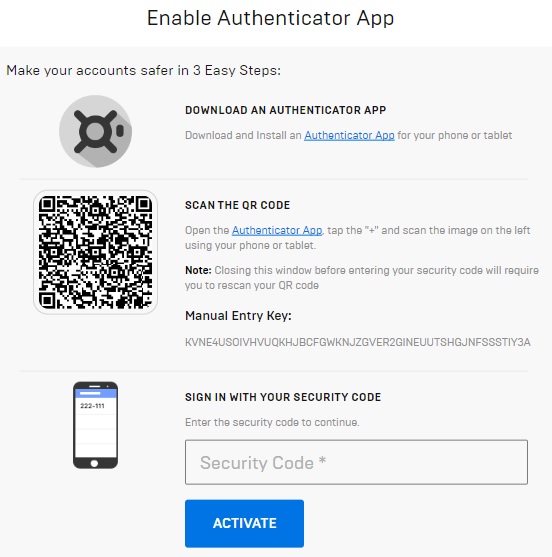
You will be presented with a screen like the one below, take a screen shot of this page as you will need it for account recovery should you need too. Then open your Auth App on your device, tap the + or add button and scan the square QR code.
From the Auth App on your device, check the Epic Games entry and type the code presented to you back into the screen you just scanned the code from, click Activate.
Epic Games Account for Fortnite - QR Code
Epic Games Account for Fortnite – QR Code

On the next screen you will be shown the Backup Codes you will need to set this up on a new device should you lose or upgrade to a new device. Take a screen shot and download the codes as well. Keep the downloaded codes and 2 screen shots you have super safe, print them out if needed and file them somewhere.

You will also receive an email confirmation this is completed.
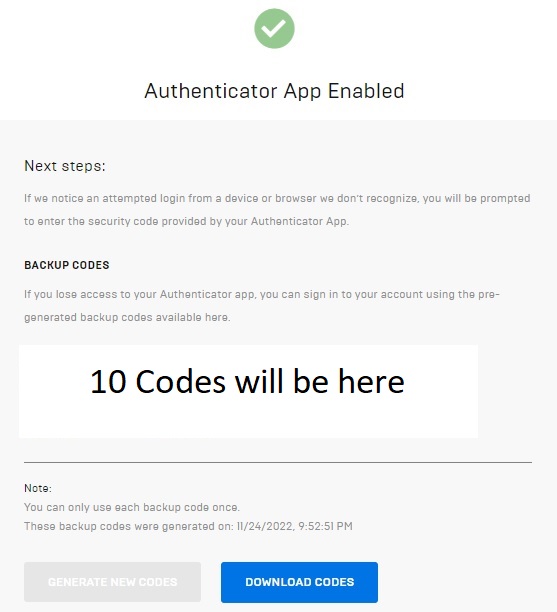
Epic Games Account for Fortnite - QR Code Enabled
Epic Games Account for Fortnite – QR Code Enabled
Once Epic Games Fortnite 2FA App is enabled and set correctly, and you have received and checked the confirmation email, your account Password & Security section should look like this.
Epic Games Account for Fortnite - QR Code Enabled
Epic Games Account for Fortnite – QR Code Enabled


You will now have to enter a 6-digit code from the Auth App every time you login into your Epic Game Account so you are going to need your smart device handing before playing.

Top-Tip: Tick the box to “Remember Device” when you login, this will cut down on the authentications you need to make

Is an Authenticator App for 2FA any good?

Using a third-party app like the MS Authenticator is the best and only option over SMS TXT and Email 2FA. It is near on impossible to hack and could only really be compromised if an attacker stole your mobile device and got your PIN code or face/finger ID from you to open up the auth app.

I like the MS Auth App as it offers that additional level of security by asking you on the launch of the app, your PIN or face/finger ID even if the device is already unlocked.

Using the MS app as your Epic Games Fortnite 2FA device is the most secure way of protecting your account.

Enabling Fortnite 2FA via SMS Authentication

Toggle on the On/Off button next to the SMS Authentication section, this will enable sending of a SMS or TXT Message to a mobile device.  You may need to complete a Security Check via a image matching process before continuing.

Epic Games Account for Fortnite - SMS Authentication
Epic Games Account for Fortnite – SMS Authentication

You will then need to add your mobile device number on the next screen, you maybe charged for these SMS TXT messages so check with the bill payer and/or contract details first.
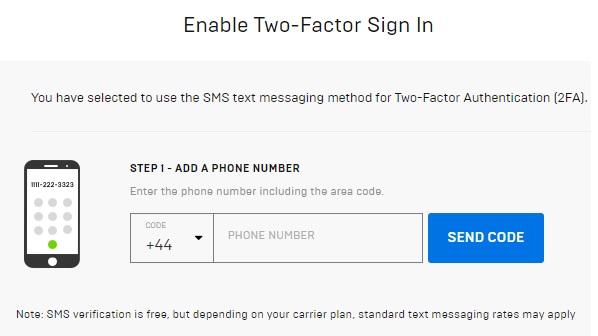
Epic Games Account for Fortnite - SMS Authentication Details
Epic Games Account for Fortnite – SMS Authentication Details

You should get an SMS TXT from Verify (same authentication company eBay uses) with a code that you will need to enter to verify your account. You will need to have your mobile device handy when you log into your account from now on.

Epic Games Account for Fortnite - SMS Authentication Code
Epic Games Account for Fortnite – SMS Authentication Code

Your Password & Security section should now look like this to show 2FA SMS is enabled and you should get an email confirmation to back this up.
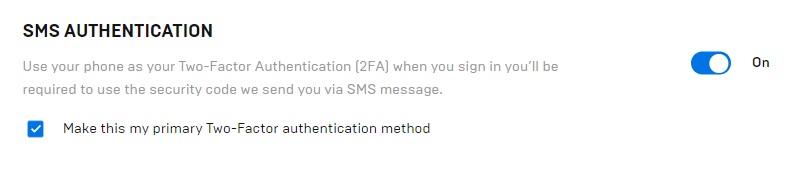
Epic Games Account for Fortnite - SMS Authentication is ON
Epic Games Account for Fortnite – SMS Authentication is ON

To disable SMS TXT Authentication is very easy, a little too easy, just toggle the button to Off. No verification needed, I feel this should be an authentication step via SMS and Email notification.  I didn’t receive either

Is SMS 2FA any good?

SMS 2FA is the second-best option on offer from Epic Games. SMS TXT System still has its flaws and can be open to a number of issues and attacks, but it’s better than no 2FA at all.

If you would like to know, more check out Text Message Authentication Explained

Enabling Fortnite 2FA via Email Authentication

Toggle on the On/Off button next to the Email section, this will enable 2FA via an email address. You may need to complete a Security Check via a image matching process before continuing.

This method use the email address you used when setting up your Epic Account at the start, the one registered under the Account Settings at the top of the left menu
Epic Games Account for Fortnite - Email Authentication
Epic Games Account for Fortnite – Email Authentication


Once enabled, you will be prompted for the code that is going to arrive in your email, check your email and enter the code. From now on, every time you log into your Epic Account you will be prompted for this code.
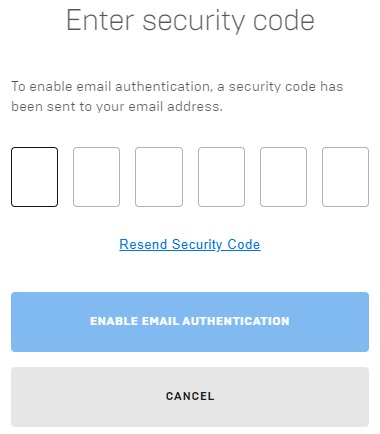
Epic Games Account for Fortnite - Email Authentication Code
Email Authentication – Enter the Code and Click Enable

Is Email 2FA any good?

Using email for Epic Games Fortnite 2FA is the most unsecure of the 3 methods on offer from Epic. You should see this as the most basic method of security but it’s still better than no 2FA at all. So, if you don’t have a smart device or a phone, then this could be your only option.

I would consider using a local computer Authenticator App like WinAuth rather than use Email!

If you are to use Email 2FA then:

  • Do Not Use a Free email account like Google, Hotmail or Yahoo – If this is your only option, enable any Advanced Protection that maybe on offer.
  • Do Not use simple passwords – Like, Password01 or FortniteistheBest99. Long random 18 Character passwords are the best

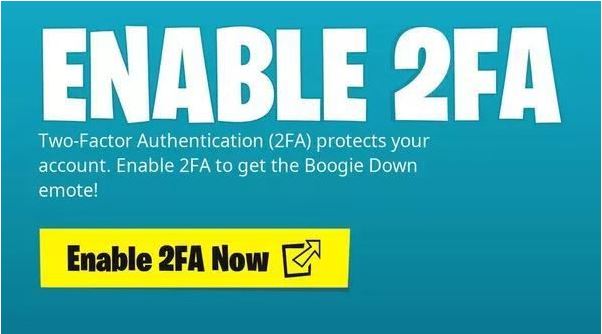
How to get the Free Boogie Down emote

Now that you have enabled Epic Games Fortnite 2FA on your account you should receive the Free Boogie Down Emote next time you login
Fortnite 2FA Boogie Down Emote

Should I use my social media Account for Fortnite?

I would not recommend this as if your social media account, Facebook, Google or Steam where to be compromised then this would ultimately affect your Epic account. be safe and make an Epic account with its own unique login.

Can you crack 2FA?

In short, there is always hackers that will try and obtain your details to gain access to your account. There are plenty of reports from reputable security companies on the internet to read up on 2FA.
Here are some tips on the safest 2FA approach:
  • Do not use FREE email providers, not even Hotmail
  • Always use 18+ character password on the email account you will use as your primary authentication method
  • Use the MS Auth Application for the 2nd authentication method – If you have no smart device use WinAuth

Enabling Epic Games Fortnite 2FA is the best way to keep your Account safe

How do hackers defeat 2FA?

There is a lot of info in the internet from professional security companies on how hackers steal your account details, read up on these rather than take my word for it.

Most of the hacks, even if you have 2FA enabled, are from man in the middle attacks meaning these are attacks from not a hack as such but your data being leaked onto the web via a tracking bot or data/screen capture spyware. It could be a weak password has been used and your account has been reset via access to your mailbox.

Here are some tips on how to be as safe as possible:

  • Never share your login or password with anyone, not ever, not even Epic
  • Use Anti-Virus apps on PC, MAC etc
  • Use different password on different platforms
  • Do not ask for account help from random people on the internet

Fortnite Guides to help you get Cracked

  • How to Enable Fortnite 2FA
  • How to Get FREE V-Bucks in Fortnite
  • FREE Fortnite Battle Pass
  • Default Fortnite KeyBinds
  • Best Fortnite Keybinds
  • All 150 Keybinds listed Key
  • Fortnite Map Locations
  • Fortnite Quest Locations
  • Fortnite Characters Locations
  • Fortnite Fish Locations
  • Fortnite Hints, Tips and Tricks
  • Fortnite Game Tactics, Old and New
  • Fortnite Game Exploits or Bugs
  • Fortnite Game Phrases

Related Posts

Fortnite /

FREE Fortnite Battle Pass (2026) V-Bucks Price Increase!

Fortnite Battle Royale

Fortnite /

Fortnite – Battle Royale is Amazing and my No1 Game

Fortnite /

All 150 Fortnite Keybinds / Keyboard Controls Full List (Jan 2026)

‹ FREE PUBG Skins Outfits – Jan 2023 › Where are the Gas Stations in Fortnite – Chapter 4 Season 2

Search the Site

Tags

Battle Royale Best Gaming Chair Fortnite Fortnite 2FA Fortnite Battle Pass Fortnite Chrome Fortnite Discord Fortnite Events Fortnite Guides Fortnite Keybinds Fortnite Locations Fortnite Paradise Fortnite Quests Fortnite Tips Free to Play Free VBucks GPU MMORPG Privacy Policy PUBG PUBG GPU Settings PUBG Keyboard Controls Secret Lab

Categories

  • Battle Royale (60)
    • Fortnite (54)
    • PUBG (6)
  • Browser Games (2)
  • Fantasy MMORPG (120)
    • Age of Conan (4)
    • Anarchy Online (6)
    • Dark Age of Camelot (19)
    • EverQuest (15)
    • EverQuest 2 (12)
    • Final Fantasy XI (11)
    • Final Fantasy XIV (5)
    • Guild Wars (3)
    • Guild Wars 2 (3)
    • Lineage 2 (6)
    • Ragnarok (5)
    • Skyforge Online (2)
    • Ultima Online (14)
    • World of Warcraft (14)
  • Hardware (7)
  • SCI-FI Games (13)
    • Eve Online (9)
    • Planetside 2 (3)

Archive

  • March 2026
  • February 2026
  • January 2026
  • January 2025
  • January 2024
  • March 2023
  • February 2023
  • January 2023
  • December 2022
  • November 2022
  • October 2022
  • September 2022
  • August 2022
  • July 2022
  • June 2022
  • May 2022
  • January 2022
  • July 2021
  • November 2020
  • October 2020
  • June 2020
  • May 2020
  • April 2020
  • March 2016
  • February 2016

Back to Top

Latest Tweets

Socials

  • Twitter Twitter
  • Home
  • About the Games I Play
  • Contact Information
  • Disclaimer
  • Privacy Policy
© Online Game Commands 2026