Essential Fortnite Hints, Tips and Tricks of (2026)

Table of Contents
Fortnite Hints, Tips and Tricks can be for EVERYONE, no single player knows everything. With the island constantly in flux, new tricks are needed all the time. From complete noobs that have just started playing Fortnite to the more seasoned players that have been around for a while, we all need to get an advantage over the next player to get that Fortnite Crown
In-Gameplay Fortnite Hints, Tips and Tricks
There are general gameplay tips that will help you in your everyday battles. They are listed from easy with most impact to harder tricks that can take some time to master
- Can you keep items in your tent
- Instantly re-grow your Reality Saplings – Spawn more fruits
- Health Hints, Tips and Tricks
- Shield Hints, Tips and Tricks
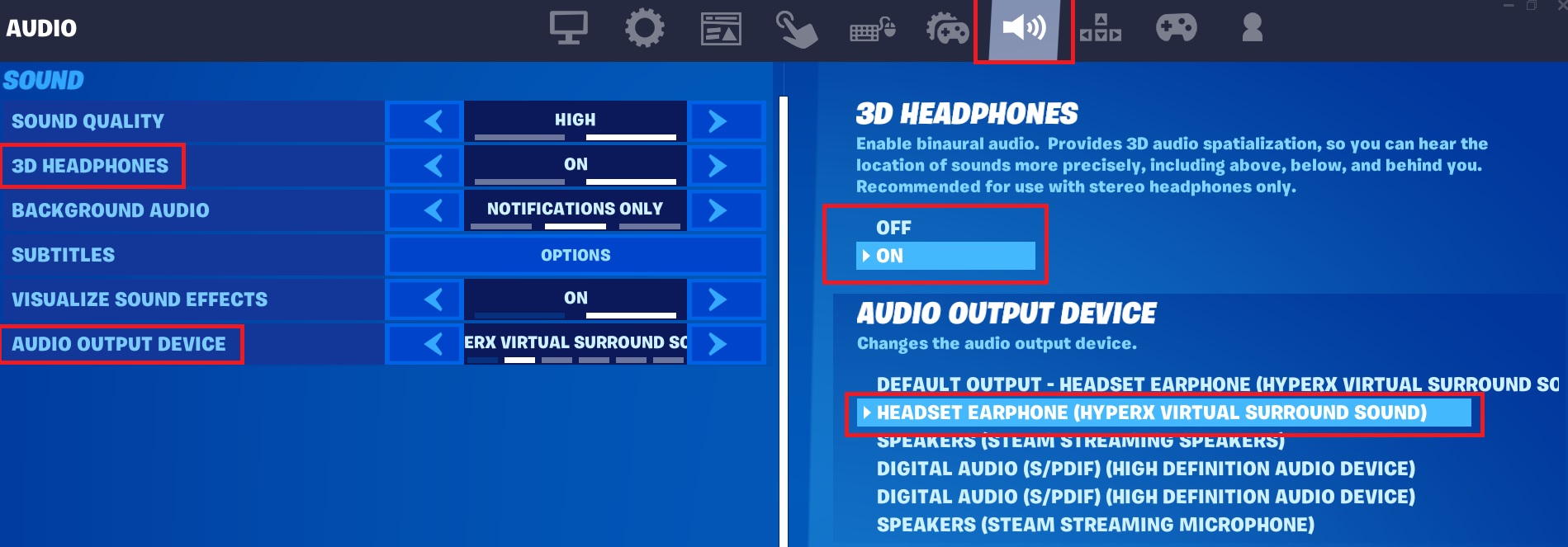
Use 5.1 Surround Sound Headphones
Use head phones as much as possible, get a decent pair of DJ Style head phones that support 7.1 or at least 5.1 Surround Sound. Having supported head phones will mean you can tell the direction the sound is coming from. The overall sound quality is also improved over standard headphone or ear buds, like the ones used for smartphones. Do not use smartphone ear buds, these sound flat and will not give the best experience.
Enable the 3d Headphones in the Audio options. Navigate to the Settings menu and then Audio, check you have 3D Headphones on and your headphones are set to defualt.
Use a High DPI Mouse
Using a high DPI mouse (anything more than 600DPI) will give you the ability to decrease the mouse sensitivity in the Fortnite Mouse Settings and so give you better control over aiming. This does sound like in reverse but this is due to the higher DPI of a better mouse.
Defualt setting is about 28%, but with a 1600 DPI Mouse you may need to bring down to 10-11%

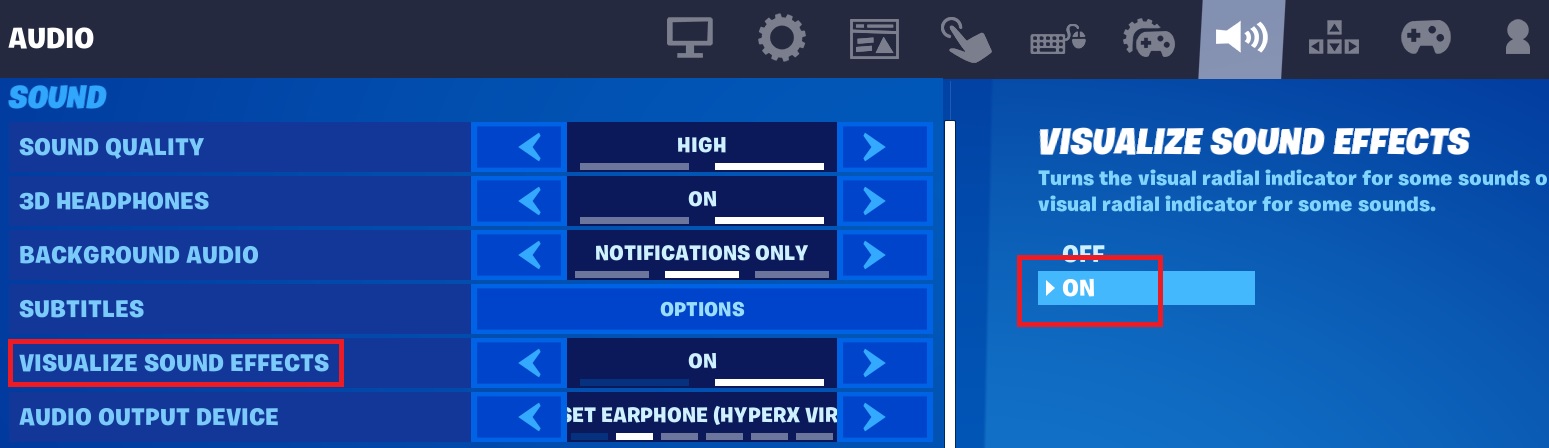
Turn on the Fortnite 3D Visualize Sound Effects
This is an option in the GUI, enabling this will give you a visual circle affect showing you where sound is coming from. Gun noise shows up as orange with a muzzle flash symbol while footsteps (players, NPC or creatures) are shown in white with small feet or an animal symbol
Collect a Long, Medium and Short-Range Weapon
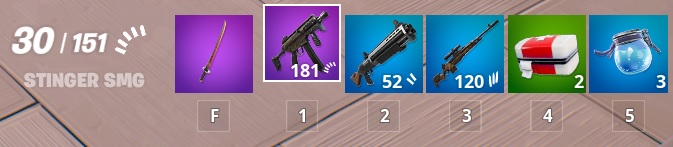
Everyone has their own preference on weapon choice but it’s a good idea to have 1 from all 3 ranges available with you, after all, a sniper can get snuck up on and so needs a side arm or shotgun. I like to keep 3 slots for the 3 ranges and upgrade each one as I find better versions.
But… Always get a weapon of some sort quickly as soon as you land, then farm a few easy materials if you’re in build mode. So, you’re ready to fight if needed
Also check on How to Update the Preferred item Slots
Keep Heals and Shields to Hand
Not everyone’s play style but I like to keep a slot for Med kits and a slot for Shield buffs. Or if you find one, the double slot Chug Cannon! I also prefer small chug pots to large; they will only take you to 50% but after a battle, you can hide and they are faster to down than the large pots. Once you have left the area, you can find something to boost you back to 100%

This is practicaly my favorite setup, in order Slot 1-5
- Mid-Range – Assault Rifle
- Close Range – One of the many Shot Guns or SMG
- Long Range – DMR or Striker Burst Rifle
- Shields – Mini Pots or Klomberry’s – Very Quick to each and will restore health first
- HP – Medmist or 100% first Aid Kit
Stay on the Move
Standing or even kneeling still is almost signing your elimination papers. Also keep on the move, left, right, back, forward, especially if you’re looking out over the map toward some gun fire you have just heard. You never know when you’re in a sniper’s sights! Never stand still, unless you really have too, like healing etc in those cases find some cover, hidden away to med up.
Also keep om the move from location to location, have a plan in mind to get into the circle before the storm.
Don’t Run in a Straight Line
Just like staying on the move, don’t run in a line. Even if you think you are safe, someone is always around the corner with a sniper rifle ready to make your day very unhappy. Ziggy and Zagging when running away or in very open territory can save you.
Make Your Shots Count
Always make sure you can land your bullets and hit your target. Don’t over reach by using a Striker Burst where you should have used a DMR. This will just waste ammo and alert other players to your location. Every gun has pro’s and con’s, make sure you know them and use them accordingly.
Try not to panic as that rush of adrenaline pumps into your system, this is often a noob mistake and after some game time you will be able to relax and take it easy, it’s all about practice.
Always use controlled bursts when using any form of rapid-fire guns. SMG and Assault Rifles will unload pretty quickly and have you shooting everything but what you want to hit. Use small controlled bursts with 1 click of the mouse at a time.
Crouch to make your crosshair smaller and tighter so giving you a better aim
Pic of crouching with DMR
Use the Surrounding Terrain
Always check around you, try and stick to the high ground so you are looking down on other players. Use building, rocks, trees and tall grass to hide behind, check the damage on a rock or tree so you have an idea how long it may last if you are shot at.
Staying hidden is a sure way of staying alive, if you can’t be seen, you can’t be shot at.
Don’t Rush into a Fight
Sometimes it pays to hand back, don’t rush at another player as soon as you see them. Hang tight a while, see if anyone else is about, they may be looking for a spot to heal up. Then take your shots and ambush them. Head shot to a player while they are using a med kit to too funny.
This also goes for 2 other players fighting it out. Don’t rush into a fight with them, by all means hit both players from a distance with a DMR. Once you see both down with no shields then take them both out.
Learn Some Basic Builds
I play Zero Build as building is my weak area, I can never get the hang of builds but I am told by my son’s it’s something I need to work on. Some basic builds can get you out of trouble and will certainly help you escape an elimination.
Keeping Quite
I think this is one of the best things to get good at in Fortnite, being quiet.
- If in a house or barn (wood is noisy) don’t auto-run, crouch, this keeps footsteps quiet and also makes you a smaller target
- Keep sniper shots to max 3 then move position as fast as possible
- Close doors behind you – this will not only reduce noise but an open door is a sign of activity
- Try not to accidently shoot your gun, if you do, move fast to a new location
Keep an Eye on the Storm
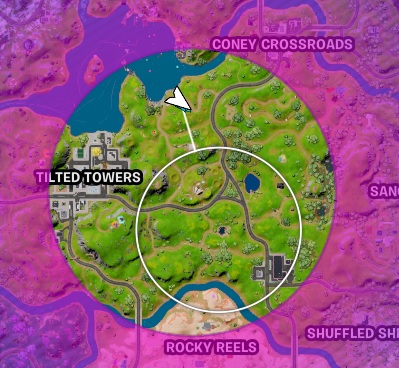
Watch the map, the storm and the Storm timer. Pay attention to the relationship between the current storm and the new inner circle location. If you’re on the side of the safe zone that furthest from the storm, the storm will move faster on this side and you won’t be able to out run it.
You can see here that the safe circle I need to get to is off centre to the safe zone before. This means the side I am on will close in faster than the other side, so I have to move quickly.
Reload Weapons Soon as You Can
Soon as you can, reload your weapons, even if you on 10% health with no shields. If you can’t fight back your eliminated anyway!
After each battle:
- Find a safe spot
- Reload all weapons
- Use med kit or health restorers
- Use shield pots or eat fruit
Learn the Order you can Heal and Restore Shields
Different restore items will only restore to a certain level.
- Bandages to 75% then the med mist can go to 100%
- 2 Small shield pots to 50% then 1 large shield pot to 100%
Fruit and Veg will also get you back upto 100% so if you see some close to you, pick it up and use it.
If you have/see a shield pot, use them if you are not 100%. These are no good in your inventory once you’re dead and even 10-20% can be the difference to being eliminated or eliminating your opponent.
If you have a large shield keg then throw this down and use a med kit/bandage at the same time to restore both HP and shield at the same time.
How to Get FREE V-Bucks in Fortnite
Everyone likes some Free V-Bucks so check out a way to get them Free every season and also some ways to get V-Bucks cheeper than directly buying them
Read my Guide here on How to Get FREE V-Bucks in Fortnite
Fortnite Guides to help you get Cracked
- How to Enable Fortnite 2FA
- How to Get FREE V-Bucks in Fortnite
- FREE Fortnite Battle Pass
- Default Fortnite KeyBinds
- Best Fortnite Keybinds
- All 150 Keybinds listed Key
- Fortnite Map Locations
- Fortnite Quest Locations
- Fortnite Characters Locations
- Fortnite Fish Locations
- Fortnite Hints, Tips and Tricks
- Fortnite Game Tactics, Old and New
- Fortnite Game Exploits or Bugs
- Fortnite Game Phrases
