Online Game Commands
PC Gaming, Software, Hardware, Reviews and Guides
  • Fantasy MMORPG
    • Age of Conan: Unchained
      • Short Cut Hot keys
      • Slash Commands
      • Emotes
    • Dark Age of Camelot
      • Action Commands
      • Alliance Commands
      • Battle Group Commands
      • Boat Commands
      • Card Game Commands
      • Chat Commands
      • Emotes
      • Fighting / Defensive Commands
      • General Command
      • Group Commands
      • Guild Commands
      • Help Commands
      • Horse Commands
      • Housing Commands
      • PvP Commands
      • Quest Commands
      • Settings & Preferences
      • Siege Weapon Commands
    • EverQuest
      • Abbreviations
      • Alternate Advancement Abilities + Codes
      • Chat Channels
      • Class Titles
      • Console Slash Commands
      • Emotes
      • Haste Buffs
      • Haste Info
      • Leader officer Raid Commands
      • Lost Dungeons of Norrath – Merchant Locations
      • Macros / Scripts
      • Permanent Haste Items
      • Short Cut Hot Keys
      • Tweaks
    • EverQuest 2
      • Chat & Chat Channels
      • Emotes & Moods
      • Group / Guild / Raid Commands
      • Interface Commands
      • Macros
      • Slash Commands
      • Targeting and Movement Commands
      • Character Appearance
      • Combat Commands
      • Pet and Mercenary commands
      • Video/Graphical Display Commands/Settings
    • Final Fantasy XI
      • Chat Commands
      • Combat Commands
      • Emotes / Actions
      • General Commands
      • Macro Commands
      • Main Menu Commands
      • Party / Alliance Commands
      • Search Commands
      • Short Cut Keys
      • System Commands
    • Final Fantasy XIV Online
      • Emotes
      • Slash Commands
      • Targeting Commands
      • Facial Expression Emotes
    • Guild Wars
      • Emotes
      • Slash Commands
    • Guild Wars 2
      • Emotes
      • Slash Commands
    • Lineage 2
      • Chat Commands
      • Macro’s & Macro Commands
      • Short Cut Hot Keys
      • Slash Commands
      • Socials & Emotes
    • Ragnarok Online
      • Camera Controls
      • Emotes
      • Shortcut Keys
      • Slash Commands
    • Ultima Online
      • Boat and Ferry Commands
      • Chat Commands
      • Commands
      • Factions
      • Hireling Commands
      • Houses
      • Named NPC Commands
      • NPC Commands
      • Pets
      • Short Cut Hot keys
      • Shrines / Karma
      • Tweaks
      • Vendor Commands
    • World of Warcraft
      • Chat Commands
      • Combat Commands
      • Emotes
      • Group Leader Commands
      • Guild Commands
      • Shortcut Keys
      • Slash Commands
      • Voice Emotes
      • Lesser Arcanum of Constitution Quest Guide
        • Night Dragons Breath Quest Guide
        • Lung Juice Cocktail Quest Guide
      • Lord of the Rings meets World of WarCraft
  • SCI-FI GAMES
    • Anarchy Online
      • Help, Pet, System and Team Commands
      • Voice Commands
      • Organisation Commands
      • Keyboard Commands
      • Chat Commands
    • Eve Online
      • Chat Channel Commands
      • Drone Commands
      • General Slash Commands
      • Module Commands
      • Movement Commands
      • Navigation Commands
      • Window Commands
    • Planetside 2
      • Chat and General Commands
      • Commander Outfit Platoon and Squad Management
    • Skyforge
      • F key Keyboard Emotes
  • Battle Royale Games
    • Fortnite
      • 2FA Guide
      • All 150 Fortnite Keybinds
      • Best Fortnite Keybinds
      • Characters Locations (NPC’s)
      • Default PC Fortnite Keybinds
      • Events
        • Easter Event
        • Summer Event
        • Fortnite’s 5th Birthday Event
        • Halloween Event
        • Christmas Winterfest Event
      • Fish Locations
      • How to Get FREE V-Bucks
      • Free Fortnite Battle Pass
        • Battle Pass – Rewards
      • Locations
        • Gas Stations & Pumps
        • Gas Stations Locations
        • Whiplash Locations
      • Quests
        • Capture Points
        • Geyser Locations
        • Hide in a Giant Snowball
        • Search Cash Registers
        • Search Ice Machines or Cash Registers at Gas Stations
        • Search Produce Boxes
        • Travel in Whiplashes
      • Tips and Tricks
        • How to Regrow Your Reality Saplings Fruit
    • PUBG
      • Best PUBG Graphics Settings – 51 FPS Boost
      • Best PUBG Keyboard Controls
      • Default PUBG Keyboard Controls
      • FREE PUBG Skins Outfits
      • Change the PUBG Keyboard Controls
  • Gaming Hardware
    • CPU
    • GPU
      • Best Budget Graphics Cards for Gaming in 2021

Online Game Hex Color / Colour Codes

Daniel Hall 26 February 2016

In some online games there is the need to change the color of the text or the color of a test window. For example to easily distinguish between group chat and guild chat, this is easier on the eye and will make reading the text so much better to identify. Colors can be changed in the options sometimes but others require a script, macro or command is need to make the colour change.

Here are the most common colours for online game chat.

Color NameColor HEXColor
AliceBlue#F0F8FF
AntiqueWhite#FAEBD7
Aqua#00FFFF
Aquamarine#7FFFD4
Azure#F0FFFF
Beige#F5F5DC
Bisque#FFE4C4
Black#000000
BlanchedAlmond#FFEBCD
Blue#0000FF
BlueViolet#8A2BE2
Brown#A52A2A
BurlyWood#DEB887
CadetBlue#5F9EA0
Chartreuse#7FFF00
Chocolate#D2691E
Coral#FF7F50
CornflowerBlue#6495ED
Cornsilk#FFF8DC
Crimson#DC143C
Cyan#00FFFF
DarkBlue#00008B
DarkCyan#008B8B
DarkGoldenRod#B8860B
DarkGray#A9A9A9
DarkGreen#006400
DarkKhaki#BDB76B
DarkMagenta#8B008B
DarkOliveGreen#556B2F
Darkorange#FF8C00
DarkOrchid#9932CC
DarkRed#8B0000
DarkSalmon#E9967A
DarkSeaGreen#8FBC8F
DarkSlateBlue#483D8B
DarkSlateGray#2F4F4F
DarkTurquoise#00CED1
DarkViolet#9400D3
DeepPink#FF1493
DeepSkyBlue#00BFFF
DimGray#696969
DodgerBlue#1E90FF
Feldspar#D19275
FireBrick#B22222
FloralWhite#FFFAF0
ForestGreen#228B22
Fuchsia#FF00FF
Gainsboro#DCDCDC
GhostWhite#F8F8FF
Gold#FFD700
GoldenRod#DAA520
Gray#808080
Green#008000
GreenYellow#ADFF2F
HoneyDew#F0FFF0
HotPink#FF69B4
IndianRed#CD5C5C
Indigo#4B0082
Ivory#FFFFF0
Khaki#F0E68C
Lavender#E6E6FA
LavenderBlush#FFF0F5
LawnGreen#7CFC00
LemonChiffon#FFFACD
LightBlue#ADD8E6
LightCoral#F08080
LightCyan#E0FFFF
LightGoldenRodYellow#FAFAD2
LightGrey#D3D3D3
LightGreen#90EE90
LightPink#FFB6C1
LightSalmon#FFA07A
LightSeaGreen#20B2AA
LightSkyBlue#87CEFA
LightSlateBlue#8470FF
LightSlateGray#778899
LightSteelBlue#B0C4DE
LightYellow#FFFFE0
Lime#00FF00
LimeGreen#32CD32
Linen#FAF0E6
Magenta#FF00FF
Maroon#800000
MediumAquaMarine#66CDAA
MediumBlue#0000CD
MediumOrchid#BA55D3
MediumPurple#9370D8
MediumSeaGreen#3CB371
MediumSlateBlue#7B68EE
MediumSpringGreen#00FA9A
MediumTurquoise#48D1CC
MediumVioletRed#C71585
MidnightBlue#191970
MintCream#F5FFFA
MistyRose#FFE4E1
Moccasin#FFE4B5
NavajoWhite#FFDEAD
Navy#000080
OldLace#FDF5E6
Olive#808000
OliveDrab#6B8E23
Orange#FFA500
OrangeRed#FF4500
Orchid#DA70D6
PaleGoldenRod#EEE8AA
PaleGreen#98FB98
PaleTurquoise#AFEEEE
PaleVioletRed#D87093
PapayaWhip#FFEFD5
PeachPuff#FFDAB9
Peru#CD853F
Pink#FFC0CB
Plum#DDA0DD
PowderBlue#B0E0E6
Purple#800080
Red#FF0000
RosyBrown#BC8F8F
RoyalBlue#4169E1
SaddleBrown#8B4513
Salmon#FA8072
SandyBrown#F4A460
SeaGreen#2E8B57
SeaShell#FFF5EE
Sienna#A0522D
Silver#C0C0C0
SkyBlue#87CEEB
SlateBlue#6A5ACD
SlateGray#708090
Snow#FFFAFA
SpringGreen#00FF7F
SteelBlue#4682B4
Tan#D2B48C
Teal#008080
Thistle#D8BFD8
Tomato#FF6347
Turquoise #40E0D0
Violet#EE82EE
VioletRed#D02090
Wheat#F5DEB3
White#FFFFFF
WhiteSmoke#F5F5F5
Yellow #FFFF00
YellowGreen#9ACD32

Online Game Hex Color / Colour Codes

If you feel we need to add any additional information please leave a comment
Ragnarok

Ragnarok Online – 52 Essential Shortcut Keys or Hot Keys

Daniel Hall Free to Play, MMORPG 26 February 2016

Within the Ragnorok Online interface you can utilise shortcut keys (or Hot Keys) to help speed up game play and make simple tasks a little easyer and faster to complete. Shortcut keys, just like in wondows, are a combination key press of 2 or 3 keys at the same time. They dont nesecery need to be pressed AT the same moment, just held down at the same time.

Example.  Hold down “ALT” key and then press “a” will Open your status window. Repeated pressing of “a” will toggle the window On and Off

Opening and Assigning Shortcut keys Bar

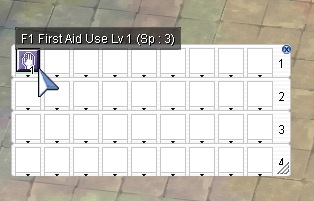
Ragnarok Key Bar WindowPress F12 to Open the Key bar.  Reapeatedly pressing F12 will open upto 4 bars.  You will notice the top line has the F numbers next to them, this will be the F key you need to press for that button to activate.  You can then drag a skill like First aid into this box from the Skills window and you have assigned First aid to the F1 key, it should look like this:

Rows 2,3 and 4 can be used as just Hot Bars or assigned to a new Shortcut key (or Hot Keys) from the “Shortcut Settings” Window


Accessing the Shortcut Key Settings Window

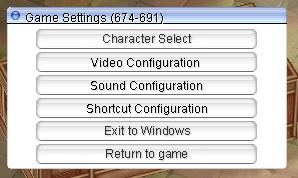
Ragnarok Game Settings

To assign more short cuts to your Key Bar you will need to to press “Esc” to open the Game settings menu


Ragnarok Shortcut Keys
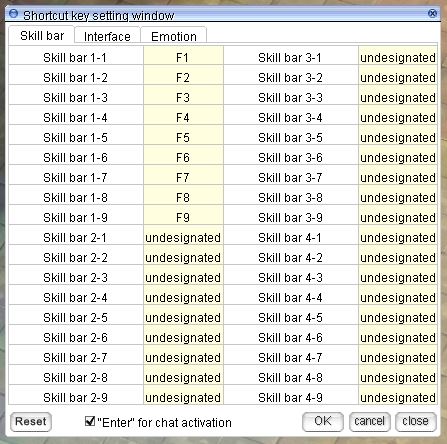
Ragnarok Shortcut Key Settings

Now click “Shortcut Configuration” and you will see this menu. Here you can Assign more Skills and Slash Commands to Hot Keys to further taylor your GUI. You will also find here the “Interface options” that further remind you about Ragnarok Slash Commands and Ragnarok Online Emotes.   These can then be atatched to shortcuts keys (or Hot Keys) and then dragged onto your Hot bar.


Not all Short cut keys (or Hot Keys) work on all versions of Ragnarok and some features requires a certain character level, feature or ability. Example, Alt + G will not work unless you are in a Guild.


Ragnarok Online – Shortcut Keys or Hot Keys

Short Cut KeysAction
Alt + 'Opens the quick menu info
Alt + =Fix the interval error between letters
Alt + a, Ctrl + aOpen / Close Status window, Activate / Minimize Status window
Alt + bOpens the instance window
Alt + cOpen / Close Chat room window
Alt + dOpen / Close Arrange Detail window, Adjust sprite and texture resolution
Alt + Double right clickAttack monster
Alt + e, Ctrl + eOpen / Close Inventory window, Activate / Minimize Inventory window
Alt + EndToggles players Health and SP bars
Alt + EnterOpens local chat but can also be used for slash commands
Alt + F10Open / Close Chat window
Alt + gOpen Guild window
Alt + hOpen / Close Friend window AKA Whisper List, shows friends' online status
Alt + HomeGround cursor on / off
Alt + iOpen / Close Friends Setup window
Alt + jOpens the pet window. This window is only accessible by pet owners.
Alt + lOpens emoticons window
Alt + mOpens the macro window
Alt + o, Ctrl + oOpen / Close Option window, Activate / Minimize Option window
Alt + pOpen / Close Party Setup window
Alt + q, Ctrl + qOpen / Close Equipment window, Activate / Minimize Equipment window
Alt + rOpens the homunculus window
Alt + sOpen / Close Skill Tree window
Alt + Single right clickTarget monster
Alt + tStandby, idle/passive mode, cancels all commands and returns to master.
Alt + TABTabs out of Ragnarok to Windows. Used a lot to get back to your desktop
Alt + uQuest Info Window
Alt + vOpen / Close Status window
Alt + wOpen the cart window
Alt + yOpens command list window
Alt + zOpen / Close Party window
Ctrl + -Used in "rock, paper, scissors" and in greetings/farewells.
Ctrl + \Used in "rock, paper, scissors" and in greetings/farewells.
Ctrl + ~Opens World map, shows yours and party members locations
Ctrl + =Used in "rock, paper, scissors", or to indicate raising of the fist.
Ctrl + EnterOpens local chat but can also be used for slash commands
Ctrl + F11Toggles the chatroom window.
Ctrl + rMercenary window
Ctrl + tToggles between passive and aggressive modes for mercenaries.
Ctrl + tabAdjust the mini map's mode (transparency off / on / no mini map)
Ctrl + vActivate / Minimize Basic Info window
ESCOpen/Close menu to end the game or return to the main menu.
F1~F9Use items or skills in the Shortcut Keys window
F10Adjust chat window height
F11Show and hide all chat windows
F12Open/Close Shortcut Keys bar
InsertCharacter Sit/Stand
Page Up/ Page DownScroll up or down while in the text windows (Mouse wheel can be used as well)
shift + click directionChange the direction the character is facing to direction clicked.
Shift + F11Toggles the chatroom window.
Shift + Right Click on playerAuto Follow another player. Note that /noctrl and /noshift need to be disabled in order to work.
TABTABS between boxes or windows you currently have open, keep tabing moves your focus

If you feel we need to add any additional information please leave a comment
Ragnarok

Ragnarok Online – 71 Essential Emotes

Daniel Hall Free to Play, MMORPG 26 February 2016

Ragnarok Online has a great list of funny Emotes to express how your character is feeling.  They appear in a small speach bubble above your characters head and can be anything from Anger ( /an ) all the way to laughter ( /heh ) and even to play “Rock Paper Sissors”

Ragnarok Emotes List


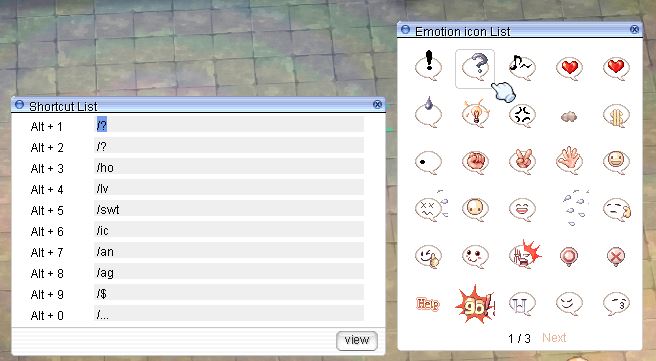
Press the Alt + L keys to open the Emotion List window. You will find 3 pages, about 70 Emotes here. These can also be used and pinned via the Key Bar for quick access aswell as a Slash command


Ragnarok Shortcut List


Press Alt + M keys brings up the Shortcut List with all the ALT short cuts. Here you can select an “ALT” + Number combo for the defualt Emotes or change the selection for your favorite emotes for a more personal feel to your character. You do this by high lighting the ALT key by clicking on the line for the number key you wish to change then click the Emote you wish to bind to that key.


Here are the defualt Emotes

CommandKey Combination
Alt + 1/hide
Alt + 2/?
Alt + 3/ho
Alt + 4/lv
Alt + 5/swt
Alt + 6/ic
Alt + 7/an
Alt + 8/ag
Alt + 9/$
Alt + 0/...

Ragnarok Online – 71 Essential Emotes

Here are all the Emotes i could find for Ragnarok Online. If you know of any others please add a comment

Emote CommandsAvailable only when you've reached a certain skill level
/!Act supprised
/$Dollar sign
/...leaves you speachless
/?You ask a question
/??Looking around, like something happened and your WTF?
/abs or /e28Your soul is Absent from your corspe, perhaps your about to die?
/aha or /icAh hah
/anAngry vein for when your super angry
/anger or /agAngry (smoke cloud)
/awsm or /e3Heart popping eyes
/bawiUsed in "rock, paper, scissors", or to indicate raising of the fist.
/boUsed in "rock, paper, scissors" and in greetings/farewells.
/bzz or /e1Angry face with poping vein
/com or /e9Come here finger
/crwd or /e17Crowd Cheering
/dbc?
/desp /otl or /e18Giving up
/dice or /e19Rolls a D6
/doridoriA very subtle head shake
/dum or /e16Dumbstruck
/e20Pointing finger
/ene or /e31Energy… maybe, most odd
/fret or /anFret
/fsh or /e13Starry eyes
/gawiUsed in "rock, paper, scissors" and in greetings/farewells.
/ggEvil laugh
/gogo Go Go!
/grat or /e11Congrats
/hehLaughing face. Funny!!!
/hlpCall for help
/hmmA thinking face
/ho or /delightHumming
/hpHELP appears on your head several times. You'll see this A LOT
/hp or /e12HP break needed
/hum or /e27Humiliation (maybe)
/icLight buld moment
/kisGives a kissing icon
/kis2Gives a kissing icon
/lvA beating heart -- you're in love!
/lv2A heart that flashes shortly -- cool
/meh or /e4Flapping tounge
/money or /$Money ($)
/mp or /e7SP break needed
/noA winking face with an index finger up... or a thumbs up, I think...
/no1Thumbs up and a wink, good job
/ohBig O, like Oh you (maybe)
/okA cute and nodding squirrel-like face
/okOK
/omgIn Shock!!
/oops or /e29Opps
/panic or /e32PANIC!!
/pat or /e6hand petting a pet
/pifA pffft like your exhaling in disbelief
/qh or /boPaper
/rice or /e2Drooling
/rkdnlor /gawiScissors
/shy or /e5Blushing
/sigh or /e15You sigh
/slur or /e8Freeky drool face
/sobCrying face...
/spin or /e14Dizzy with drool
/spit or /e30Spitting
/sryYour sorry for something
/swtSweatdrop
/swt2Lots of sweatdrops
/thxThanks
/wahCrying like a baby
/whisp or /e33A Whisp
/wnajr or /bawi or /qkdnlRock Fist
/xSame as NO
/yawn or /e10Yawny face

Ragnarok Online Emotes or Emoticons

If you feel we need to add any additional information please leave a comment
Ragnarok

Ragnarok Online – 87 Essential Slash Commands

Daniel Hall Free to Play, MMORPG 26 February 2016

Slash Commands in Ragnarok Online will help you navigate the GUI console much faster and easyer and can sometimes save you several clicks or key presses by combining commands into marcos. These console commands cover must options within the game and when used with the macro option can create some powerful function to help with your game play.

The command console can be accessed via the Ragnarok short cut keys “Alt + Enter” or “Ctrl + Enter”   The defualt mode for this chat box is local chat but can be used for the commands aswell. All command start with a slash  \  to tell the interface the following text is a command and not chat. This is where you type you command.

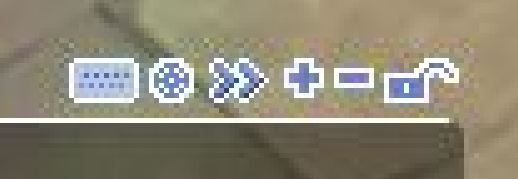
I like to have one of my widnows on the GUI as a “focus tab” and this is where i  enter my commands but also use for general chat aswell, this is why i call it “My focus Tab”.  You can click on/off the keyboard command window by clicking the very small icon that looks like a Keyboard. I always have this on.

Ragnarok Slash Commands Window

Tip: use the “arrow up” to cycle through all the commands you have type in this session to save typing them again.

Tip 2: How to Whisper: Enter a Character’s Name on the left side of chat window and type your message on the right side. The Tab key helps you move between these boxes.


On the main window focus window it has some options. This will help create your own GUI style and you can move chat, guild, macros etc to the window of your choice.

Ragnarok Window Tab Options
  • Keybaord   –   Opens and Closes the Keybaord command console
  • Target   –   Opens options for the style of chat you wish to be dispalyed here
  • Arrow Right   –   Pops out the current tab to a new window
  • Plus   –   Create new tab
  • Minus   –   Closes current tab
  • Padlock   –   Locks current tab so cant be changed

Ragnarok slash commands combined with Ragnarok  short cut keys can really enhance your game play and make it easyer and more enjoyable to play. It is worth learning some of the ones you will need the most but have the following on hand while you play.

To speak to the party you are in Add % in front of every message. (Example: \%Hello)

To speak to the guild you are in Add $ in front of every message. (Example: \$Hello)

To speak to the clan you are in Add /cl in front of every message. (Example: /cl Hello)

CommandsUasge
/acceptEnables party invites. oposite to /refuse
/alchemistShows top 10 Alchemists in the server
/auraReduces the aura of LV99+ character
/aura2Disable the aura of LV99+ character
/bangbangRotates player clockwise
/battlechatEnables battle chat but disables normal, party or guild chats
/battlemode /bmallows you to use skills assigned to Shortcut Window 2 by pressing Q ~ O keys. Press the space bar to Chat when in Battle mode
/bgmToggles background music on and off
/bingbingRotates player counter clockwise
/blacksmithShows top 10 Blacksmiths in the server
/bookingOpens party recruitment listing search window
/breakguild [Guild Name]You will need to kick all guild members first
/buildinfoShows Build version of your client
/bv [0-127]Adjusts the BGM volume.
/callToggles the effect of all guild members to be teleported next to the Guild Master
/cameraToggles camera zooming on and off
/chatCreate a chat room
/check [some text]Creates text in green font. Maybe a system check to see if font is readable
/cl or /clanchatClan chat channels
/dealTrade/Deal Items
/effectToggles effects on and off (like exit gates, and mage spells)
/effectTurns the spell special effects on/off
/emWill auto reply to a wisper sent to you, set if you are AFK Eg /am gone for coffee, back in 5
/emblemToggles your guild emblem on and off
/emotionviews the emoticon list.
/eqopenMakes your equipment viewable by anyone
/exShow the list of characters you have blocked whispering from
/ex [Character name]Block whispering from the character
/exallBlock whispering from everyone
/expel [Character name]Character Name': Expel the character from your party, if you are the party leader
/fogFog On/Off
/fontToggles discription to above or below character name, party name, guild name, guild title, and emblem
/gc or /guildchat [Message]Guild Chat
/guild [Your name here]Creates a Guild, if you have an Emperium.
/h or /helpShow the Command List
/hi [message]Send greetings to people who are online and registered on your Friend List.
/hoaiToggles Homunculus AI between default and custom mode
/huntingYou can check the your hunting list
/in [Character name]Character Name': Allow whispering from the character
/inallAllow whispering from anyone
/invite [Character name]Invite to party
/itemsnapTurn snap on/off for items on the ground
/leaveLeaves your current party
/lightmapToggles light effects
/loginout or /liShows guildsmen and friends online status. On Off
/memoMemorizes a warp point
/meraiSwitches Mercenary AI between default and custom mode
/mineffect or /minimizeReduces graphics effects to minimum
/missToggles miss notification on and off
/monsterhpToggles monster health bars
/musicTurn BGM on/off
/navigation or /naviNavigation System can take you through portals. Use as /navi mapname X/Y coordinates
/navigation2 or /navi2Navigation System can take you through portals. Shows route and supports Scroll, Zeny and Airship respectively
/noctrl or /ncAuto Attack without pressing CTRL key
/noshiftYou may use your ''force heal'' ability without the Shift key. On | Off
/notalkmsgChat will not be displayed in chat window. On | Off
/notalkmsg2Hides chat messages(including guild chat). On Off
/notrade or /ntDeclines trade offers automatically. On | Off
/organize [Your party name here]Party Name'' To organize a party. Type /leave To leave a Party
/pkShows top 10 Player Killers on the server
/qLeaves a chat room.
/quakeToggle shake effect
/quickspell1 or /q1Right-click menu enables you to use skills assigned to the F9 hotkey. On | Off
/quickspell2 or /q2By rolling the mouse wheel up and down, you are able to use skills registered on F7 and F8 hotkeys. On | Off
/quickspell3 or /q3Enables /q1 and /q2
/recruitOpens the party recruitment listing creation window
/refuserefuses all party invites. Opposite to /accept
/savechatSaves your entire message log into a text file. It is located in the folder "Chat", in your RO directory.
/set1include 3 command function together which is /noctrl + /showname + /skillfail
/shoppingEnables you to open a shop with a single left-click and close your shop with a single right-click. On Off
/shownameCharacter name display in a diffrent font.
/sitSit (if you are sitting, you will stand instead)
/skillfailDisplay red font message when skill fails. On | Off
/skillsnapTurn snap on/off for skills.
/skipToggles frame skip on and off. This will skip frames to keep game play smooth
/snapTurn snap on/off for fights
/soundToggles sound effects on and off
/standStand (if you are standing, you will sit instead)
/stateinfoToggles the status icon descriptions
/taekwonShows top 10 TaeKwon Kids in the server
/tingonlyOnly chat room sound is audible
/tipOpens ''Tip of the Day''
/traceaiSaves Homunculus' status as a text file
/v [0-127]Adjusts the sound effect volume
/w or /whoDisplays number of players online
/whereDisplays your current location (map name and XY coordinates)
/windowDisplay windows will snap/dock together. On | Off

Ragnarok Online – Slash Commands

These commands should work with all official versions of Ragnarok

  • Ragnarok EU
  • Ragnarok KO
  • Ragnarok US

If you feel we need to add any additional information please leave a comment

Ragnarok

Ragnarok Online – Camera Controls

Daniel Hall Free to Play, MMORPG 26 February 2016

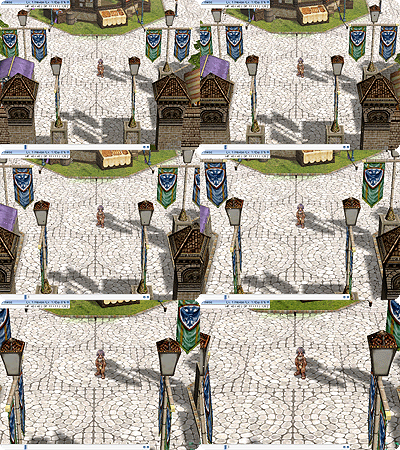
camera_1Camera Angle:
Hold down Shift Key and the right mouse button and drag the mouse up and down to adjust the height angle.
camera_2Camera Rotation:
Hold down the right mouse button and drag the mouse from side to side. This will rotate the camera 360 degrees with the character being the focus.
camera_3Camera Zoom:
Hold down Control Key and the right mouse button and drag the mouse up or down to zoom the camera in and out on the character. If you have a wheel mouse this will also work.

Ragnarok Online – Camera Controls

«‹ 37 38 39 40 ›»

Search the Site

Tags

Battle Royale Best Gaming Chair Fortnite Fortnite 2FA Fortnite Battle Pass Fortnite Chrome Fortnite Discord Fortnite Events Fortnite Guides Fortnite Keybinds Fortnite Locations Fortnite Paradise Fortnite Quests Fortnite Tips Free to Play Free VBucks GPU MMORPG Privacy Policy PUBG PUBG GPU Settings PUBG Keyboard Controls Secret Lab

Categories

  • Battle Royale (60)
    • Fortnite (54)
    • PUBG (6)
  • Browser Games (2)
  • Fantasy MMORPG (120)
    • Age of Conan (4)
    • Anarchy Online (6)
    • Dark Age of Camelot (19)
    • EverQuest (15)
    • EverQuest 2 (12)
    • Final Fantasy XI (11)
    • Final Fantasy XIV (5)
    • Guild Wars (3)
    • Guild Wars 2 (3)
    • Lineage 2 (6)
    • Ragnarok (5)
    • Skyforge Online (2)
    • Ultima Online (14)
    • World of Warcraft (14)
  • Hardware (7)
  • SCI-FI Games (13)
    • Eve Online (9)
    • Planetside 2 (3)

Archive

  • March 2026
  • February 2026
  • January 2026
  • January 2025
  • January 2024
  • March 2023
  • February 2023
  • January 2023
  • December 2022
  • November 2022
  • October 2022
  • September 2022
  • August 2022
  • July 2022
  • June 2022
  • May 2022
  • January 2022
  • July 2021
  • November 2020
  • October 2020
  • June 2020
  • May 2020
  • April 2020
  • March 2016
  • February 2016

Back to Top

Latest Tweets

Socials

  • Twitter Twitter
  • Home
  • About the Games I Play
  • Contact Information
  • Disclaimer
  • Privacy Policy
© Online Game Commands 2026