Online Game Commands
PC Gaming, Software, Hardware, Reviews and Guides
  • Fantasy MMORPG
    • Age of Conan: Unchained
      • Short Cut Hot keys
      • Slash Commands
      • Emotes
    • Dark Age of Camelot
      • Action Commands
      • Alliance Commands
      • Battle Group Commands
      • Boat Commands
      • Card Game Commands
      • Chat Commands
      • Emotes
      • Fighting / Defensive Commands
      • General Command
      • Group Commands
      • Guild Commands
      • Help Commands
      • Horse Commands
      • Housing Commands
      • PvP Commands
      • Quest Commands
      • Settings & Preferences
      • Siege Weapon Commands
    • EverQuest
      • Abbreviations
      • Alternate Advancement Abilities + Codes
      • Chat Channels
      • Class Titles
      • Console Slash Commands
      • Emotes
      • Haste Buffs
      • Haste Info
      • Leader officer Raid Commands
      • Lost Dungeons of Norrath – Merchant Locations
      • Macros / Scripts
      • Permanent Haste Items
      • Short Cut Hot Keys
      • Tweaks
    • EverQuest 2
      • Chat & Chat Channels
      • Emotes & Moods
      • Group / Guild / Raid Commands
      • Interface Commands
      • Macros
      • Slash Commands
      • Targeting and Movement Commands
      • Character Appearance
      • Combat Commands
      • Pet and Mercenary commands
      • Video/Graphical Display Commands/Settings
    • Final Fantasy XI
      • Chat Commands
      • Combat Commands
      • Emotes / Actions
      • General Commands
      • Macro Commands
      • Main Menu Commands
      • Party / Alliance Commands
      • Search Commands
      • Short Cut Keys
      • System Commands
    • Final Fantasy XIV Online
      • Emotes
      • Slash Commands
      • Targeting Commands
      • Facial Expression Emotes
    • Guild Wars
      • Emotes
      • Slash Commands
    • Guild Wars 2
      • Emotes
      • Slash Commands
    • Lineage 2
      • Chat Commands
      • Macro’s & Macro Commands
      • Short Cut Hot Keys
      • Slash Commands
      • Socials & Emotes
    • Ragnarok Online
      • Camera Controls
      • Emotes
      • Shortcut Keys
      • Slash Commands
    • Ultima Online
      • Boat and Ferry Commands
      • Chat Commands
      • Commands
      • Factions
      • Hireling Commands
      • Houses
      • Named NPC Commands
      • NPC Commands
      • Pets
      • Short Cut Hot keys
      • Shrines / Karma
      • Tweaks
      • Vendor Commands
    • World of Warcraft
      • Chat Commands
      • Combat Commands
      • Emotes
      • Group Leader Commands
      • Guild Commands
      • Shortcut Keys
      • Slash Commands
      • Voice Emotes
      • Lesser Arcanum of Constitution Quest Guide
        • Night Dragons Breath Quest Guide
        • Lung Juice Cocktail Quest Guide
      • Lord of the Rings meets World of WarCraft
  • SCI-FI GAMES
    • Anarchy Online
      • Help, Pet, System and Team Commands
      • Voice Commands
      • Organisation Commands
      • Keyboard Commands
      • Chat Commands
    • Eve Online
      • Chat Channel Commands
      • Drone Commands
      • General Slash Commands
      • Module Commands
      • Movement Commands
      • Navigation Commands
      • Window Commands
    • Planetside 2
      • Chat and General Commands
      • Commander Outfit Platoon and Squad Management
    • Skyforge
      • F key Keyboard Emotes
  • Battle Royale Games
    • Fortnite
      • 2FA Guide
      • All 150 Fortnite Keybinds
      • Best Fortnite Keybinds
      • Characters Locations (NPC’s)
      • Default PC Fortnite Keybinds
      • Events
        • Easter Event
        • Summer Event
        • Fortnite’s 5th Birthday Event
        • Halloween Event
        • Christmas Winterfest Event
      • Fish Locations
      • How to Get FREE V-Bucks
      • Free Fortnite Battle Pass
        • Battle Pass – Rewards
      • Locations
        • Gas Stations & Pumps
        • Gas Stations Locations
        • Whiplash Locations
      • Quests
        • Capture Points
        • Geyser Locations
        • Hide in a Giant Snowball
        • Search Cash Registers
        • Search Ice Machines or Cash Registers at Gas Stations
        • Search Produce Boxes
        • Travel in Whiplashes
      • Tips and Tricks
        • How to Regrow Your Reality Saplings Fruit
    • PUBG
      • Best PUBG Graphics Settings – 51 FPS Boost
      • Best PUBG Keyboard Controls
      • Default PUBG Keyboard Controls
      • FREE PUBG Skins Outfits
      • Change the PUBG Keyboard Controls
  • Gaming Hardware
    • CPU
    • GPU
      • Best Budget Graphics Cards for Gaming in 2021

World of Warcraft

WoW Slash Commands – 66 You Need to Know!

Daniel Hall Free to Play, MMORPG 26 February 2016

WoW Slash commands are really an essential part of playing World of Warcraft. I think you would struggle to get anywhere in the game with out knowing the bassic commands and you will miss an exciting aspect of the game not learning about them.

World of Warcraft Slash commands or Console Commands as some call them can really enhance your character and make it really personal to you. By WoW Key Binding  to WoW Slash commands and using them in combination with  WoW Emotes, WoW Shortcut Keys and WoW Combat Commands you really can stand out in your party or raid.

They can save you time on certain repeatable task but have a limit as they can not be used to create full automation tasks, meaning you can’t use them to repeat tasks for farming mobs or collectables. Automation was banned by Blizzard due to Botting as this is viewed as cheating… Well technically having a script run your character while you pop off to the shopd is not really playing so is cheating.

How to Open the Command or Console Interface

WoW Slash Commands
WoW Slash Commands

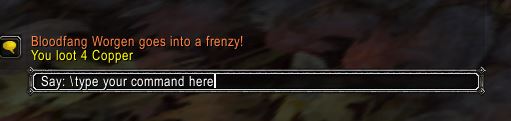
To type one of the slash commands direct into the interface you can use the General Console Tab and click on the chat bar.  This is the defualt bar where you would normaly type things to say, you can either press “Enter” or click into the window to start this process.


WoW Slash Commands \Assist


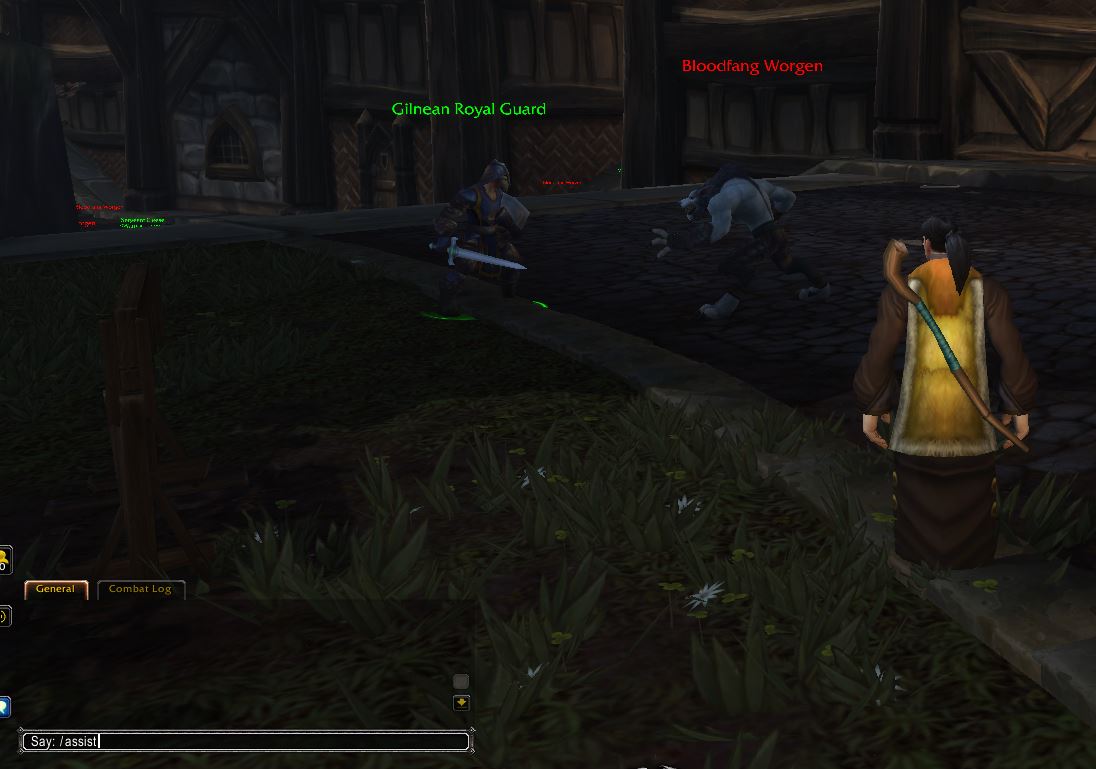
Here is an example of using the \assist command.  By targeting the friendly NPC (shown as the Green aura and Green Cirlce around their feet)  and typing into the WoW Commands console you will switch to the same target they are fighting and you can now attack this target and assist them in battle.


To make the assist process even easyer you could just use the F key from the WoW Bindings list or create a simple script and map that to your own icon to have on your shortcut bar. This is just an example to help you start to understand the interface.

WoW Slash Commands can be used within the game via the Key Bindings console. You can access this by typing /macro into the console.

WoW Assist then Autoattack


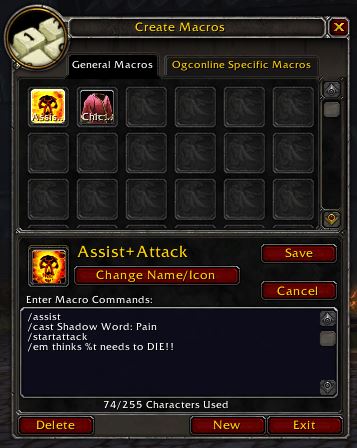
Here i have created a quick Macro to assist my target,  “Cast Shadow Word: Pain” and then start melee attack ready for then my target approaches me and gets into range.

  • /assist
  • /cast Shadow Word: Pain
  • /startattack


Select the flaming skull icon and drag onto your shortcuts bar.  You now have 3 actions on one click. After using your new macro you can now start spamming smite until your target falls…  Or you die..  Or run away to the guards


World of WarCraft Slash commands can be used together in all sorts of ways to help you in battle or even when you are crafting. The only limitation is your imagination and as your here i assume you have that in plenty. Try adding some WoW Emotes into your Macro list like this, there are over 200 Emotes in World of WarCraft with some of them being extremely funny joke emotes.

World of WarCraft Slash Commands


  • /assist
  • /cast Shadow Word: Pain
  • /startattack
  • /em thinks %t needs to DIE!!
WoW /emote Die!!
/em thinks %t needs to DIE!!  Adds the above


66 WoW Slash Commands

CommandAction
/assist [player name]
/assist %t
Assist your currently selected target, or target [player name] if specified.
/bindGives your current bind location.
/bugSubmit a bug report.
/calendarOpens the Calendar
/camp /logoutLogs out with a 20 second timer. Safe Exit
/cancelauraTurns off your current aura you may have on
/cancelformCancels your current shapeshift
/cancelqueuedspell
/cqs
Cancels casting of currently queued spell
/castAllows you to cast spells by name. Type /cast (spell subtext)
/castglyphEnables a Glyph
/castrandom
/userandom
Casts a random spell from a list
/castsequenceCasts spells from a list in order
/changeactionbarChanges action bar page
/clickSame as clicking left mouse button
/combatlogToggle logging of your Combat Log into (wow folder)\Logs\PlayerCombatLog.txt.
/consoleOpens console window to allow use of advanced commands
/console [command]For performing some game console commands, such as "gxrestart", "reloadui" and "quit".
/console settingname [newsetting]For tweaking of game settings.
/disableaddonsDisables Add-on and reloads UI
/duel [player name]Request a duel with your target, or target player if specified.
/dumpVariable dump information
/eventtrace /etraceIn-game event tracer
/exitExit the game
/follow
/f
follows a player even if they are not in your group
/forfeit
/yield
/concede
You forfeit the current duel
/framestack /fstackEnables all frames
/friend [player name]Add a player to your friends list
/guildfinder
/gf
Opens Guild finder options
/h
/help
/?
Opens the basic command list
/ignore [player name]Put someone on your ignore list
/inspect /insInspect the target player to see his equipment.
/invite [player Name]Invite player to your group
/lfg
/lfd
/df
/dungeonfinder
Looking for a Group Window
/lfr
/raidbrowser
/rb
/otherraids
Looking for a Raid Window
/logoutLogout with the 20 second sit count down. Ensures a safe save of location and items
/macro
/m
Opens the macro interface
/macrohelpGives basic help on making macros.
/macrohelpOpens the basic macro commands list
/note [message]Submit a message.
/playedLets you know how long you have been playing. Ekkk
/pvpSets your character to PVP mode
/quit
/exit
Quick exit of the game. Only use in safe areas
/random
/rand
/rnd
/roll [number] [number2]
Roll a random number between the 2 numbers specified
/reloadReloads the UI
/remfriend [player name]Remove a friend from your friends list.
/roundrobinSets loot so everyone in the group gets a loot one at a time
/script LUA-commandFor UI creators.
/script
/run
Runs a block of LUA code
/sitYou sit
/split [G S C]Splits specified money with party members
/standYou stand
/startattackEnables auto-attack
/stopattackDisables auto-attack
/stopcastingInterupts the casting of a spell
/stopmacroStops a macro mid run
/suggestSubmit a suggestion.
/swapactionbarSwap between action bars
/target [name]Change the currently selected target to the specified player or NPC. (spelling must be exact)
/timeShow the current game and server time.
/timer
/stopwatch
/sw
Opens Timer Window
/timesetShows FPS and for benchmarking
/tradeOpens trade window with targeted player.
/unignoreRemoves player from your ignore list
/wait [x] secondsUsed in macros to insert a pause where X is seconds [Removed due to farming]
/wargameStarts a War Game
/whoList players online
/who [string[ string2...]] [num[-num2]] [r-"race"] [c-"class"] [z-"zone"] [g-"guild"]With no arguments, lists online players around your level in the current zone. string will list all players whose name, guild, class, race or zone contain the specified string. num[-num2] will list players within the specified level range.

More MMORPG World of WarCraft Information

  • WoW – Chat Commands
  • WoW – Essential Combat Commands
  • WoW – Emotes
  • WoW – Group Leader Commands
  • WoW – Guild Commands
  • WoW – Lesser Arcanum of Constitution Quest Guide
    • WoW – Lung Juice Cocktail Quest Guide
    • WoW – Night Dragons Breath Quest Guide
  • WoW – Shortcut Keys
  • WoW – Slash Commands
  • WoW – Voice Emotes

If you feel we need to add any additional information please leave a comment World of Warcraft – No 1 MMORPG in the World

World of Warcraft

WoW Shortcut Keys – 95 Essential Keybinds or Hot Keys

Daniel Hall Free to Play, MMORPG 26 February 2016

WoW Shortcut keys can be an essential part of your gameplay in Azaroth. They will certianly help with speeding up tasks and actions you will need to do while adventuring, some of these things you will do over and over again while leveling and so WoW Key Bindings make short work of these repeatable tasks and help you save time to enjoy World of WarCraft more.

World of WarCraft Keybinds also add that personal touch to a charcater by combining spells with wow emotes and then creating a wow macro or script to perform the task then add that to a Key, this makes the game experience more fun and your character unique amongst the Horde of players (yes i said it).

WoW Shortcut keys are well worth remembering (or you could have this page open while you play) and try and use as many as possible, you will soon start to learn them.

How do i setup WoW Shortcut Keys, WoW Keybinds & Hot Keys?

WoW Key Bindings
Press Esc for the Game Menu

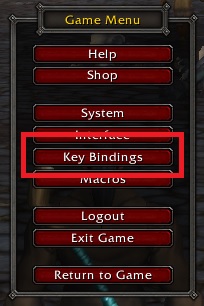
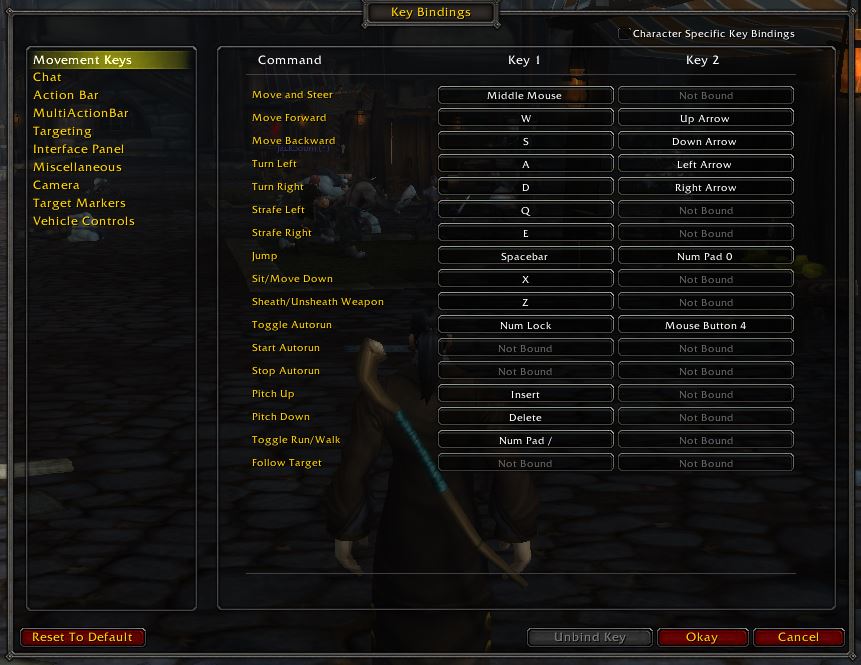
The Key Bindings menu can be found by pressing the Escape / Esc key and clicking “Key Bindings”

“WoW Key bindings” or “binding” is the act of associating a WoW action with a key on your keyboard.  Blizzard has pre-defined your keys but you can rearange them if required. The most simple example of WoW Key bindings is Arrow up or “W” Key makes your character run forward, you could change this is you need too.

“WoW Shortcut Keys” these are key combinations that when pressed as the same time (no need for timing the key press) it performs an action.  The “Shift” & “Control” keys are the most commonly used with another key for WoW Shortcut Keys.  Shift + R is one is use a lot to re-wisper someone that missed my message.

“WoW Hot Keys” is another turm for “WoW Shortcut Keys” These are the same function but given another name by a different group of players.


In the WoW Key Bindings Menu you will find a huge list of WoW Commands you can bind keys too. This would include:

WoW Shortcut Keys
WoW Shortcut Keys
  • Movement keys
  • Chat
  • Action bar
  • MultiActionBar
  • Targeting
  • Interface Panel
  • Miscellaneous
  • Camera
  • Target markers
  • Vehicle Controls


95 Essential WoW Shortcut Keys

These are the defualt interface WoW key bindings for a new installation.  All these shortcut keys can be tailored in the Key Bindings Menu to your personal preference.

Shortcut keyAction
A
Arrow Left
Turn left
0Action Button 10
1Action Button 1
2Action Button 2
3Action Button 3
4Action Button 4
5Action Button 5
6Action Button 6
7Action Button 7
8Action Button 8
9Action Button 9
-Action Button 11
/Open/Start chat slash
=Action Button 12
B or F12Opens main backpack
CCharcater Panel
Ctrl+0Pet Action Button 10
Ctrl+1Pet Action Button 1
Ctrl+2Pet Action Button 2
Ctrl+3Pet Action Button 3
Ctrl+4Pet Action Button 4
Ctrl+5Pet Action Button 5
Ctrl+6Pet Action Button 6
Ctrl+7Pet Action Button 7
Ctrl+8Pet Action Button 8
Ctrl+9Pet Action Button 9
Ctrl+F1Special Action Button 1
Ctrl+F10Special Action Button 10
Ctrl+F2Special Action Button 2
Ctrl+F3Special Action Button 3
Ctrl+F4Special Action Button 4
Ctrl+F5Special Action Button 5
Ctrl+F6Special Action Button 6
Ctrl+F7Special Action Button 7
Ctrl+F8Special Action Button 8
Ctrl+F9Special Action Button 9
Ctrl+IDungeons & Raids
Ctrl+PageDOWNCombat log page down
Ctrl+PageUPCombat log page up
Ctrl+Shift+PageDOWNCombat Log bottom of window
Ctrl+VShow all health and names
Ctrl-TabCycles through close allies
D
Right Arrow
Turn right
EStrafe right
EnterOpen/Start chat
Escape KeyShows game menu
FAssist your target
F1Toggles targeting yourself and your pet
F12Opens main backpack
F2 - F5Target Party members
F8, F9, F10, F11Opens 2nd, 3rd, 4th, and 5th bags
GTarget 1st enemy
HHonor / PVP window
IAbilities
IGroup Finder
JGuild & Communities
KSkills panel
LQuest log
MMap
NTalents (level 10+ only)
Num LockToggle walking / running
OSocial panel
PSpell book
PageDownChat Page Down
PageUPChat Page Up
QStrafe left
RReply to your last wisper
S
Arrow Down
Move backward
Shift +1 to 6Bound to Action page and cen be selected as needed
Shift+Down
Shift+Mouse Wheel Down
Next Action Bar
Shift+F1Targets your pet
Shift+F2Targets party members pet
Shift+F3Targets party members pet
Shift+F4Targets party members pet
Shift+F5Targets party members pet
Shift+JAdventure Guide
Shift+MZone Map
Shift+PageDownGoto bottom of chat window
Shift+RRe-wisper a previous wisper
Shift+Space barScore Screen
Shift+TABTarget Prevouis ememy
Shift+YGame stats
Shift-BOpens all bags
Shift-IPet book
Shift-PPet panel or Collections?
Shift-TPet attack your target
Shift-VShow health bars over allies / ememies
Spacebar
NUMPAD0
Jump
TChat Pane
TabCycles through close enemies
UReputation panel
VShow enemy health and name
W
Arrow Up
Move forward
XSit / Stand or Fly / Swim Down
YAchievement Frame
ZToggle sheathing your weapon


Right Click with your mouse button

  1. On any enemy to initiate melee attack on it. This works the same as the default key “T”.
  2. On any object to activate/loot it.
  3. On an NPC to talk with it.
  4. On any item to activate its effects. Some effects require a target.
  5. On an item in the vendor window to buy it.
  6. On an equipable item to equip it if possible.
  7. On a Characters portrate to display a list of option avalible
  8. When your Vendor window is open, right clicking an item will sell it instantly.
  9. When you bank window is open, right click on an item in your inventory to move it into your bank (does not activate/use the item) into a computer-decided empty slot in the bank.
  10. Similarly, you can right click any item in your bank (even an item in a bag in the bank) to move it into your inventory.

SHIFT+Left Click your mouse button

  1. On a stack of items to separate them into 2 stacks.
  2. On a player name in the Chat Window which is surrounded by [] brackets to do a /who on him.
  3. On a spell in your spellbook to auto-generate the /cast spellname(rank x) text into your Macro window.
  4. On any bag in your toolbar to open/close ALL your bags at a go. (Or just rebind B to open all bags) Shift+Right-Click works for this too.
  5. On any item in the Vendor window to buy more than ONE of that item at a time. Say you buy want to buy 20 Coarse threads, just Shift+Left-Click on the Coarse Thread, type 20. You can only purchase up to one stack this way (so you can’t do 21 and more). Shift+Right-Click works for this too.

SHIFT+Right Click your mouse button

  1. On any lootable object to autoloot everything in it (corpse, mineral node, skinning, quest object, etc)

Left + Right Click your mouse button

  1. Hold down both Left and Right buttons simultaeneously to walk forward using mouselook.


Chat-related shortcuts

  1. Shift+Left-Click on an item to link it into the text. You can link items from your inventory, quest log, profession skill windows and even the auction house. Does not work in General Chat.
  2. Shift+Left-Click on any quest in your Quest Log to copy the quest name into the current chat.
  3. Alt-Left and Alt-Right moves your cursor to the left or right so you can edit what you type.
  4. Alt-Up and Alt-Down scrolls through the last 10 or so commands/text messages that you have typed.
  5. Ctrl-Backspace deletes everything from the cursor to the start of the line.
  6. Alt-Ctrl-Left, Alt-Ctrl-Right moves the cursor to the beginning or the previous or next word. Hold down Shift too if you want to highlight the text.
  7. Alt-Home and Alt-End moves the cursor to the start/end of the line. Hold down Shift to highlight.
  8. Hit R to reply automatically to the last person who whispered to you.
  9. Hit R, then press TAB TAB TAB to cycle through a list of all players who last whispered to you so you can easily hold multiple chat conversations.
  10. When typing any slash command, you can use TAB to autocomplete it. For example, typing /as followed by pressing Tab Tab Tab will cycle through the slash commands beginning with AS.
  11. Left-Click on a name in the chat window which is surrounded by [] brackets, to do an automatic /whisper to him (/tell, /w).
  12. When you hover your mouse over a chat window pane. A “Tab” will appear after a few seconds for that chat pane. Right click on that Tab to see chat options for that pane (a big menu). Drag that Tab to move the pane. Available only when chat settings are not locked.


More MMORPG World of WarCraft Information

  • WoW – Chat Commands
  • WoW – Essential Combat Commands
  • WoW – Emotes
  • WoW – Group Leader Commands
  • WoW – Guild Commands
  • WoW – Lesser Arcanum of Constitution Quest Guide
    • WoW – Lung Juice Cocktail Quest Guide
    • WoW – Night Dragons Breath Quest Guide
  • WoW – Shortcut Keys
  • WoW – Slash Commands
  • WoW – Voice Emotes

If you feel we need to add any additional information please leave a comment World of Warcraft – No 1 MMORPG in the World

Lord of the Rings meets WoW

World of Warcraft

Lord of the Rings meets World of WarCraft

Daniel Hall Free to Play, MMORPG 26 February 2016

If a World of Warcraft player found themselves on a Lord of the Rings adventure is might go something like this

If you know the author then please comment below

2Mb GIF file will load soon, if not already. PLEASE WAIT, its worth it.


Lord of the Rings meets World of WarCraft


More MMORPG World of WarCraft Information

  • WoW – Chat Commands
  • WoW – Essential Combat Commands
  • WoW – Emotes
  • WoW – Group Leader Commands
  • WoW – Guild Commands
  • WoW – Lesser Arcanum of Constitution Quest Guide
    • WoW – Lung Juice Cocktail Quest Guide
    • WoW – Night Dragons Breath Quest Guide
  • WoW – Shortcut Keys
  • WoW – Slash Commands
  • WoW – Voice Emotes

If you feel we need to add any additional information please leave a comment World of Warcraft – No 1 MMORPG in the World

World of Warcraft

WoW Emotes – 213 Amazing World of WarCraft Emotes

Daniel Hall Free to Play, MMORPG 26 February 2016

WoW emotes or emoticons are a great way of expressing yourself in World of Warcraft and so its a great idea to memorise a few and then have this list of emotes in WoW ready for when you need more!

Emotes can be used with no target selected, targeting yourself, another player or NPC. Some WoW emotes will do different things depending on what your target is.

World of Warcraft emotes can be used to make an almost infinate funny wow emotes chain with some hilarious results. Its worth spending some time playing with different combinations to find soemthing that is unusual and both fitting for your character.

Complete List of WoW Emotes

Emotes with sound have a voice that would fit your character. These really are funny wow emotes!

  • Emotes with a X in the A column are animated.
  • Emotes with a X in the V column are voiced by your character.

WoW EmotesAVWith out a targetWith a target
/agreeYou agree.You agree with (Target).
/amazeYou are amazed!You are amazed by (Target)!
/angryxYou raise your fist in anger.You raise your fist in anger at (Target).
/apologizeYou apologize to everyone. Sorry!You apologize to (Target). Sorry!
/applaud
/applause
xxYou applaud. Bravo!You applaud at (Target). Bravo!
/attacktargetxxYou tell everyone to attack something.You tell everyone to attack (Target).
/barkYou bark. Woof woof!You bark at (Target)
/bashfulxYou are bashful.You are so bashful...too bashful to get (Target)'s attention.
/beckonYou beckon everyone over to you.You beckon (Target) over.
/begxYou beg everyone around you. How pathetic.You beg (Target). How pathetic.
/belchYou let out a loud belch.You burp rudely in (Target)'s face.
/biteYou look around for someone to bite.You bite (Target). Ouch!
/bleedBlood oozes from your wounds.
/blinkYou blink your eyes.You blink at (Target).
/bloodBlood oozes from your wounds.
/blowxxYou blow a kiss into the wind.You blow a kiss to (Target).
/blushxYou blush.You blush at (Target).
/bogglexYou boggle at the situation.You boggle at (Target).
/bonkYou bonk yourself on the noggin. Doh!You bonk (Target) on the noggin. Doh!
/boredxYou are overcome with boredom. Oh the drudgery!You are terribly bored with (Target).
/bounceYou bounce up and down.You bounce up and down in front of (Target).
/bowxYou bow down graciously.You bow before (Target).
/bravoxxYou applaud. Bravo!You applaud at (Target). Bravo!
/brbYou let everyone know you'll be right backYou let (Target) know you'll be right back.
/burpYou let out a loud belch.You burp rudely in (Target)'s face.
/byexxYou wave goodbye to everyone. Farewell!You wave goodbye to (Target). Farewell!
/cacklexxYou cackle maniacally at the situation.You cackle maniacally at (Target).
/calmYou remain calm.You try to calm (Target) down.
/catYou scratch yourself. Ah, much better!You scratch (Target). How catty!
/catty
/chargexxYou start to charge.
/cheerxxYou cheer!You cheer at (Target).
/chewxYou begin to eat.You begin to eat in front of (Target).
/chickenxxWith arms flapping, you strut around. Cluck, Cluck, Chicken!With arms flapping, you strut around (Target). Cluck, Cluck, Chicken!
/chucklexxYou let out a hearty chuckle.You chuckle at (Target).
/clapxxYou clap excitedly.You clap excitedly for (Target).
/coldYou let everyone know that you are cold.You let (Target) know that you are cold.
/comfortYou need to be comforted.You comfort (Target).
/commendxxYou commend everyone on a job well done.You commend (Target) on a job well done.
/confusedxYou are hopelessly confused.You look at (Target) with a confused look.
/cong
/congrats
/congratulate
xxYou congratulate everyone around you.You congratulate (Target).
/coughYou let out a hacking cough.You cough at (Target).
/cowerYou cower in fear.You cower in fear at the sight of (Target).
/crackYou crack your knuckles.You crack your knuckles while staring at (Target).
/cringeYou cringe in fear.You cringe away from (Target).
/cryxxYou cry.You cry on (Target)'s shoulder.
/cuddleYou need to be cuddled.You cuddle up against (Target).
/curiousxYou express your curiosity to those around you.You are curious what (Target) is up to.
/curtseyxYou curtsey.You curtsey before (Target).
/dancexYou burst into dance.You dance with (Target).
/disappointed
/disappointment
You frown.You frown with disappointment at (Target).
/dohYou bonk yourself on the noggin. Doh!You bonk (Target) on the noggin. Doh!
/doomYou threaten everyone with the wrath of doom.You threaten (Target) with the wrath of doom.
/drinkxYou raise a drink in the air before chugging it down. Cheers!You raise a drink to (Target). Cheers!
/droolA tendril of drool runs down your lip.You look at (Target) and begin to drool.
/duckYou duck for cover.You duck behind (Target).
/eatxYou begin to eat.You begin to eat in front of (Target).
/excitedxYou talk excitedly with everyone.You talk excitedly with (Target).
/eyeYou cross your eyes.You eye (Target) up and down.
/farewellxxYou wave goodbye to everyone. Farewell!You wave goodbye to (Target). Farewell!
/fartYou fart loudly. Whew...what stinks?You brush up against (Target) and fart loudly.
/fearYou cower in fear.You cower in fear at the sight of (Target).
/feastxYou begin to eat.You begin to eat in front of (Target).
/fidgetYou fidget.You fidget impatiently while waiting for (Target).
/fist
/flapxxWith arms flapping, you strut around. Cluck, Cluck, Chicken!With arms flapping, you strut around (Target). Cluck, Cluck, Chicken!
/fleexxYou yell for everyone to flee!
/flexxYou flex your muscles. Oooooh so strong!You flex at (Target). Oooooh so strong!
/flirtxxYou flirt.You flirt with (Target).
/flopYou flop about helplessly.You flop about helplessly around (Target).
/followmexxYou motion for everyone to follow.You motion for (Target) to follow.
/foodYou are hungry!You are hungry. Maybe (Target) has some food...
/frownYou frown.You frown with disappointment at (Target).
/gaspxYou gasp.You gasp at (Target).
/gazeYou gaze off into the distance.You gaze eagerly at (Target).
/gigglexxYou giggle.You giggle at (Target).
/gladYou are filled with happiness!You are very happy with (Target)!
/glareYou glare angrily.You glare angrily at (Target).
/gloatxxYou gloat over everyone's misfortune.You gloat over (Target)'s misfortune.
/golfclapxxYou clap half heartedly, clearly unimpressed.You clap for (Target), clearly unimpressed.
/goodbyexxYou wave goodbye to everyone. Farewell!You wave goodbye to (Target). Farewell!
/greet
/greetings
xYou greet everyone warmly.You greet (Target) warmly.
/grinYou grin wickedly.You grin wickedly at (Target).
/groanYou begin to groan.You look at (Target) and groan.
/grovelxYou grovel on the ground, wallowing in subservience.You grovel before (Target) like a subservient peon.
/growlxYou growl menacingly.You growl menacingly at (Target).
/guffawxxYou let out a boisterous guffaw!You take one look at (Target) and let out a guffaw!
/hailxYou hail those around you.You hail (Target).
/happyYou are filled with happiness!You are very happy with (Target)!
/healmexxYou call out for healing!
/helloxxYou greet everyone with a hearty hello!You greet (Target) with a hearty hello!
/helpmexxYou cry out for help!
/hixxYou greet everyone with a hearty hello!You greet (Target) with a hearty hello!
/hugYou need a hug!You hug (Target).
/hungryYou are hungry!You are hungry. Maybe (Target) has some food...
/impatientYou fidget.You fidget impatiently while waiting for (Target).
/incomingxxYou yell incoming enemies!
/insultxYou think everyone around you is a son of a motherless ogre.You think (Target) is the son of a motherless ogre.
/introduceYou introduce yourself to everyone.You introduce yourself to (Target).
/jkYou were just kidding!You let (Target) know that you were just kidding!
/kissxxYou blow a kiss into the wind.You blow a kiss to (Target).
/kneelxYou kneel down.You kneel before (Target).
/knucklesYou crack your knuckles.You crack your knuckles while staring at (Target).
/laughxxYou laugh.You laugh at (Target).
/lavishYou praise the Light.You lavish praise upon (Target).
/lay /laydownxYou lie down.You lie down before (Target).
/lickYou lick your lips.You lick (Target).
/lie /liedownxYou lie down.You lie down before (Target).
/listenYou are listening!You listen intently to (Target).
/lolxxYou laugh.You laugh at (Target).
/lostxYou are hopelessly lost.You want (Target) to know that you are hopelessly lost.
/loveYou feel the love.You love (Target).
/madxYou raise your fist in anger.You raise your fist in anger at (Target).
/massageYou need a massage!You massage (Target)'s shoulders.
/moanYou moan suggestively.You moan suggestively at (Target).
/mockYou mock life and all it stands for.You mock the foolishness of (Target).
/mooxMooooooooooo.You moo at (Target). Mooooooooooo.
/moonYou drop your trousers and moon everyone.You drop your trousers and moon (Target).
/mournxxIn quiet contemplation, you mourn the loss of the dead.In quiet contemplation, you mourn the death of (Target).
/noxxYou clearly state, NO.You tell (Target) NO. Not going to happen.
/nodxxYou nod.You nod at (Target).
/nosepickWith a finger deep in one nostril, you pass the time.You pick your nose and show it to (Target).
/oomxxYou announce that you have low mana!
/openfirexxYou give the order to open fire.
/panicYou run around in a frenzied state of panic.You take one look at (Target) and panic.
/partyxYou raise a drink in the air before chugging it down. Cheers!You raise a drink to (Target). Cheers!
/patYou need a pat.You gently pat (Target).
/peerYou peer around, searchingly.You peer at (Target) searchingly.
/peonxYou grovel on the ground, wallowing in subservience.You grovel before (Target) like a subservient peon.
/pestYou shoo the measly pests away.You shoo (Target) away. Be gone pest!
/pickWith a finger deep in one nostril, you pass the time.You pick your nose and show it to (Target).
/pityYou pity those around you.You look down upon (Target) with pity.
/pizzaYou are hungry!You are hungry. Maybe (Target) has some food...
/pleadxYou drop to your knees and plead in desperation.You plead with (Target).
/pointxYou point over yonder.You point at (Target).
/pokeYou poke your belly and giggle.You poke (Target). Hey!
/ponderxYou ponder the situation.You ponder (Target)'s actions.
/pounceYou pounce out from the shadows.You pounce on top of (Target).
/praiseYou praise the Light.You lavish praise upon (Target).
/prayxYou pray to the Gods.You say a prayer for (Target).
/purrYou purr like a kitten.You purr at (Target).
/puzzledxYou are puzzled. What's going on here?You are puzzled by (Target).
/questionYou want to know the meaning of life.You question (Target).
/raiseYou raise your hand in the air.You look at (Target) and raise your hand.
/raspxxYou make a rude gesture.You make a rude gesture at (Target).
/rdy
/ready
You let everyone know that you are ready!You let (Target) know that you are ready!
/rearYou shake your rear.You shake your rear at (Target).
/roarxYou roar with bestial vigor. So fierce!You roar with bestial vigor at (Target). So fierce!
/roflxxYou roll on the floor laughing.You roll on the floor laughing at (Target).
/rudexYou make a rude gesture.You make a rude gesture at (Target).
/salutexYou stand at attention and salute.You salute (Target) with respect.
/scaredYou are scared!You are scared of (Target).
/scratchYou scratch yourself. Ah, much better!You scratch (Target). How catty!
/sexyYou're too sexy for your tunic...so sexy it hurts.You think (Target) is a sexy devil.
/shakeYou shake your rear.You shake your rear at (Target).
/shimmyYou shimmy before the masses.You shimmy before (Target).
/shindigxYou raise a drink in the air before chugging it down. Cheers!You raise a drink to (Target). Cheers!
/shiverYou shiver in your boots. Chilling!You shiver beside (Target). Chilling!
/shooYou shoo the measly pests away.You shoo (Target) away. Be gone pest!
/shrugxYou shrug. Who knows?You shrug at (Target). Who knows?
/shyxYou smile shyly.You smile shyly at (Target).
/sighxYou let out a long, drawn-out sigh.You sigh at (Target).
/sillyxxYou tell a joke.You tell (Target) a joke.
/slapYou slap yourself across the face. Ouch!You slap (Target) across the face. Ouch!
/sleepxYou fall asleep. Zzzzzzz.You fall asleep. Zzzzzzz.
/smellYou smell the air around you. Wow, someone stinks!(Target) smells (Target). Wow, someone stinks!
/smileYou smile.You smile at (Target).
/smirkA sly smirk spreads across your face.You smirk slyly at (Target).
/snarlYou bare your teeth and snarl.You bare your teeth and snarl at (Target).
/snickerYou quietly snicker to yourself.You snicker at (Target).
/sniffYou sniff the air around you.You sniff (Target).
/snubYou snub all of the lowly peons around you.You snub (Target).
/sobxxYou cry.You cry on (Target)'s shoulder.
/sootheYou need to be soothed.You soothe (Target). There, there...things will be ok.
/sorryYou apologize to everyone. Sorry!You apologize to (Target). Sorry!
/spitYou spit on the ground.You spit on (Target).
/spoonYou need to be cuddled.You cuddle up against (Target).
/stareYou stare (Target) down.
/stinkYou smell the air around you. Wow, someone stinks!(Target) smells (Target). Wow, someone stinks!
/strongxxYou flex your muscles. Oooooh so strong!You flex at (Target). Oooooh so strong!
/strutxxWith arms flapping, you strut around. Cluck, Cluck, Chicken!With arms flapping, you strut around (Target). Cluck, Cluck, Chicken!
/surprisedYou are so surprised!You are surprised by (Target)'s actions.
/surrenderxYou surrender to your opponents.You surrender before (Target). Such is the agony of defeat...
/talkxYou Talk to yourself since no one seems interested
/talkexxYou talk excitedly with everyone
/talkqxYou want to know the meaning of life
/tapYou tap your foot. Hurry up already!You tap your foot as you wait for (Target).
/tauntxxYou taunt everyone around you. Bring it fools!You make a taunting gesture at (Target). Bring it!
/teaseYou are such a tease.You tease (Target).
/thank
/thanks
xxYou thank everyone around you.You thank (Target).
/thirstyYou are so thirsty. Can anyone spare a drink?You let (Target) know you are thirsty. Spare a drink?
/threat
/threaten
You threaten everyone with the wrath of doom.You threaten (Target) with the wrath of doom.
/tickleYou want to be tickled. Hee hee!You tickle (Target). Hee hee!
/tiredYou let everyone know that you are tired.You let (Target) know that you are tired.
/trainxxChoo Choo Train Animation and sound
/tyxxYou thank everyone around you.You thank (Target).
/vetoYou veto the motion on the floor.You veto (Target)'s motion.
/victoryxYou bask in the glory of victory.You bask in the glory of victory with (Target).
/violinxxYou begin to play the world's smallest violin.You play the world's smallest violin for (Target).
/volunteerYou raise your hand in the air.You look at (Target) and raise your hand.
/waitxxYou ask everyone to wait.(Target) asks (Target) to wait.
/waveYou beckon everyone over to you.You wave at (Target).
/weepxxYou cry.You cry on (Target)'s shoulder.
/welcomexxYou welcome everyone.You welcome (Target).
/whineYou whine pathetically.You whine pathetically at (Target).
/whistlexYou let forth a sharp whistle.You whistle at (Target).
/wicked
/wickedly
You grin wickedly.You grin wickedly at (Target).
/winkYou wink slyly.You wink slyly at (Target).
/workYou begin to work.You work with (Target).
/wrathYou threaten everyone with the wrath of doom.You threaten (Target) with the wrath of doom.
/yawnxYou yawn sleepily.You yawn sleepily at (Target).
/yayYou are filled with happiness!You are very happy with (Target)!
/yesxxYou nod.You nod at (Target).

To use a wow emote, click into your main chat command window or just hit the slash / key. With focus on your main window you can begin by typing the slash command / Then followed by the emote you want to use.

WoW Chicken Emotes
WoW Chicken Emotes

To call someone a chicken, target them and type in   /chicken   and the text will turn orange as the defualt colour to signify an emote. When you hit the “return key” the emote will execute and all around you will see it.

All WoW emotes are executed on the command line can can be made into a simpe macro and then a shortcut button for speedy access  during combat or just one that you may use a lot. Unfortunately  since Blizzard removed automation commands (due to farming) on the macro page you can no longer que up commands that would include a spell, then a pause (or wait commands as it used to be) and then your emote. You can however have up to 255 characters to try and achieve what you need.

Blizzard are always updating the commands list so if you think we have missed one or two WoW emotes please drop a comment below

Click WoW Voice Emotes – 53 Amazing World of WarCraft Voice Emotes if you are looking for the voice Emotes


How to Use a WoW Emotes in a Short Macro

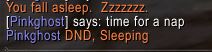
  • /sleep
  • /say time for a nap
  • /em DND, Sleeping
WoW Emotes Macro
WoW Emotes Macro

This would be the effect of that macro, along with the sleeping animation. The first line creates the sleeping animation, second line makes yoy character say “time for a nap” and the last adds a personal emote using /em DND, (Do Not Disturb) Sleeping.

If you wish to make your own WoW emotes you can use the /em command with any combination of text you like.  This will not have any sound or graphic animation unless you add an additional emote to enchance yours followed by what ever text you wish.

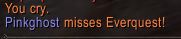
  • /cry
  • /em misses EverQuest!
WoW Emotes Missing Everquest

Your personal emote /em will also start with your characters name to show others that its you crying.

Here is a list of WoW emotes, Some of them have associated animations and sound. Funny WoW emotes add another dimension to your character and i always enjoy chatting to players that use WoW emotes freely in everyday chat.

If you are unsure on how to make a macro, its worth checking out my other pages on WoW Macros and WoW Slash Commands. These will help you put together some great commands for your character that will have your friends amazed!

  • How to make World of WarCraft Macros
  • How to Use WoW Slash Commands


More MMORPG World of WarCraft Information

  • WoW – Chat Commands
  • WoW – Essential Combat Commands
  • WoW – Emotes
  • WoW – Group Leader Commands
  • WoW – Guild Commands
  • WoW – Lesser Arcanum of Constitution Quest Guide
    • WoW – Lung Juice Cocktail Quest Guide
    • WoW – Night Dragons Breath Quest Guide
  • WoW – Shortcut Keys
  • WoW – Slash Commands
  • WoW – Voice Emotes

If you feel we need to add any additional information please leave a comment World of Warcraft – No 1 MMORPG in the World

World of Warcraft

WoW Chat Commands – 41 Essential’s

Daniel Hall Free to Play, MMORPG 26 February 2016

Wow chat commands are an essential part of World of Warcraft and can be a powerful tool when chatting with other players. The more chat commands you know the easyer and fatser it will be to communicate with your group or raid parties and therfore have a much more enjoyable experience.

WoW chat commands can also be used in combinatioon with WoW Emotes and WoW Commands within the WoW console.  They create a very powerful way of scripting but not automating a lot of the functions within WoW and will make game play smoother and faster.

They will also let you party or raid groups know what you are doing or if you need assistance with something.

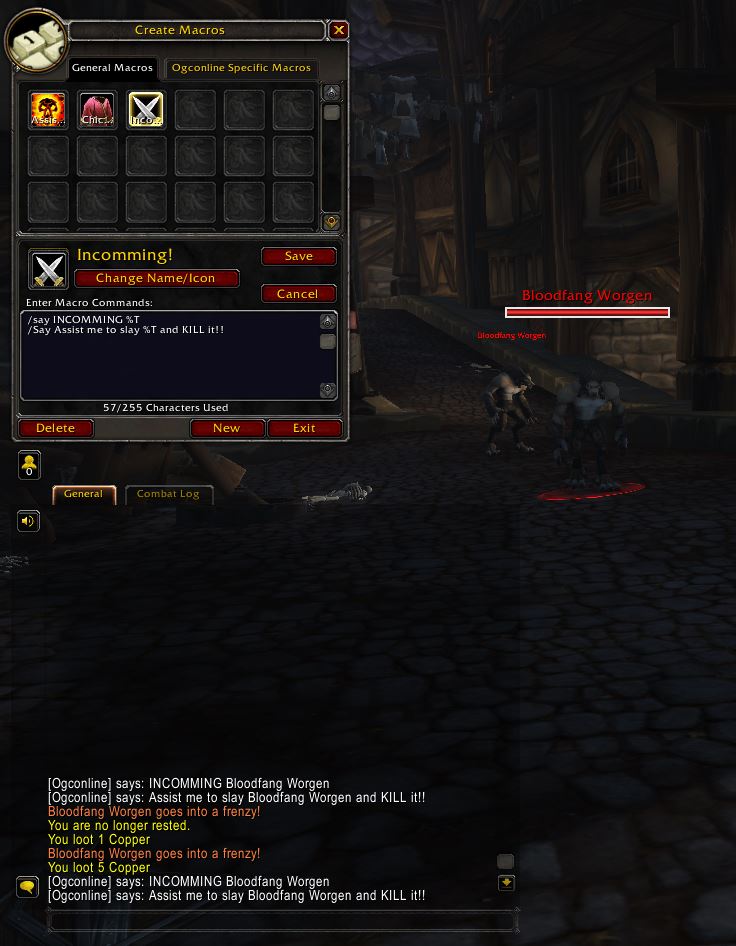
To help run an active fast paced XP group with players that know the drill, the Main Assist (sometimes also the Main Tank) could setup some short macros and place them on the Hot key Bar

WoW Chat Commands
WoW Chat Commands


  • /say Incomming %T
  • /say Assist me to slay %T and Kill it!!


Here i have used the /say command to let all around me know we have a new target incomming and be ready to kill but this could easily be setup with the /p command for your party or /raid for your current raid.

NOTE: Too much of this kind of script in chat can be annoying sometimes, so please pick your balance right so you will still get future group invites.

Try a few different combination until you find ones that suite your character.


WoW Chat Commands

CommandAction
/#
/c
/csay
Send text to channel
/afk
/away
/dnd
Set your Away From Keyboard or Do Not Disturb flags
/announce
/ann
Toggle channel announcements.
/battleground
/bg
Sends a chat message to your battleground.
/chathelpList of chat commands
/emote
/em
/e
/me
text display of a player created emote using the given text
/guild
/g
/gc
Send the message to your guild chat channel.
/instance
/i
Sends a chat message to the instance group
/officer
/o
/osay
Guild officer Chat channel
/party
/p
Local party channel
/r
/reply
Replyies to the last wisper you received. Also use Arrow up to scroll though messages
/raid
/rsay
the current Raid channel chat
/raidwarning
/rw
Send a warning to your raid group
/reply
/r
or R key
Send the message to the last player to whisper to you.
/say
/s
Send a message to people near you via a speech bubble
/wisper
/w
/tell
/t
Send a player a private message. You can scroll through all the people that whispered you recently by typing on the tab key.
/yell
/y
/sh
/shout
Yells a message to the area around. Many players consider this to be "spam" so use it sparingly.


WoW Chat Channel Commands

While playing World of WarCraft you may wish to set up a private channel just for you and your close friends, or perhaps one for Guild spacific chat. You may want a secret guild channel that is passworded incsae you have a mole in your guild that you need to keep them out. Who knows what you need it for but you can do it!


WoW OGC Chat Channel Commands
WoW OGC Chat Channel

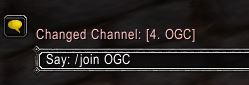
You can simply create a channel by using the “/join OGC” command.  This now creates and adds me to the OGC channel as a new Channel 4.  At this point anyone can join this channel if they know the name.


WoW OGC Chat Channel Password Commands
WoW OGC Chat Channel Password

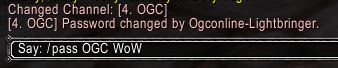
You can now add a password to the channel by using the following command,  “/pass OGC WoW” anyone that wants to join the channel from now on needs to use the super secure, unguessable password “WoW”


CommandAction
/announcements
/ann
Toggle join/leave announcements on a channel
/ban
/unban
Ban/unban a player from a channel
/chathelp
/chat
List of chat commands
/chatlist
/chatwho
/chatinfo
List channels, or channel members
/chatlogEnables/disables chat logging
/cinvite
/chatinvite
Invite a player to a channel
/ckickKicks target player out of specified channel.
/join
/channel
/chan
Creates or Joins a user created channel
/leave
/chatleave
/chatexit
Leaves a user created channel
/mod
/moderator
/unmod
/unmoderator
Change a player's moderator status
/moderateToggle moderation on a channel
/mute
/squelch
/voice
Mutes a player
/ownerShows details about the owner of a channel
/password
/pass [channel] [password]
Sets a password on a user created channel. You need to be owner or Moderator
/resetchatResets chat settings to defualt if you have changed colours or channels etc
/unmute
/unsquelch
/unvoice
Un-mutes a player


WoW Character Commands

This last table shows the WoW Commands that are aimed more towards the character itself.  These wow commands can help you design command macros to manage tasks like switching to your mount while using the “Carrot on aa stick” buff for mount speed, then drop from mount and switch back to combat gear.

With WoW Macro, Chat, Emote used together you can really create some great WoW Commands to help your Adventuring become easyer and quicker.

CommandAction
/dismountDismount your player from current mount
/equip
/eq
Equip an item to its default slot
/equipsetUses equipment manager to equip an armour set
/equipslotEquip an item to a certain slot
/follow
/f
/fol
Follow your target
/friend
/friends
Add player to friends list
/leavevehicleExits current vehicle
/randompetSummons random non-combat pet
/removefriend
/remfriend
Remove player from friends list
/settitleSets your titile
/usetalentsSwap to a predefined talent spec


More MMORPG World of WarCraft Information

  • WoW – Chat Commands
  • WoW – Essential Combat Commands
  • WoW – Emotes
  • WoW – Group Leader Commands
  • WoW – Guild Commands
  • WoW – Lesser Arcanum of Constitution Quest Guide
    • WoW – Lung Juice Cocktail Quest Guide
    • WoW – Night Dragons Breath Quest Guide
  • WoW – Shortcut Keys
  • WoW – Slash Commands
  • WoW – Voice Emotes

If you feel we need to add any additional information please leave a comment World of Warcraft – No 1 MMORPG in the World

«‹ 36 37 38 39 ›»

Search the Site

Tags

Battle Royale Best Gaming Chair Fortnite Fortnite 2FA Fortnite Battle Pass Fortnite Chrome Fortnite Discord Fortnite Events Fortnite Guides Fortnite Keybinds Fortnite Locations Fortnite Paradise Fortnite Quests Fortnite Tips Free to Play Free VBucks GPU MMORPG Privacy Policy PUBG PUBG GPU Settings PUBG Keyboard Controls Secret Lab

Categories

  • Battle Royale (60)
    • Fortnite (54)
    • PUBG (6)
  • Browser Games (2)
  • Fantasy MMORPG (120)
    • Age of Conan (4)
    • Anarchy Online (6)
    • Dark Age of Camelot (19)
    • EverQuest (15)
    • EverQuest 2 (12)
    • Final Fantasy XI (11)
    • Final Fantasy XIV (5)
    • Guild Wars (3)
    • Guild Wars 2 (3)
    • Lineage 2 (6)
    • Ragnarok (5)
    • Skyforge Online (2)
    • Ultima Online (14)
    • World of Warcraft (14)
  • Hardware (7)
  • SCI-FI Games (13)
    • Eve Online (9)
    • Planetside 2 (3)

Archive

  • March 2026
  • February 2026
  • January 2026
  • January 2025
  • January 2024
  • March 2023
  • February 2023
  • January 2023
  • December 2022
  • November 2022
  • October 2022
  • September 2022
  • August 2022
  • July 2022
  • June 2022
  • May 2022
  • January 2022
  • July 2021
  • November 2020
  • October 2020
  • June 2020
  • May 2020
  • April 2020
  • March 2016
  • February 2016

Back to Top

Latest Tweets

Socials

  • Twitter Twitter
  • Home
  • About the Games I Play
  • Contact Information
  • Disclaimer
  • Privacy Policy
© Online Game Commands 2026