Online Game Commands
PC Gaming, Software, Hardware, Reviews and Guides
  • Fantasy MMORPG
    • Age of Conan: Unchained
      • Short Cut Hot keys
      • Slash Commands
      • Emotes
    • Dark Age of Camelot
      • Action Commands
      • Alliance Commands
      • Battle Group Commands
      • Boat Commands
      • Card Game Commands
      • Chat Commands
      • Emotes
      • Fighting / Defensive Commands
      • General Command
      • Group Commands
      • Guild Commands
      • Help Commands
      • Horse Commands
      • Housing Commands
      • PvP Commands
      • Quest Commands
      • Settings & Preferences
      • Siege Weapon Commands
    • EverQuest
      • Abbreviations
      • Alternate Advancement Abilities + Codes
      • Chat Channels
      • Class Titles
      • Console Slash Commands
      • Emotes
      • Haste Buffs
      • Haste Info
      • Leader officer Raid Commands
      • Lost Dungeons of Norrath – Merchant Locations
      • Macros / Scripts
      • Permanent Haste Items
      • Short Cut Hot Keys
      • Tweaks
    • EverQuest 2
      • Chat & Chat Channels
      • Emotes & Moods
      • Group / Guild / Raid Commands
      • Interface Commands
      • Macros
      • Slash Commands
      • Targeting and Movement Commands
      • Character Appearance
      • Combat Commands
      • Pet and Mercenary commands
      • Video/Graphical Display Commands/Settings
    • Final Fantasy XI
      • Chat Commands
      • Combat Commands
      • Emotes / Actions
      • General Commands
      • Macro Commands
      • Main Menu Commands
      • Party / Alliance Commands
      • Search Commands
      • Short Cut Keys
      • System Commands
    • Final Fantasy XIV Online
      • Emotes
      • Slash Commands
      • Targeting Commands
      • Facial Expression Emotes
    • Guild Wars
      • Emotes
      • Slash Commands
    • Guild Wars 2
      • Emotes
      • Slash Commands
    • Lineage 2
      • Chat Commands
      • Macro’s & Macro Commands
      • Short Cut Hot Keys
      • Slash Commands
      • Socials & Emotes
    • Ragnarok Online
      • Camera Controls
      • Emotes
      • Shortcut Keys
      • Slash Commands
    • Ultima Online
      • Boat and Ferry Commands
      • Chat Commands
      • Commands
      • Factions
      • Hireling Commands
      • Houses
      • Named NPC Commands
      • NPC Commands
      • Pets
      • Short Cut Hot keys
      • Shrines / Karma
      • Tweaks
      • Vendor Commands
    • World of Warcraft
      • Chat Commands
      • Combat Commands
      • Emotes
      • Group Leader Commands
      • Guild Commands
      • Shortcut Keys
      • Slash Commands
      • Voice Emotes
      • Lesser Arcanum of Constitution Quest Guide
        • Night Dragons Breath Quest Guide
        • Lung Juice Cocktail Quest Guide
      • Lord of the Rings meets World of WarCraft
  • SCI-FI GAMES
    • Anarchy Online
      • Help, Pet, System and Team Commands
      • Voice Commands
      • Organisation Commands
      • Keyboard Commands
      • Chat Commands
    • Eve Online
      • Chat Channel Commands
      • Drone Commands
      • General Slash Commands
      • Module Commands
      • Movement Commands
      • Navigation Commands
      • Window Commands
    • Planetside 2
      • Chat and General Commands
      • Commander Outfit Platoon and Squad Management
    • Skyforge
      • F key Keyboard Emotes
  • Battle Royale Games
    • Fortnite
      • 2FA Guide
      • All 150 Fortnite Keybinds
      • Best Fortnite Keybinds
      • Characters Locations (NPC’s)
      • Default PC Fortnite Keybinds
      • Events
        • Easter Event
        • Summer Event
        • Fortnite’s 5th Birthday Event
        • Halloween Event
        • Christmas Winterfest Event
      • Fish Locations
      • How to Get FREE V-Bucks
      • Free Fortnite Battle Pass
        • Battle Pass – Rewards
      • Locations
        • Gas Stations & Pumps
        • Gas Stations Locations
        • Whiplash Locations
      • Quests
        • Capture Points
        • Geyser Locations
        • Hide in a Giant Snowball
        • Search Cash Registers
        • Search Ice Machines or Cash Registers at Gas Stations
        • Search Produce Boxes
        • Travel in Whiplashes
      • Tips and Tricks
        • How to Regrow Your Reality Saplings Fruit
    • PUBG
      • Best PUBG Graphics Settings – 51 FPS Boost
      • Best PUBG Keyboard Controls
      • Default PUBG Keyboard Controls
      • FREE PUBG Skins Outfits
      • Change the PUBG Keyboard Controls
  • Gaming Hardware
    • CPU
    • GPU
      • Best Budget Graphics Cards for Gaming in 2021

World of Warcraft

WoW Voice Emotes – 53 Amazing World of WarCraft Voice Emotes

Daniel Hall Free to Play, MMORPG 2 March 2016

WoW Voice Emotes are a great way to bring some funny animations and jokes to your  World of WarCraft character.  Some of these Emotes are truly side splitting, most of them will have WoW Jokes hidden in them and are relevant to things that have happened in World of WarCraft.

All the amazing WoW Voice Emotes can be used in WoW Macros along with the standard WoW Commands and the normal non-audio WoW Emotes. This makes for some really interesting funny emotes that will have other players /laugh and maybe even /ROFL
WoW Voice Emotes
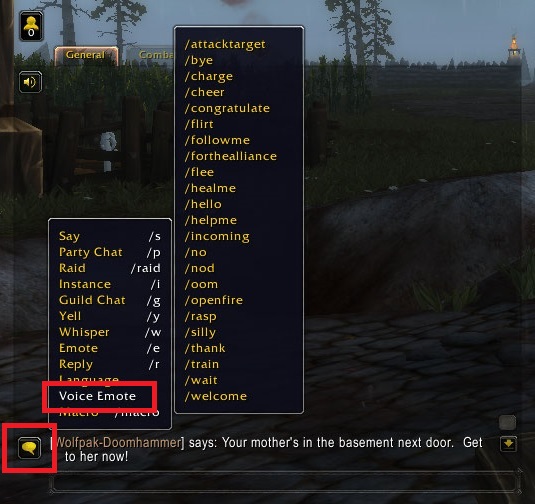
WoW Voice Emotes Accessed from the Game menu


You can access the quick Voice Emotes by clicking the speech bubble in the bottom right corner, then Voice Emote. This will display a list of the common WoW Voice Emotes, Just click the one you want to use.

These are also the commands for each emote ready to use in a macros. WoW macros are quick to create, great fun to use and in some situations very much essential!


For the really Rare WoW Emotes and newer 7.2+ Patch Emotes, you need to use the command line and create a short macro to use them or you will be forever typing them out over and over.


How to make a Quick WoW Voice Emotes Macros
WoW Macros Menu
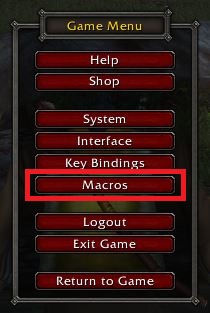
WoW Macros Menu


To make a Quick pulling macro for when you are Main Tank in your group

We will make 2 macros

  • Incomming macros, to warn your group a mob is on the way.
  • Assist me kill this mob Macros, for when you have enough agro for the group to open up on your enemy

Hit “Esc” key and select the Macro menu

A quicker way to open the WoW Macro Window by using the /macro command.


Inside the Macros menu click “New” to create a new Macros. Select an appropriate icon that will remind you this is for Incomming enemies. I have selected a spy glass.

WoW Incomming with WoW Voice Emote
WoW Incomming with Voice Emote

Enter the following text to make your Macro.

  • /incomming
  • /say Incomming %T
  • /startattack

This will use the Voice Emote sound and /em to signal,  “You point out (Target) as an incoming enemy!”

You will say to players near you. Incomming (Target)

World of WarCraft Voice Emotes

And as i am Main Tank i will want to start Melee attack as soon as the mob is in range so i end with /startattack


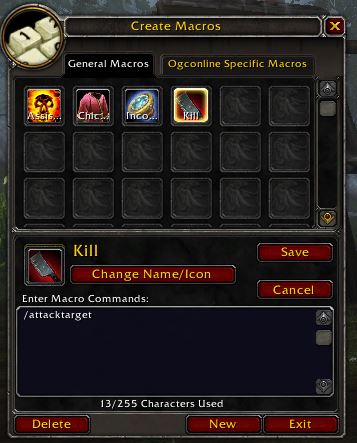
Create a another Macros, this time i selected a Cleaver and called it “Kill”
WoW Voice Emotes
WoW Attack Target Voice


This one will be very simple and just use the following single command

  • /attacktarget

This will use the Voice Emote sound and then /em to display, You tell everyone to attack (Target).

World of WarCraft Voice Emotes


You can listent to some of the Funny joke Wow Voice Emotes over at WoW Head Emote Sounds


WoW Voice Emotes

Here are the Current Voice Emotes up to Patch v7.2. If you know of any others or missing information from the table below please drop a comment

Use the Search box to find an emote or click the top bar to sort in the order you need.

Here are 53 Unique World of Warcraft Emotes, if 2 or 3 commands create one emote i have listed them together.

Emote CommandWithout targetWith a targetWoW Patch Version
/applaud
/applause
/bravo
You applaud. Bravo!You applaud at (Target). Bravo!
/attacktargetYou tell everyone to attack something.You tell everyone to attack (Target).4.2
/blow
/kiss
You blow a kiss into the wind.You blow a kiss to (Target).
/boredYou are overcome with boredom. Oh the drudgery!You are terribly bored with (Target).
/bravoYou applaud. Bravo!You applaud at (Target). Bravo!
/bye
/farewell
/goodbye
You wave goodbye to everyone. Farewell!You wave goodbye to (Target). Farewell!
/cackleYou cackle maniacally at the situation.You cackle maniacally at (Target).
/chargeYou start to charge.
/cheer
/woot
You cheer!You cheer at (Target).
/chicken
/flap
/strut
With arms flapping, you strut around. Cluck, Cluck, Chicken!With arms flapping, you strut around (Target). Cluck, Cluck, Chicken!
/chuckleYou let out a hearty chuckle.You chuckle at (Target).
/clapYou clap excitedly.You clap excitedly for (Target).
/commendYou commend everyone on a job well done.You commend (Target) on a job well done.
/cong
/congrats
/congratulate
You congratulate everyone around you.You congratulate (Target).
/cry
/sob
/weep
You cry.You cry on (Target)'s shoulder.
/doomYou threaten everyone with the wrath of doom.You threaten (Target) with the wrath of doom7
/fleeYou yell for everyone to flee!
/flirtYou flirt.You flirt with (Target).
/followmeYou motion for everyone to follow.You motion for (Target) to follow.
/ForTheAllianceYou cheer for the Alliance!You cheer for the Alliance!7
/ForTheHordeYou cheer for the Horde!You cheer for the Horde!7
/giggleYou giggle.You giggle at (Target).
/gloatYou gloat over everyone's misfortune.You gloat over (Target)'s misfortune.
/golfclapYou clap half heartedly, clearly unimpressed.You clap for (Target), clearly unimpressed.
/guffawYou let out a boisterous guffaw!You take one look at (Target) and let out a guffaw!
/healmeYou call out for healing!
/hello
/hi
You greet everyone with a hearty hello!You greet (Target) with a hearty hello!
/helpmeYou cry out for help!
/incomingYou yell incoming enemies!You point out (Target) as an incoming enemy!
/kissYou blow a kiss into the wind.You blow a kiss to (Target).
/laugh
/lol
You laugh.You laugh at (Target).
/moo (Tauren only)Mooooooooooo.You moo at (Target). Mooooooooooo.
/mournIn quiet contemplation, you mourn the loss of the dead.In quiet contemplation, you mourn the death of (Target).
/noYou clearly state, NO.You tell (Target) NO. Not going to happen.
/nod
/yes
You nod.You nod at (Target).
/oomYou announce that you have low mana!
/oopsYou made a mistake.You made a mistake.7
/openfireYou give the order to open fire.
/raspYou make a rude gesture.You make a rude gesture at (Target).
/roarYou roar with bestial vigor. So fierce!You roar with bestial vigor at (Target). So fierce!4.2
/roflYou roll on the floor laughing.You roll on the floor laughing at (Target).
/sighYou let out a long, drawn-out sigh.You sigh at (Target).
/sillyYou tell a joke.You tell (Target) a joke.
/sorryYou apologize to everyone. Sorry!You apologize to (Target) Sorry!7
/strongYou flex your muscles. Oooooh so strong!You flex at (Target). Oooooh so strong!
/tauntYou taunt everyone around you. Bring it fools!You make a taunting gesture at (Target). Bring it!7
/thank
/thanks
/ty
You thank everyone around you.You thank (Target).
/trainChoo Choo Train Animation and sound
/violinYou begin to play the world's smallest violin.You play the world's smallest violin for (Target).
/waitYou ask everyone to wait.(Target) asks (Target) to wait.
/welcomeYou welcome everyone.You welcome (Target).
/whistleYou let forth a sharp whistle.You whistle at (Target).
/whoaYou are blown away.You are blown away by (Target).7
/yawnYou yawn sleepily.You yawn sleepily at (Target).


More MMORPG WoW Information

  • WoW – Chat Commands
  • WoW – Essential Combat Commands
  • WoW – Emotes
  • WoW – Group Leader Commands
  • WoW – Guild Commands
  • WoW – Lesser Arcanum of Constitution Quest Guide
    • WoW – Lung Juice Cocktail Quest Guide
    • WoW – Night Dragons Breath Quest Guide
  • WoW – Shortcut Keys
  • WoW – Slash Commands
  • WoW – Voice Emotes

If you feel we need to add any additional information or we have incorrectly listed something, please drop a comment


EverQuest 2

EverQuest 2 – Pet and Mercenary commands

Daniel Hall Free to Play, MMORPG 2 March 2016

Pet Commands

/pet attackPet will attack your current target
/pet backoffPet will cease attacking its target
/pet follow mePet will follow you
/pet getlostPet will disappear
/pet guardherePet will guard its current location
/pet guardmePet will guard and follow you
/pet hideHides your pet
/pet meleeYour pet will use melee attacks
/pet preserve_masterpet will protect you from new attackers
/pet preserve_selfpet will protect itself from new attackers
/pet rangedYour pet will use ranged attacks and casts spells
/pet reportPet will announce his health in a percentage
/pet stayherePet will stop following you and remain where it is
/pet whoPet will announce its master
/petname ****Your next summoned pet will be named ****
/petoptionsBrings up the Pet Options window.
/togglepetToggles the display of the pet information and command UI window

Mercenary commands

CommandExampleNotes
/merc/merc rangedYour mercenary will use ranged attacks and casts spells more freqently as in melee stance
/merc meleeYour mercenary will use melee attacks
/merc resumeYour mercenary will return after being suspended
/merc attackSends mercenary to attack your current or implied target
/merc backoffMercenary will (try to) back off from its current target and run to you. It will stop protecting itself or you.
/mercname {name}/mercname SoandsoYour mercenary's name will be changed to Soandso
/togglemerc/togglemercToggles the display of the Mercenary information and command UI window.
/cl_ignore_merc_chatter {true/false}/cl_ignore_merc_chatter trueEnables or disables Mercenary group chat

EverQuest 2

EverQuest 2 – Character Appearance

Daniel Hall Free to Play, MMORPG 2 March 2016

Character Appearance

/equip_equipment_set 0 "MaxHitpoint"Swaps Equipment sets, 0 for Adventure gear 1 for Appearance, The Set name in quotes.
/hi
/hide_illusionsHides your illusion forms
/showcloakHides or shows your cloak
/showhelmDisplays or hides helmet.
/showhoodDisplays or hides cape hood.
/showrangedDisplays your bow.
/suspend_mount_mode 0Always show mount
/suspend_mount_mode 1Hide mount during combat
/suspend_mount_mode 2Always hide mount
/toggletorchTurns on/off your personal torch.
/unequip_appearance cloakEmpties the cloak appearance slot.
/unequip_appearance headEmpties helm appearance slot.
/unequip_appearance primaryEmpties primary weapon appearance slot.

Dark Age of Camelot

Dark Age of Camelot – Settings & Preferences

Daniel Hall Free to Play, MMORPG 2 March 2016

/anonymous (or /anon)Make your character anonymous on the /who listings
/chatlog [filename]Opens up a chatlog to the specified filename instead of "chat.log" The extension ".log" is automatically added to the filename specified.
/clientsleep background | minimized | noneSets the client to go into "sleep mode" and use less processor power on one's computer. You can adjust these settings from the options menu as well.
/clockToggles the display of a new window that shows the current time of day (real time, not game time)
/colornamesTurns on the new name coloring features that make it easier to distinguish certain NPCs from others
/effects self | group | all | noneToggle spell effects to show one's spell effects only, all, your group's, or none at all
/filterToggles the chat curse filter
/hidegravesHides all gravestones except for your own
/hidenames players | monsters | self | graves | allHide names of the specified objects (players, monsters, one's self, graves, or all objects)
/keyboardOpens a window with the current keyboard configuration
/lfguildFlags yourself as Looking For a Guild
/noqueueToggles the spell queuing system on and off
/oldnamecolorsTurns off the new colored name feature and returns to the original release name coloring
/quickbar Qbar# 1/0Toggle quickbars when using multiple quickbars as introduced in 1.75. For example, to enable quickbar 2, use /quickbar 2 1.
/resetcameraResets the default camera settings
/scrollchatToggles the Chat Buffer scrolling. If it is toggled on, messages in your visible chat buffer will disappear after 90 seconds - but you will still be able to view old messages by scrolling back in the chat buffer.
/setcameraSaves your default camera settings
/setwho class | tradeSets how the player wishes to be displayed on a /who inquery. Class displays the character's class and level. Trade displays the tradeskill type and level of the character.
/shownames self | players | monsters | gravestones | groupmates | guildmates | enemiesShows names of the specified objects (players, monsters, one's self, graves, or all objects)
/sshot [preferred basename of screenshot files]Will take a screenshot and apply the specified image name as the base filename for screenshots taken after issuing this command. So executing "/sshot Raid" will name screenshots taken after as Raid-01.jpg, Raid-02.jpg, etc.
/tradeToggles the ability to trade on and off
/webdisplay nopointsToggles whether or not your realm points, rank, and master level information is displayed on the Herald
/webdisplay tradesToggles whether or not your tradeskill information is displayed on the Herald

Dark Age of Camelot – Settings & Preferences

Download DAoC for Free to Download but there is a monthly subscription charge

Drop a comment if you know anymore commands that need to be added.

Dark Age of Camelot

Dark Age of Camelot – Siege Weapon Commands

Daniel Hall Free to Play, MMORPG 2 March 2016

/aimAims the weapon
/armReadies the weapon for firing
/controlAllows a player to control siege equipment
/fireFires the weapon at the target
/loadLoads the weapon with ammunition

Dark Age of Camelot – Siege Weapon Commands

Download DAoC for Free to Download but there is a monthly subscription charge

Drop a comment if you know anymore commands that need to be added.

«‹ 29 30 31 32 ›»

Search the Site

Tags

Battle Royale Best Gaming Chair Fortnite Fortnite 2FA Fortnite Battle Pass Fortnite Chrome Fortnite Discord Fortnite Events Fortnite Guides Fortnite Keybinds Fortnite Locations Fortnite Paradise Fortnite Quests Fortnite Tips Free to Play Free VBucks GPU MMORPG Privacy Policy PUBG PUBG GPU Settings PUBG Keyboard Controls Secret Lab

Categories

  • Battle Royale (60)
    • Fortnite (54)
    • PUBG (6)
  • Browser Games (2)
  • Fantasy MMORPG (120)
    • Age of Conan (4)
    • Anarchy Online (6)
    • Dark Age of Camelot (19)
    • EverQuest (15)
    • EverQuest 2 (12)
    • Final Fantasy XI (11)
    • Final Fantasy XIV (5)
    • Guild Wars (3)
    • Guild Wars 2 (3)
    • Lineage 2 (6)
    • Ragnarok (5)
    • Skyforge Online (2)
    • Ultima Online (14)
    • World of Warcraft (14)
  • Hardware (7)
  • SCI-FI Games (13)
    • Eve Online (9)
    • Planetside 2 (3)

Archive

  • March 2026
  • February 2026
  • January 2026
  • January 2025
  • January 2024
  • March 2023
  • February 2023
  • January 2023
  • December 2022
  • November 2022
  • October 2022
  • September 2022
  • August 2022
  • July 2022
  • June 2022
  • May 2022
  • January 2022
  • July 2021
  • November 2020
  • October 2020
  • June 2020
  • May 2020
  • April 2020
  • March 2016
  • February 2016

Back to Top

Latest Tweets

Socials

  • Twitter Twitter
  • Home
  • About the Games I Play
  • Contact Information
  • Disclaimer
  • Privacy Policy
© Online Game Commands 2026